05 September 2008

Center for the Study of Human Polymorphisms: Week 1

I've started my first week at the center Center for the Study of Human Polymorphisms and today we had our first meeting with Mario Foglio and some other to define what will be my job in the following monthes. As I said, I will collaborate with the National Center of Genotyping on Operon, a feasible bioinformatics platform to centralize scientific software and biomedical data with internal results. It was curious because I found that nobody there uses most of the tools used/discussed with the biogang (rss feeds, social bookmarking, etc... ) and I hope I will present some slides about this later.

I will have to re-factoring the current 'C' code of operon (written over BerkeleyDB) to build a new clean C API that will be used some other persons.

What is cool is that this is an open source project and we will host it on google (http://code.google.com/p/polymorphism/).
I've also created a mailing list on google.groups: http://groups.google.com/group/operon-dev, shown my collaborators how to share a calendar on google-calendar (to find what are the possible dates for organizing a meeting) and we have already started to share some documents using google-docs. Thank you google.

The 'C' language was chosen because it is a low-level language and it seems that the developers at the CNG prefer it. I hope I will create some wrappers around this API with some other language. I already know it is possible with java using the Java Native Interface (JNI, see my previous post about this). SWIG (http://www.swig.org/), a tool generating some wrappers in various languages (python, perl...), might also be of hel. Using a Java wrapper will allow us to deploy any application in a java web server such as tomcat.

I've not much played with 'C' since 1998 ( I then played with C++ for 4 years before switching to java) but I (hope) still have some good skills and I know I now have better good programming practice.

That's it for tonight.

Pierre

02 September 2008

Ubiquity: Arf-arf ! smooch ! Achoo! Wee Woo !

Ok, after a few others (Pawel, Thomas Lemberger, Egon, )I've succumbed to Mozilla Ubiquity, an experimental Firefox extension that (they say) gives you a powerful way to interact with the Web. The following useless script comics inserts a speech balloon using the font samples from http://www.dafont.com/

CmdUtils.CreateCommand({
name: "comics",
author: { name: "Pierre Lindenbaum", email: "plindenbaum@yahoo.fr"},
description: "Comics",
takes: {"Your text": noun_arb_text},
help: "Insert a speech balloon with a comic font ",

preview: function( pblock, theShout ) {
var msg = "Inserts a speech balloon : (<i>"+ theShout.summary+"</i>)";
pblock.innerHTML = CmdUtils.renderTemplate( msg );
},

execute: function(theShout) {
CmdUtils.setSelection(
"<img src=\'http://img.dafont.com/preview.php?text=" +
escape(theShout.text)+
"&ttf=badaboom_bb0&size=49&psize=m&y=58'/>"
);
}
})


It worked fine with GMail !


Update: The script is available here.

Pierre

01 September 2008

I'm not looking for a job anymore: Welcome at the CEPH


Today was my first day as a bioinformatician at the Center for the Study of Human Polymorphisms (CEPH http://www.cephb.fr/en/cephdb) and I want to thank my former colleagues Christine K and Philippe Gesnouin (philguess on twitter/FF ) who helped me to find this position. It's a short term contract (one year).

The CEPH is localized in Paris near the St-Louis Hospital and the "Place de la République" it maintains a database of genotypes for genetic markers that have been typed on the CEPH reference family resource for linkage mapping (Genomics 6: 575-577, 1990; Science 265: 2049-2054, 1994). The CEPH works works in conjunction with the National Center of Genotyping (CNG/Evry) where I also worked height years ago and both centers are managed by Dr Mark Lathrop. One of my first objective is to develop a set of tools around OPERON with the help of his author, Mario Foglio.

As far as I've understand operon today (I may be wrong), it is a C program handling a large set of genotypes (among other things...) using BerkeleyDB as a storage engine (I blogged about BerkeleyDB a few posts ago). It seems that using this strategy, the genotypes can be quickly accessed using something like fseek(table,sizeof(genotype_t)*(sample_count*marker_index+sample_index),SEEK_SET).

As a java programmer, I wish I could write a wrapper around the Operon C API, that would be useful to embed this model in a web container (servlet, jsp) or to write a Swing interface. My first ideas to achieve this are:
* using JNI (Java Native Interface, allows to call C from java) to write a java wrapper around the C API
* reading the data in the berkeleyDB files using the BerkeleyDB Java API.
* ...

That's it for tonight.

Pierre

30 August 2008

My Old Thesis Presentation

I found the my thesis presentation (in french, 2000) in the old iBook I left in my cellar.


It is really outdated now :-) ....

I wonder how I would write this presentation now... this makes me think about this presentation pointed out by Berci Mesko on twitter: I would make this presentation obligatory for all the speakers of the world.
Death by PowerPoint
View SlideShare presentation or Upload your own. (tags: powerpoint ppt)


Pierre

Mesh Fequencies & Pubmed Articles

In a recent post on his blog, David Rothman was asked for a 3rd Party PubMed/MEDLINE Tool: What I’d like to do is to be able to enter the PMIDs of several citations and have the tool search MEDLINE via PubMed for the assigned MeSH terms, and return a single list of the terms used by any of the entered citations with a measurement of frequency. For example, if I input PMIDs 16234728, 15674923, and 17443536, the tool would return results telling me that 100% or 3 of 3 use the term “Catheters, Indwelling”, 2 of 3 use “Time Factors,” 1 of the 3 uses “Urination Disorders,” and so on. Although this example uses 3 PMIDs, I’d like to be able to input at least 10, just based on personal experience.

It took less than half an hour to write this tool using java. The source code is available here and an executable jar file is available here.

The input is a standard pubmed query :

java -jar pubmedfrequencies.jar -term "Lindenbaum P[Author]" -n 20 > ~/page.html
or a list of pmid
java -jar pubmedfrequencies.jar -pmid 8985320,16027742,15047801,18053270,9682060 > ~/page.html


The output is a simple html table:


Mesh89853201602774215047801180532709682060
HumansXXX
AnimalsXX
Autistic DisorderXX
(...)
RNA-Binding ProteinsXX
RotavirusXX
SoftwareX
Two-Hybrid System TechniquesX
Zinc FingersX


well... that was not Big Science....

Note: Rajarshi Guha also suggested another solution: http://www.chembiogrid.org/cheminfo/rest/mesh/16234728,15674923,17443536

Pierre


Addendum:After the first comments, I've added a gui support and a count of the mesh terms in the result.

25 July 2008

Feeling like a newbie: Parsing NCBI-TinySeq with RUBY

I've been recently interested in the new popular language Ruby and its web framework Rails for two reasons:
First,this picture:


Second, Matt Wood's blog about bioinformatics and ruby.

So here is my very first experience with ruby. The book I used was

Very good for learning but a little bit outdated. And I shoudl have started with a book about ruby only.

I've downloaded rails as described here. I got two problems:
  • a ssl library was not installed. I fixed the problem thank to this post
  • a problem with the zlib library, fixed by installing the ruby-zlib


My 'hello world' was "download a sequence from ncbi in TinySeq/XML format, parse the XML and create a new instance of 'a sequence' class". I've been suprised to find that ruby doesn't contain a decent API for parsing XML with DOM or SAX. The default API is called REXML and I found it ugly (or I may be too new to ruby to understand why it may be good). On friendfeed Adam Kraut suggested me to consider libxml-ruby (http://libxml.rubyforge.org/) or Hpricot (an xhtml parser). However I gave REXML a try by using its event-based API (but it is *not* a SAX API (namespaces are not supported) ).

OK, here is how I coded this (it took me hours to find the correct statements :-) ).
First we define a class handling an Organism which is just an id and a name (taxId and taxName)
class Organism
#constructor
def initialize(id,name)
@id=id
@name=name
end
end


We also tell ruby to generate the getters to access those two properties
attr_accessor :id, :name


Next, we define a TinySeq class:
class TinySeq
#class members
@seqtype=nil
@gi=nil
@accver=nil
@sid=nil
@local=nil
@organism=nil
@defline=nil
@length=nil
end


In this TinySeq class I defined a nested class Handler: a XML stream handler using the REXML::StreamListener API. This looks like a SAX Handler but it doesn't handle the namespaces.
A TinySeq XML looks like this
<?xml version="1.0"?>
<!DOCTYPE TSeqSet PUBLIC "-//NCBI//NCBI TSeq/EN" "http://www.ncbi.nlm.nih.gov/dtd/NCBI_TSeq.dtd">
<TSeqSet>
<TSeq>
<TSeq_seqtype value="nucleotide"/>
<TSeq_gi>5</TSeq_gi>
<TSeq_accver>X60065.1</TSeq_accver>
<TSeq_taxid>9913</TSeq_taxid>
<TSeq_orgname>Bos taurus</TSeq_orgname>
<TSeq_defline>B.bovis beta-2-gpI mRNA for beta-2-glycoprotein I</TSeq_defline>
<TSeq_length>1136</TSeq_length>
<TSeq_sequence>CCAGCGCTCGTCT.....CAAGAAAAAAA</TSeq_sequence>
</TSeq>
</TSeqSet>


here is the code I used to handle the XML events:
class Handler
include REXML::StreamListener
....

the class is initialized with an empty TinySeq instance
def initialize(tinyseq)
@tinyseq = tinyseq
#current tag
@tag = nil
#current text
@textcontent = nil
#did we see an error ?
@error=false
@taxid=nil
@taxname=nil
end

I wish I could have just declared some getters for the class TinySeq but this nested class TinySeq::Handler needed to set the properties of this tinyseq. It seems not to work like java where the nested classes have an access to the private properties of the parent class) that is why I asked ruby to create both setters and getters in TinySeq.
attr_accessor :seqtype, :gi, :accver, :sid, :local, :organism, :defline, :length


Next we define what the handler should do when it opens a tag
def tag_start(name, attrs)
@tag=nil
if !( name=="TSeq_sequence" || name=="TSeqSet" || name=="TSeq" || name=="TSeq_seqtype"|| name=="Error" )
@tag=name
@textcontent=""
elsif name=="TSeq_seqtype"
@tinyseq.seqtype = attrs["value"]
elsif name=="Error"
@error=true
end
end

... when it finds a text within a tag
def text(text)
unless @tag.nil?
@textcontent+=text
end
end

... when it closes a tag (it fills the properties of the tinyseq)
def tag_end(name)
unless @tag.nil?
case @tag
when "TSeq_gi"
@tinyseq.gi = @textcontent
when "TSeq_accver"
@tinyseq.accver = @textcontent
when "TSeq_sid"
@tinyseq.sid = @textcontent
when "TSeq_local"
@tinyseq.local = @textcontent
when "TSeq_defline"
@tinyseq.defline = @textcontent
when "TSeq_taxid"
@taxid = @textcontent
when "TSeq_orgname"
@orgname = @textcontent
when "TSeq_length"
@tinyseq.length = @textcontent
else
$stderr.puts "Error #{name} #{@tag}\n"
end
end

if name=="TSeq" && !error
@tinyseq.organism= Organism.new(@taxid,@orgname)
end
@tag=nil
@textcontent=""
end


Then we create a static... sorry... a "class method" fetch for TinySeq returning a TinySeq object from a ncbi gi identifier.
def TinySeq.fetch(gi)
#build the efetch uri
#the API works whatever db is protein or nucleotide
url = "http://www.ncbi.nlm.nih.gov/entrez/eutils/efetch.fcgi?db=protein&id="+ CGI::escape(gi.to_s)+"&rettype=fasta&retmode=xml";
#create a new Streaming handler
handler= TinySeq::Handler.new TinySeq.new
#parse the document
REXML::Document.parse_stream(Net::HTTP.get_response(URI.parse(url)).body, handler)
if handler.error
return nil
end
return handler.tinyseq
end


Finally, here is a good old 'main argc/argv' reading a list of gi on the command line, fetching a TinySeq object, putting this instance in an array and printing the content of the array.
seqarray=[]
ARGV.each{|gi|
seq=TinySeq.fetch(gi)
if seq.nil?
$stderr.print "#{gi} is a bad gi\n"
else
seqarray << seq
end
}
seqarray.each{|seq| print seq.to_s+"\n"}


... testing....
pierre@linux:~> ruby tinyseq.rb 5 6 7
(5|X60065.1) "B.bovis beta-2-gpI mRNA for beta-2-glycoprotein I" size:1136 (9913) Bos taurus
(6|CAA42669.1) "beta-2-glycoprotein I [Bos taurus]" size:342 (9913) Bos taurus
(7|X51700.1) "Bos taurus mRNA for bone Gla protein" size:437 (9913) Bos taurus


That's it. I would be curious to know about a simpler and more elegant solution.

Pierre


The complete source code:


require "cgi"
require 'net/http'
require 'rexml/document'
require 'rexml/streamlistener'

#an organism: a taxon ncbi id and a name
class Organism
#generate the getters; getId() and getName()
attr_accessor :id, :name
#constructor
def initialize(id,name)
@id=id
@name=name
end

#toString method
def to_s
return "("+@id+") "+@name
end
end

#a ncbi TinySeq
class TinySeq

#class members
@seqtype=nil
@gi=nil
@accver=nil
@sid=nil
@local=nil
@organism=nil
@defline=nil
@length=nil

#generate the getters and the setters
#How can I just use attr_reader instead attr_accessor of and the nested class TinySeq::Handler have an access to those properties ?
attr_accessor :seqtype, :gi, :accver, :sid, :local, :organism, :defline, :length

#toString function
def to_s
return "(#{@gi}|#{@accver}) \"#{@defline}\" size:#{@length} #{@organism}"
end

#internal class
class Handler
include REXML::StreamListener
attr_reader :error, :tinyseq

#initialize with a tinyseq
def initialize(tinyseq)
@tinyseq = tinyseq
#current tag
@tag = nil
#current text
@textcontent = nil
#did we see an error
@error=false
@taxid=nil
@taxname=nil
end

def tag_start(name, attrs)
@tag=nil
if !( name=="TSeq_sequence" || name=="TSeqSet" || name=="TSeq" || name=="TSeq_seqtype"|| name=="Error" )
@tag=name
@textcontent=""
elsif name=="TSeq_seqtype"
@tinyseq.seqtype = attrs["value"]
elsif name=="Error"
@error=true
end
end

def tag_end(name)
unless @tag.nil?
case @tag
when "TSeq_gi"
@tinyseq.gi = @textcontent
when "TSeq_accver"
@tinyseq.accver = @textcontent
when "TSeq_sid"
@tinyseq.sid = @textcontent
when "TSeq_local"
@tinyseq.local = @textcontent
when "TSeq_defline"
@tinyseq.defline = @textcontent
when "TSeq_taxid"
@taxid = @textcontent
when "TSeq_orgname"
@orgname = @textcontent
when "TSeq_length"
@tinyseq.length = @textcontent
else
$stderr.puts "Error #{name} #{@tag}\n"
end
end

if name=="TSeq" && !error
@tinyseq.organism= Organism.new(@taxid,@orgname)
end
@tag=nil
@textcontent=""

end

def text(text)
unless @tag.nil?
@textcontent+=text
end
end

end


#class method (eq java static)
def TinySeq.fetch(gi)


#build the efetch uri
#the API works whatever db is protein or nucleotide
url = "http://www.ncbi.nlm.nih.gov/entrez/eutils/efetch.fcgi?db=protein&id="+ CGI::escape(gi.to_s)+"&rettype=fasta&retmode=xml";
#create a new Streaming handler
handler= TinySeq::Handler.new TinySeq.new
#parse the document
REXML::Document.parse_stream(Net::HTTP.get_response(URI.parse(url)).body, handler)
if handler.error
return nil
end
return handler.tinyseq
end
end

seqarray=[]
ARGV.each{|gi|
seq=TinySeq.fetch(gi)
if seq.nil?
$stderr.print "#{gi} is a bad gi\n"
else
seqarray << seq
end
}
seqarray.each{|seq| print seq.to_s+"\n"}

21 July 2008

SciFOAF 2.0

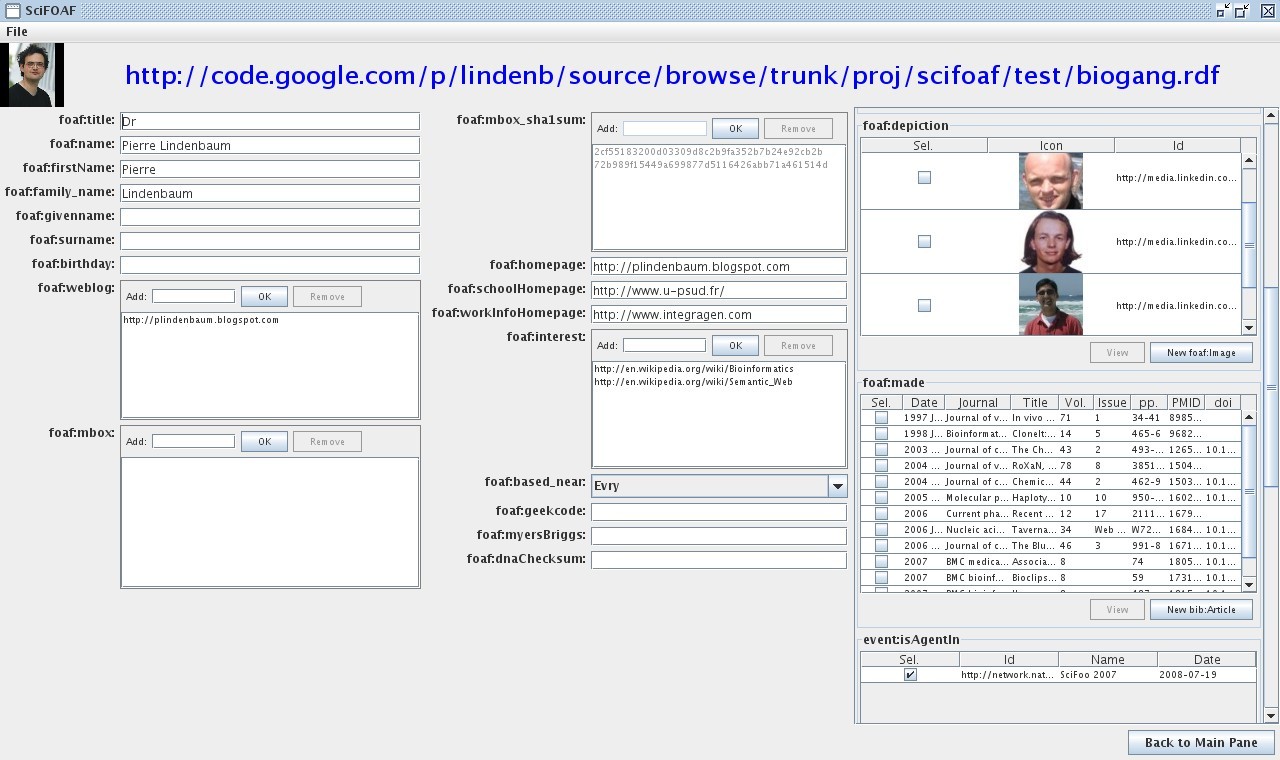
If you're following me on twitter or on friendfeed you may know that I've re-written a new version of SciFOAF.

Here is the documentation:


What is SciFOAF


SciFOAF is the second version of a tool I created to build a FOAF/RDF file from your publications in ncbi/pubmed. The FOAF project defines a semantic format based on RDF/XML to define persons or groups, their relationships, as well as their basic properties such as name, e-mail address, subjects of interest, publications, and so on... This FOAF profile can be used to describe your work, your laboratory, your contacts.
The first version was introduced in 2006 here as a java webstart interface and had many problems:

  • the RDF file could not be loaded/saved

  • only a few properties could be edited

  • authors'name definition may vary from one journal to another as some journal may use the initial of an author while another may use the complete first name.

  • the interaction was just a kind of multiple-choice questionnaire


The new version now uses the Jena API, the rdf repository can be loaded and saved.

Requirements


Downloading SciFOAF


A *.jar file should be available for download at http://lindenb.googlecode.com/files/scifoaf.jar.

Running SciFOAF


Setup the CLASSPATH
export JENA_LIB=your_path_to/Jena/lib
export CLASSPATH=${JENA_LIB}/antlr-2.7.5.jar:${JENA_LIB}/arq-extra.jar:${JENA_LIB}/arq.jar:${JENA_LIB}/commons-logging-1.1.1.jar:${JENA_LIB}/concurrent.jar:${JENA_LIB}/icu4j_3_4.jar:${JENA_LIB}/iri.jar:${JENA_LIB}/jena.jar:${JENA_LIB}/jenatest.jar:${JENA_LIB}/json.jar:${JENA_LIB}/junit.jar:${JENA_LIB}/log4j-1.2.12.jar:${JENA_LIB}/lucene-core-2.3.1.jar:${JENA_LIB}/stax-api-1.0.jar:${JENA_LIB}/wstx-asl-3.0.0.jar:${JENA_LIB}/xercesImpl.jar:${JENA_LIB}/xml-apis.jar:YOUR_PATH_TO/scifoaf.jar

Run SciFOAF
java org.lindenb.scifoaf.SciFOAF

the first time your run SciFOAF, You're prompted to give yourself an URI. The best choice would be to give the URL where your foaf file will be stored or the URL of your personnal homepage or blog. On startup a file called foaf.rdf will be created in your home directory. Alternatively you can specify a file on the command line.
When the application is closed, the FOAF model will be saved back to the file.

The Main Pane


The first window contains a sequence of tab Each tab fits to a given rdf Class:

  • foaf:Person

  • geo:Place

  • bibo:Article

  • ...


For each tab, a button "New ...." creates a new instance of the given Class.

Building your profile


Add a foaf:Image


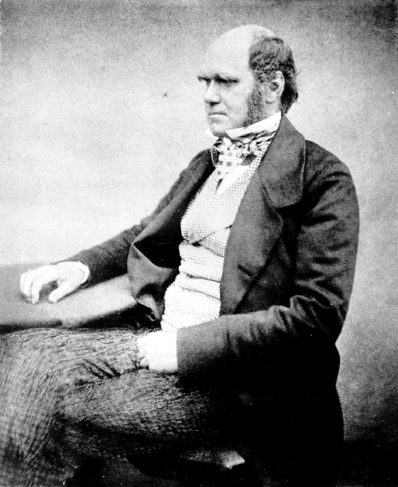
Add the URL of the picture, for example: http://upload.wikimedia.org/wikipedia/commons/4/42/Charles_Darwin_aged_51.jpg.

Add an bibo:Article


enter the PMID of the artcle

Add a geo:Place


SciFOAF, uses the geonames.org API.

Add a foaf:Person


You can the link this person to his publication, his foaf:based_near, the persons he knows..
SciFOAF 2.0

Etc...


Create foaf:Group, event:Event, doap:Project....

Exporting to KML


(Experimental) In menu "File' select 'Export to KML'. SciFOAF will export a KML file containing the geolocalized foaf:Persons.
A test is available here and is visible in maps.google.com at http://maps.google.com/maps?q=http://yokofakun.....

Exporting to XHTML+SVG


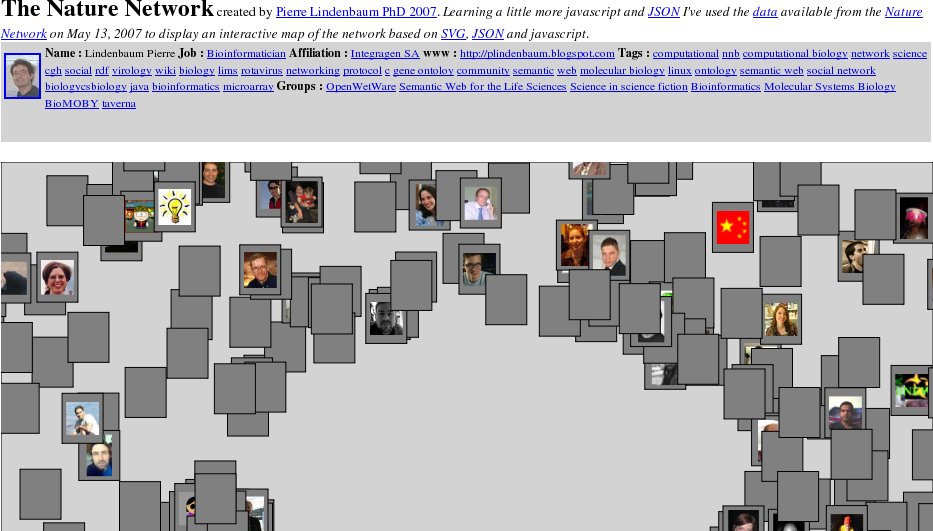
(Experimental) In menu "File' select 'Export to XHTML'. Here, I've roughly copied the tool I wrote for exploring the Nature Network using SVG/javscript/JSON/XTML. Many things remain to do.
Nature Network

Loading a Batch of Articles


In the main panel, for bibo:Article a button can be used to load a batch of articles.
On ncbi/pubmed, perform a query, choose
Display: and then . Copy the list of PMID and paste it in the "Load Batch" dialog, press OK. After a moment, all the articles are uploaded in the RDF model.

Example


A RDF File describing a few persons in the Biogang is available here.

Source Code


The source code is available on http://code.google.com/p/lindenb/.
The ant file is in
lindenb/proj/scifoaf/build.xml
.


Pierre

01 July 2008

Bioinformatics Zen : Bioinformatics Career Survey

Via Bioinformatics Zen:


If you’d like to embed this form in your own webpage or blog, using the following HTML.

<iframe src="http://spreadsheets.google.com/embeddedform?key=pdgOWoFpnRtwTMsOuSjN2YA&hl=en_GB" width="350" height="3150" frameborder="0" marginheight="0" marginwidth="0">Loading...</iframe>

Parsing JSON with javacc my Notebook.

Although I didn't wrote a new great programming language, I had a little experience with C lexers/parsers especialy with lex/yacc|flex/bison , a LALR parser. Now I'm programming in Java, I've been looking for the parsers available for this language: the most popular tools seems to be the top-down parsers javacc and antlr. In this post I show how I wrote a simple javacc parser reading a JSON entry (this is just an exercice, it is also easy to write this kind of parser using java.io.StreamTokenizer or java.util.Scanner).
First of all I found that the documentation was very limited and unlike Bison, I had the feeling that the javacc tutorial was a kind of "Look a the examples, isn't it cool ?"? I just writing my notebook here, so on my side I won't explain how I think I've understand how javacc works :-).
OK now, let's go back, to our JSON grammar and to the content of the javacc file.

The file is called JSONHandler.jj, it contains a java class JSONHandler with a main calling a method object after reading the input from stdin. This method will parse the json stream , transform it into a java object and echo it on stderr. The class is delimited by the keywords PARSER_BEGIN and PARSER_END


PARSER_BEGIN(JSONHandler)
public class JSONHandler {
public static void main(String args[])
{
try
{
JSONHandler parser = new JSONHandler(System.in);
Object o=parser.object();
System.err.println("JAVA OBJECT: "+o);
} catch(Exception err)
{
err.printStackTrace();
}
}
}
PARSER_END(JSONHandler)


Next we declare that the blank characters will be ignored:
SKIP :
{
" "
| "\t"
| "\n"
| "\r"
}


We then declare the lexical tokens (numbers, string, quoted strings) using a BNF grammar. As an example, here, a SIMPLE_QUOTE_LITERAL starts and ends with "\'" , it contains an unlimited number of ("escaped C special characters" or "normal characters").

TOKEN : /* LITERALS */
{
<#LETTER: ["_","a"-"z","A"-"Z"] >
| <#DIGIT: ["0"-"9"] >
| <#SIGN: ["-","+"]>
| <#EXPONENT: ("E"|"e") (<SIGN>)? (<DIGIT>)+
>
| <FLOATING_NUMBER: (<DIGIT>)* "." (<DIGIT>)* (<EXPO
NENT>)?
| (<DIGIT>)+ (<EXPONENT>) >
| <INT_NUMBER: (<DIGIT>)+ >
| <IDENTIFIER: <LETTER> (<LETTER>|<DIGIT>|<->)* >
| <#ESCAPE_CHAR: "\\" ["n","t","b","r","f","\\","'","\""]
>
| <SIMPLE_QUOTE_LITERAL:
"\'"
( (~["\'","\\","\n","\r"])
| <ESCAPE_CHAR>
)*
"\'"
>
|
<DOUBLE_QUOTE_LITERAL:
"\""
( (~["\"","\\","\n","\r"])
| <ESCAPE_CHAR>
)*
"\""
>
}


As we saw, the parser starts is job by invoking the object method. We expect here a JSON array or a JSON object or another identifier (null ||false||true||string). Those choices store their results in the variable o. This method returns a java.lang.Object.

public Object object():
{Object o;}
{
(
o=array()
| o= map()
| o= identifier()
)
{return o;}
}


JSON arrays will be returned as java.util.Vector<Object>. A JSON array is identified as starting by "[" and ending with "]", it contains zero or more JSON objects separated with a comma. Each time an element of this array is found, it is added in the vector. at the end, the vector is returned as the value of this array.
public Vector<Object> array():
{Vector<Object> vector= new Vector<Object>(); Object o;}
{
"[" ( o= object() {vector.addElement(o);} ("," o=object() {vector.addElement(o);} ) * )? "]"
{
return vector;
}
}


A JSON identifier can be a number, a string, a quoted string (need to be un-escaped), null, true or false. The content of this lexical token is obtained via the Token object which class is generated by javacc.

public Object identifier():
{Token t;}
{
(
t=<FLOATING_NUMBER>
{
return new Double(t.image);
}
| t=<INT_NUMBER>
{
return new Long(t.image);
}
| t=<IDENTIFIER>
{
if(t.image.equals("true"))
{
return Boolean.TRUE;
}
else if(t.image.equals("false"))
{
return Boolean.FALSE;
}
else if(t.image.equals("null"))
{
return null;
}
return t.image;
}
| t=<SIMPLE_QUOTE_LITERAL>
{
return unescape(t.image);
}
| t=<DOUBLE_QUOTE_LITERAL>
{
return unescape(t.image);
}
)
}


JSON Object will be returned as java.util.HashMap. A JSON Object starts with '{' and ends with '}'. In this case, we're passing this map as an argument each time the parser finds a pair of key/value.

public HashMap<String,Object> map():
{HashMap<String,Object> map= new HashMap<String,Object>(); }
{
"{" ( keyValue(map) ("," keyValue(map))*)? "}"
{
return map;
}
}

public void keyValue( HashMap<String,Object> map):
{Object k; Object v;}
{
(k=identifier() ":" v=object())
{
if(k==null) throw new ParseException("null cannot be used as key in object");
if(!(k instanceof String)) throw new ParseException(k.toString()+"("+k.getClass()+") cannot
be used as key in object");
map.put(k.toString(),v);
}
}


Compilation:
javacc JSONHandler.jj
Java Compiler Compiler Version 4.0 (Parser Generator)
(type "javacc" with no arguments for help)
Reading from file JSONHandler.jj . . .
Parser generated successfully.
javac JSONHandler.java


Testing:
Here is the content of test.json
{
organisms:[
{
id:10929,
name:"Bovine Rotavirus"
},
{
id:9606,
name:"Homo Sapiens"
}
],
proteins:[
{
label:"NSP3",
description:"Rotavirus Non Structural Protein 3",
organism-id: 10929,
acc: "ACB38353"
},
{
label:"EIF4G",
description:"eukaryotic translation initiation factor 4 gamma",
organism-id: 9606,
acc:"AAI40897"
}
],
interactions:[
{
label:"NSP3 interacts with EIF4G1",
pubmed-id:[77120248,38201627],
proteins:["ACB38353","AAI40897"]
}
]
}


This file is parsed, a *java* object is returned and printed on screen.
java JSONHandler < test.json
JAVA OBJECT: {organisms=[{id=10929, name=Bovine Rotavirus}, {id=9606, name=Homo Sapiens}],
proteins=[{description=Rotavirus Non Structural Protein 3, organism-id=10929, label=NSP3,
acc=ACB38353}, {description=eukaryotic translation initiation factor 4 gamma,
organism-id=9606, label=EIF4G, acc=AAI40897}], interactions=[{pubmed-id=[77120248, 38201627],
label=NSP3 interacts with EIF4G1, proteins=[ACB38353, AAI40897]}]}


Here is the complete javacc source code:
PARSER_BEGIN(JSONHandler)
import java.util.Vector;
import java.util.HashMap;

public class JSONHandler {


public static void main(String args[])
{
try
{
JSONHandler parser = new JSONHandler(System.in);
Object o=parser.object();
System.err.println("JAVA OBJECT: "+o);
} catch(Exception err)
{
err.printStackTrace();
}
}

/** unescape a C string */
private static String unescape(String s)
{
StringBuilder sb= new StringBuilder(s.length());
for(int i=1;i< s.length()-1;++i)
{
if(s.charAt(i)=='\\')
{
if(i+1< s.length()-1)
{
++i;
switch(s.charAt(i))
{
case '\n': sb.append('\n'); break;
case '\r': sb.append('\r'); break;
case '\\': sb.append('\\'); break;
case 'b': sb.append('\b'); break;
case 't': sb.append('\t'); break;
case 'f': sb.append('\f'); break;
case '\'': sb.append('\''); break;
case '\"': sb.append('\"'); break;
default: sb.append(s.charAt(i));
}
}
}
else
{
sb.append(s.charAt(i));
}
}
return sb.toString();
}

}

PARSER_END(JSONHandler)

SKIP :
{
" "
| "\t"
| "\n"
| "\r"
}


TOKEN : /* LITERALS */
{
<#LETTER: ["_","a"-"z","A"-"Z"] >
| <#DIGIT: ["0"-"9"] >
| <#SIGN: ["-","+"]>
| <#EXPONENT: ("E"|"e") (<SIGN>)? (<DIGIT>)+ >
| <FLOATING_NUMBER: (<DIGIT>)* "." (<DIGIT>)* (<EXPONENT>)?
| (<DIGIT>)+ (<EXPONENT>) >
| <INT_NUMBER: (<DIGIT>)+ >
| <IDENTIFIER: <LETTER> (<LETTER>|<DIGIT>|"-")* >
| <#ESCAPE_CHAR: "\\" ["n","t","b","r","f","\\","'","\""] >
| <SIMPLE_QUOTE_LITERAL:
"\'"
( (~["\'","\\","\n","\r"])
| <ESCAPE_CHAR>
)*
"\'"
>
|
<DOUBLE_QUOTE_LITERAL:
"\""
( (~["\"","\\","\n","\r"])
| <ESCAPE_CHAR>
)*
"\""
>
}


public Object object():
{Object o;}
{
(
o=array()
| o= map()
| o= identifier()
)
{return o;}
}

public Object identifier():
{Token t;}
{
(
t=<FLOATING_NUMBER>
{
return new Double(t.image);
}
| t=<INT_NUMBER>
{
return new Long(t.image);
}
| t=<IDENTIFIER>
{
if(t.image.equals("true"))
{
return Boolean.TRUE;
}
else if(t.image.equals("false"))
{
return Boolean.FALSE;
}
else if(t.image.equals("null"))
{
return null;
}
return t.image;
}
| t=<SIMPLE_QUOTE_LITERAL>
{
return unescape(t.image);
}
| t=<DOUBLE_QUOTE_LITERAL>
{
return unescape(t.image);
}
)
}

public Vector<Object> array():
{Vector<Object> vector= new Vector<Object>(); Object o;}
{
"[" ( o=object() {vector.addElement(o);} ("," o=object() {vector.addElement(o);} ) * )? "]"
{
return vector;
}
}

public HashMap<String,Object> map():
{HashMap<String,Object> map= new HashMap<String,Object>(); }
{
"{" ( keyValue(map) ("," keyValue(map))*)? "}"
{
return map;
}
}

public void keyValue( HashMap<String,Object> map):
{Object k; Object v;}
{
(k=identifier() ":" v=object())
{
if(k==null) throw new ParseException("null cannot be used as key in object");
if(!(k instanceof String)) throw new ParseException(k.toString()+"("+k.getClass()+") cannot be used as key in object");
map.put(k.toString(),v);
}
}


That's it. What's next ? jjtree is another component of the javacc package and seems to be a promising tool: it builds a tree structure from the grammar. The nodes of this tree can then be visited just like in a DOM/XML document and a language can be implemented, but here again, the documentation is succinct.

bye ! bye ! my private web server !

I'm about to leave my current job. Thus, soon or later, the web server where I stored my stuff will diseappear. Most of those items have been introduced on this blog.


Pierre