Showing posts with label paper. Show all posts

30 January 2009

Bravo !! Microblogging the ISMB: A New Approach to Conference Reporting

Microblogging the ISMB: A New Approach to Conference Reporting

Neil Saunders, Pedro Beltrão, Lars Jensen, Daniel Jurczak, Roland Krause, Michael Kuhn, Shirley Wu
PLoS Comput Biol 5(1): e1000263. doi:10.1371/journal.pcbi.1000263.

Hey ! I know the authors of this paper !! :-)
I personally congratulate them !

Follow them/me/us/the biogang on FriendFeed !

21 July 2008

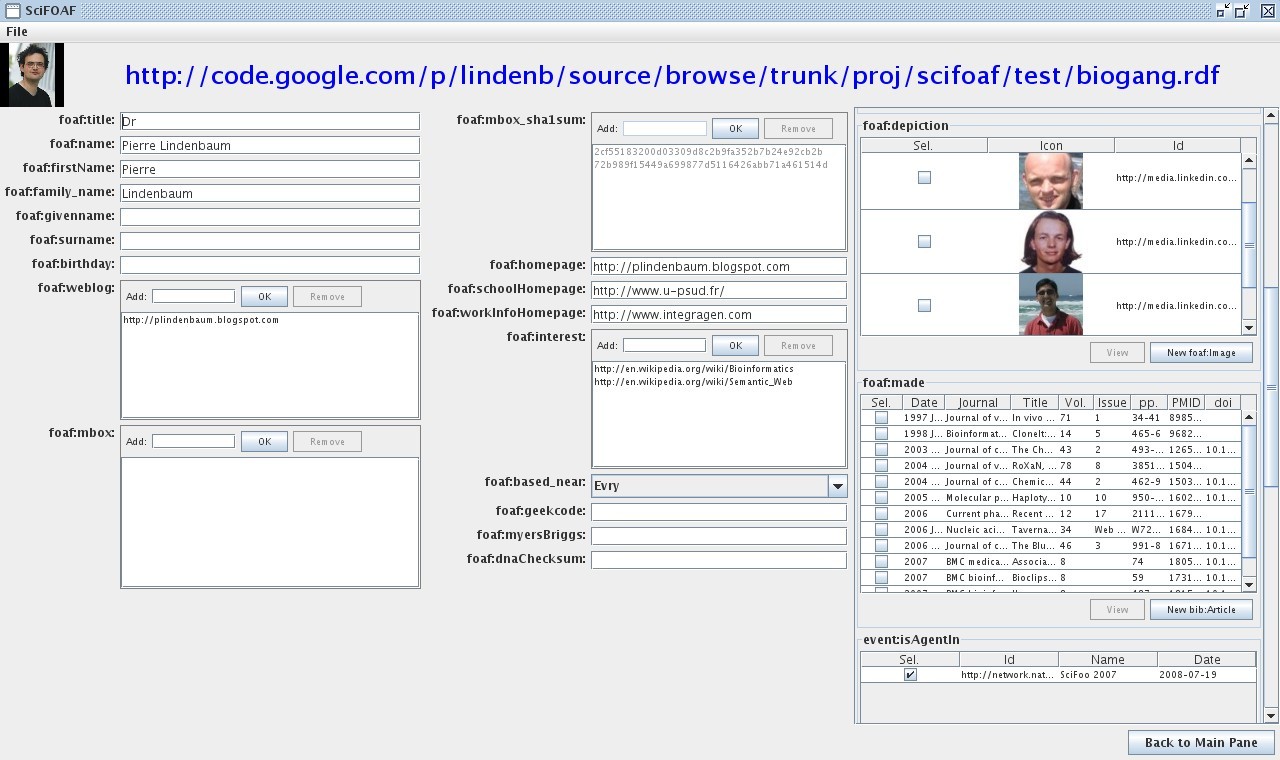
SciFOAF 2.0

If you're following me on twitter or on friendfeed you may know that I've re-written a new version of SciFOAF.

Here is the documentation:


What is SciFOAF


SciFOAF is the second version of a tool I created to build a FOAF/RDF file from your publications in ncbi/pubmed. The FOAF project defines a semantic format based on RDF/XML to define persons or groups, their relationships, as well as their basic properties such as name, e-mail address, subjects of interest, publications, and so on... This FOAF profile can be used to describe your work, your laboratory, your contacts.
The first version was introduced in 2006 here as a java webstart interface and had many problems:

  • the RDF file could not be loaded/saved

  • only a few properties could be edited

  • authors'name definition may vary from one journal to another as some journal may use the initial of an author while another may use the complete first name.

  • the interaction was just a kind of multiple-choice questionnaire


The new version now uses the Jena API, the rdf repository can be loaded and saved.

Requirements


Downloading SciFOAF


A *.jar file should be available for download at http://lindenb.googlecode.com/files/scifoaf.jar.

Running SciFOAF


Setup the CLASSPATH
export JENA_LIB=your_path_to/Jena/lib
export CLASSPATH=${JENA_LIB}/antlr-2.7.5.jar:${JENA_LIB}/arq-extra.jar:${JENA_LIB}/arq.jar:${JENA_LIB}/commons-logging-1.1.1.jar:${JENA_LIB}/concurrent.jar:${JENA_LIB}/icu4j_3_4.jar:${JENA_LIB}/iri.jar:${JENA_LIB}/jena.jar:${JENA_LIB}/jenatest.jar:${JENA_LIB}/json.jar:${JENA_LIB}/junit.jar:${JENA_LIB}/log4j-1.2.12.jar:${JENA_LIB}/lucene-core-2.3.1.jar:${JENA_LIB}/stax-api-1.0.jar:${JENA_LIB}/wstx-asl-3.0.0.jar:${JENA_LIB}/xercesImpl.jar:${JENA_LIB}/xml-apis.jar:YOUR_PATH_TO/scifoaf.jar

Run SciFOAF
java org.lindenb.scifoaf.SciFOAF

the first time your run SciFOAF, You're prompted to give yourself an URI. The best choice would be to give the URL where your foaf file will be stored or the URL of your personnal homepage or blog. On startup a file called foaf.rdf will be created in your home directory. Alternatively you can specify a file on the command line.
When the application is closed, the FOAF model will be saved back to the file.

The Main Pane


The first window contains a sequence of tab Each tab fits to a given rdf Class:

  • foaf:Person

  • geo:Place

  • bibo:Article

  • ...


For each tab, a button "New ...." creates a new instance of the given Class.

Building your profile


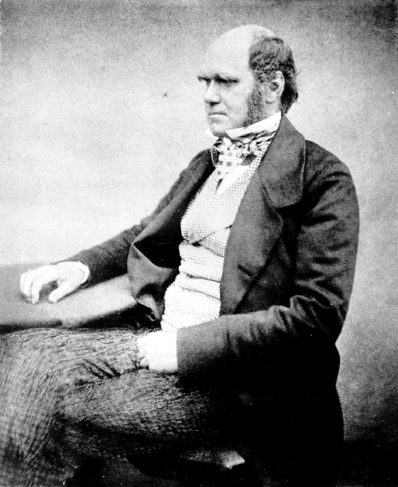
Add a foaf:Image


Add the URL of the picture, for example: http://upload.wikimedia.org/wikipedia/commons/4/42/Charles_Darwin_aged_51.jpg.

Add an bibo:Article


enter the PMID of the artcle

Add a geo:Place


SciFOAF, uses the geonames.org API.

Add a foaf:Person


You can the link this person to his publication, his foaf:based_near, the persons he knows..
SciFOAF 2.0

Etc...


Create foaf:Group, event:Event, doap:Project....

Exporting to KML


(Experimental) In menu "File' select 'Export to KML'. SciFOAF will export a KML file containing the geolocalized foaf:Persons.
A test is available here and is visible in maps.google.com at http://maps.google.com/maps?q=http://yokofakun.....

Exporting to XHTML+SVG


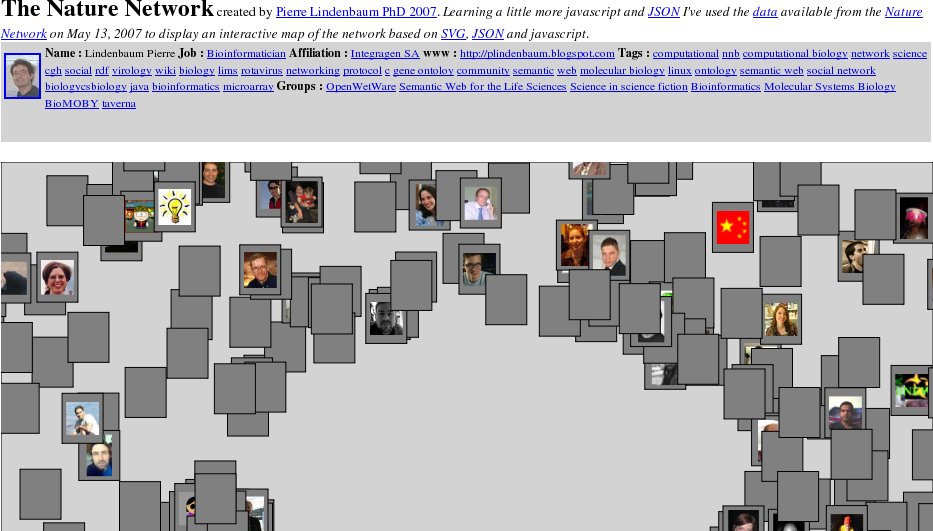
(Experimental) In menu "File' select 'Export to XHTML'. Here, I've roughly copied the tool I wrote for exploring the Nature Network using SVG/javscript/JSON/XTML. Many things remain to do.
Nature Network

Loading a Batch of Articles


In the main panel, for bibo:Article a button can be used to load a batch of articles.
On ncbi/pubmed, perform a query, choose
Display: and then . Copy the list of PMID and paste it in the "Load Batch" dialog, press OK. After a moment, all the articles are uploaded in the RDF model.

Example


A RDF File describing a few persons in the Biogang is available here.

Source Code


The source code is available on http://code.google.com/p/lindenb/.
The ant file is in
lindenb/proj/scifoaf/build.xml
.


Pierre

14 June 2007

Papiers Aléatoire

I'm starting a new blog called "Papier Aléatoires" (Random Papers). It will contain translations of abstracts in French in order to motivate myself to read more papers and to better understand them (this is my defect: I don't know how to identify a good article: as an example, I remember years ago I read the abstract of THIS paper introducing the siRNA without being interested). Nevertheless I am not certain that I will contribute to this blog on a regular basis.

Contributions are also welcomed: I'll post any french translation of any scholar abstract.
In the future, I may also store the translation in a public (RDF?) file.

Pierre

11 June 2007

Nature Scintilla


just like Deepak, I've received an invitation from Euan Adie (thanks Euan) to join the new service from Nature http://scintilla.nature.com/.

Scintilla collects data from hundreds of news outlets, scientific blogs, journals and databases and then makes it easy for you to organize, share and discover exactly the type of information that you're interested in.

For example, you can keep track of life science podcasts, or the latest papers on schizophrenia, DNA methylation or immunology. Interested in physics blogs? Scintilla can help.

Euan is already the author of www.postgenomic.com and the two tools seem to have an identical function at first glance. This also reminds me Aggademia, a tool created and tested by Alf Eaton a year ago.

I just had on overview of this tool but I already I found it interesting to add a pubmed query in my collection of sources. The service is distinct from Connotea and network.nature.com but with those three tools you can create a group, send some invitations (people around me are annoyed with all my invitations) and I hope all of this will be merged in the future.

Shall I use this tool ? I don't know. I already use google-reader , technorati , etc.. to handles my resources, just tell me why I should change.

Science Magazine ? Science Magazine ? Where are you ?


Pierre

10 June 2007

Mapping NCBI/PUBMED

In my previous post I showed how I used the tag <Affiliation> from the XML/pubmed records to extract the mails and the names from the authors of a paper. I've slightly changed the source code of this program to find the country of origin of each paper. To retrieve the country I used:
1) the suffix of the mail (if any)
2) the name of the country (if any)
3) the name of the city (a few famous one such as Standord, for the US or UK)

My program takes as input a pubmed query and the ouput is the number of papers per year and per country. I put a few results on ManyEyes. As an example with the query "Rotavirus" with 1000 records, I was able to retrieve 887 countries.


Publications in "Bioinformatics", "BMC Bioinformatics", "Plos Comp. Biol."


Publications about "Rotavirus"


publications about malaria, anopheles, plasmodium etc...

22 May 2007

Is there any XMP in scientific pdf ? (No)

Roderic Page from iPhylo has introduced XMP in his blog. XMP is an Adobe format used to store metadata in files, such as PDFs. Adobe also provides an API to extract the XMP from the files.

I've downloaded the toolkit to see if any meta information could be extracted from the scientific papers. The adobe toolkit needs expat (a XML parser) to be installed and it comes with a sample application 'DumpScannedXMP' finding all XMP Packets in a file and printing their content.

I've tested this with some papers found on the net.
./target/i80386linux/debug/DumpScannedXMP 3851.pdf
RoXaN, a Novel Cellular Protein Containing TPR, LD, and Zinc Finger Motifs, Forms a Ternary Complex with Eukaryotic Initiation Factor 4G and Rotavirus NSP3: from Journal of Virology 2003

// ==============================================================

// Dumping raw input for "/home/pierre/3851.pdf" (879724..881254)

<?xpacket begin="" id="W5M0MpCehiHzreSzNTczkc9d"?>
<x:xmpmeta xmlns:x="adobe:ns:meta/" x:xmptk="3.1-701">
<rdf:RDF xmlns:rdf="http://www.w3.org/1999/02/22-rdf-syntax-ns#">
<rdf:Description rdf:about=""
xmlns:xap="http://ns.adobe.com/xap/1.0/">
<xap:CreateDate>2004-03-16T15:35:47Z</xap:CreateDate>
<xap:CreatorTool>XPP</xap:CreatorTool>
<xap:ModifyDate>2007-05-22T12:24:37Z</xap:ModifyDate>
</rdf:Description>
<rdf:Description rdf:about=""
xmlns:dc="http://purl.org/dc/elements/1.1/">
<dc:format>application/pdf</dc:format>
<dc:description>
<rdf:Alt>
<rdf:li xml:lang="x-default"/>
</rdf:Alt>
</dc:description>
<dc:creator>
<rdf:Seq>
<rdf:li/>
</rdf:Seq>
</dc:creator>
<dc:title>
<rdf:Alt>
<rdf:li xml:lang="x-default"/>
</rdf:Alt>
</dc:title>
</rdf:Description>
<rdf:Description rdf:about=""
xmlns:pdf="http://ns.adobe.com/pdf/1.3/">
<pdf:Keywords/>
<pdf:Producer/>
</rdf:Description>
<rdf:Description rdf:about=""
xmlns:xapMM="http://ns.adobe.com/xap/1.0/mm/">
<xapMM:DocumentID>uuid:e0500da6-1dd1-11b2-0a00-ecd00f090858</xapMM:DocumentID>
<xapMM:InstanceID>uuid:e0500db1-1dd1-11b2-0a00-000000004869</xapMM:InstanceID>
</rdf:Description>
</rdf:RDF>
</x:xmpmeta>
<?xpacket end="r"?>

Dumping XMPMeta object "" (0x0)

http://ns.adobe.com/xap/1.0/ xap: (0x80000000 : schema)
xap:CreateDate = "2004-03-16T15:35:47Z"
xap:CreatorTool = "XPP"
xap:ModifyDate = "2007-05-22T12:24:37Z"

http://purl.org/dc/elements/1.1/ dc: (0x80000000 : schema)
dc:format = "application/pdf"
dc:description (0x1E00 : isLangAlt isAlt isOrdered isArray)
[1] = "" (0x50 : hasLang hasQual)
? xml:lang = "x-default" (0x20 : isQual)
dc:creator (0x600 : isOrdered isArray)
[1] = ""
dc:title (0x1E00 : isLangAlt isAlt isOrdered isArray)
[1] = "" (0x50 : hasLang hasQual)
? xml:lang = "x-default" (0x20 : isQual)

http://ns.adobe.com/pdf/1.3/ pdf: (0x80000000 : schema)
pdf:Keywords = ""
pdf:Producer = ""

http://ns.adobe.com/xap/1.0/mm/ xapMM: (0x80000000 : schema)
xapMM:DocumentID = "uuid:e0500da6-1dd1-11b2-0a00-ecd00f090858"
xapMM:InstanceID = "uuid:e0500db1-1dd1-11b2-0a00-000000004869"

Pretty serialization, 1478 bytes :

<x:xmpmeta xmlns:x="adobe:ns:meta/" x:xmptk="Public XMP Toolkit Core 3.5">
<rdf:RDF xmlns:rdf="http://www.w3.org/1999/02/22-rdf-syntax-ns#">
<rdf:Description rdf:about=""
xmlns:xap="http://ns.adobe.com/xap/1.0/">
<xap:CreateDate>2004-03-16T15:35:47Z</xap:CreateDate>
<xap:CreatorTool>XPP</xap:CreatorTool>
<xap:ModifyDate>2007-05-22T12:24:37Z</xap:ModifyDate>
</rdf:Description>
<rdf:Description rdf:about=""
xmlns:dc="http://purl.org/dc/elements/1.1/">
<dc:format>application/pdf</dc:format>
<dc:description>
<rdf:Alt>
<rdf:li xml:lang="x-default"/>
</rdf:Alt>
</dc:description>
<dc:creator>
<rdf:Seq>
<rdf:li/>
</rdf:Seq>
</dc:creator>
<dc:title>
<rdf:Alt>
<rdf:li xml:lang="x-default"/>
</rdf:Alt>
</dc:title>
</rdf:Description>
<rdf:Description rdf:about=""
xmlns:pdf="http://ns.adobe.com/pdf/1.3/">
<pdf:Keywords/>
<pdf:Producer/>
</rdf:Description>
<rdf:Description rdf:about=""
xmlns:xapMM="http://ns.adobe.com/xap/1.0/mm/">
<xapMM:DocumentID>uuid:e0500da6-1dd1-11b2-0a00-ecd00f090858</xapMM:DocumentID>
<xapMM:InstanceID>uuid:e0500db1-1dd1-11b2-0a00-000000004869</xapMM:InstanceID>
</rdf:Description>
</rdf:RDF>
</x:xmpmeta>

Compact serialization, 990 bytes :

<x:xmpmeta xmlns:x="adobe:ns:meta/" x:xmptk="Public XMP Toolkit Core 3.5">
<rdf:RDF xmlns:rdf="http://www.w3.org/1999/02/22-rdf-syntax-ns#">
<rdf:Description rdf:about=""
xmlns:xap="http://ns.adobe.com/xap/1.0/"
xmlns:dc="http://purl.org/dc/elements/1.1/"
xmlns:pdf="http://ns.adobe.com/pdf/1.3/"
xmlns:xapMM="http://ns.adobe.com/xap/1.0/mm/"
xap:CreateDate="2004-03-16T15:35:47Z"
xap:CreatorTool="XPP"
xap:ModifyDate="2007-05-22T12:24:37Z"
dc:format="application/pdf"
pdf:Keywords=""
pdf:Producer=""
xapMM:DocumentID="uuid:e0500da6-1dd1-11b2-0a00-ecd00f090858"
xapMM:InstanceID="uuid:e0500db1-1dd1-11b2-0a00-000000004869">
<dc:description>
<rdf:Alt>
<rdf:li xml:lang="x-default"/>
</rdf:Alt>
</dc:description>
<dc:creator>
<rdf:Seq>
<rdf:li/>
</rdf:Seq>
</dc:creator>
<dc:title>
<rdf:Alt>
<rdf:li xml:lang="x-default"/>
</rdf:Alt>
</dc:title>
</rdf:Description>
</rdf:RDF>
</x:xmpmeta>


A test with a more recent paper RNAmmer: consistent and rapid annotation of ribosomal RNA genes . NAR 2007 contains as much information.

So is there any interesting XMP in scientific pdf ? no.


Pierre

10 May 2007

SharedCopy: A collaborative tool for annotating web pages

Via TechCrunch: SharedCopy is a collaborative tool for annotating web pages. It takes a snapshot of the current page and uses it for annotations: then the visitors will sees the original page. I've tested it on a paper in pubmedcentral:


Pierre