Showing posts with label mozilla. Show all posts

16 October 2014

IGVFox: Integrative Genomics Viewer control through mozilla Firefox

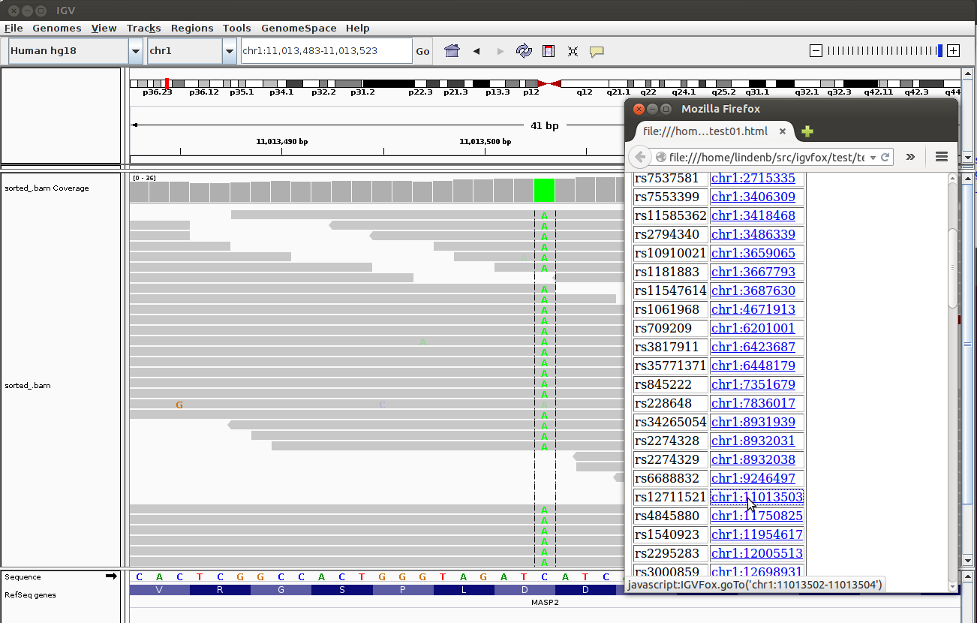
I've just pushed IGVFox 0.1 an add-on for Firefox, controlling IGV, the Integrative Genomics Viewer.
This add-on allows the users to set the genomic position of IGV by just clicking a hyperlink in a HTML page. The source code is available on github at https://github.com/lindenb/igvfox and a first release is available as a *.xpi file at https://github.com/lindenb/igvfox/releases.


That's it,

Pierre

29 May 2013

Binding a C library with Javascript/ #mozilla. An example with the Tabix library

In this post I'll show how to bind a C API to javascript using the mozilla/xul-runner API and the tabix library.

About xpcshell

XULRunner is a Mozilla runtime package. The SDK package contains xpcshell, a JavaScript Shell application that lets you run JavaScript code. "Unlike the ordinary JS shell (js), xpcshell lets the scripts running in it access the mozila technologies (XPCOM)." I've tested the current code with
$ xulrunner -v
Mozilla XULRunner 22.0 - 20130521223249
XULRunner is not installed by default on ubuntu on needs to be downloaded.

The js.type library

The js-ctypes is a foreign-function library for Mozilla's privileged JavaScript. It provides C-compatible data types and allows JS code to call functions in shared libraries (dll, so, dylib) and implement callback functions.

Tabix

Heng Li's Tabix is "a generic tool that indexes position sorted files in TAB-delimited formats such as GFF, BED, PSL, SAM and SQL export, and quickly retrieves features overlapping specified regions.". The code is available in github at https://github.com/samtools/tabix.

Binding the Tabix library to javascript

First of all, the dynamic library for tabix must be compiled:
$ cd /path/to/tabix.dir
$ make libtabix.so.1
A javascript file tabix.js is created. At the top, we tell the javascrpipt engine we want to use the js.type library:
Components.utils.import("resource://gre/modules/ctypes.jsm")
The dynamic library for tabix is loaded:
var lib = ctypes.open("libtabix.so.1");
We bind each required methods of the tabix library to javascript. As an example we're going to bind ti_open. The C declaration for this method is:
tabix_t *ti_open(const char *fn, const char *fnidx);
Using js.type, the call to that method is wrapped to javascript using declare/:
var DLOpen= lib.declare("ti_open",/* method name */
 ctypes.default_abi,/* Application binary interface type */
 ctypes.voidptr_t, /* return type is a pointer 'void*' */
 ctypes.char.ptr,  /* first argument is 'char*' */
 ctypes.int32_t /* second argument is 'int' */
 );
In javascript, the library is used by invoking DLOpen :
function TabixFile(filename)
 {
 this.ptr= DLOpen(filename,0);
 if(this.ptr.isNull()) throw "I/O ERROR: Cannot open \""+filename+"\"";
 };
var tabix=new TabixFile("annotatons.bed.gz");

The tabix.js library

All in one, I wrote the following file.

Testing


load("tabix.js");
var tabix=new TabixFile("/path/to/tabix-0.2.5/example.gtf.gz");
var iter=tabix.query("chr2:32800-35441");
while((line=iter.next())!=null)
 {
 print(line);
 }
tabix.close();

Set the dynamic library path (LD_LIBRARY_PATH) and invoke this script with xpcshell:
LD_LIBRARY_PATH=/path/to/xulrunner-sdk/bin:/path/to/tabix-0.2.5 /path/to/xulrunner-sdk/bin/xpcshell -f test.js
Output:
chr2 HAVANA transcript 28814 36385 . - . gene_id "ENSG00000184731"; transcript_id "ENST00000327669"; gene_type "protein_coding"; gene_status "KNOWN"; gene_name "FAM110C"; transcript_type "protein_coding"; transcript_status "KNOWN"; transcript_name "FAM110C-001"; level 2; tag "CCDS"; ccdsid "CCDS42645"; havana_gene "OTTHUMG00000151321"; havana_transcript "OTTHUMT00000322220";
chr2 HAVANA gene 28814 36870 . - . gene_id "ENSG00000184731"; transcript_id "ENSG00000184731"; gene_type "protein_coding"; gene_status "KNOWN"; gene_name "FAM110C"; transcript_type "protein_coding"; transcript_status "KNOWN"; transcript_name "FAM110C"; level 2; havana_gene "OTTHUMG00000151321";
chr2 HAVANA transcript 31220 32952 . - . gene_id "ENSG00000184731"; transcript_id "ENST00000460464"; gene_type "protein_coding"; gene_status "KNOWN"; gene_name "FAM110C"; transcript_type "processed_transcript"; transcript_status "KNOWN"; transcript_name "FAM110C-003"; level 2; havana_gene "OTTHUMG00000151321"; havana_transcript "OTTHUMT00000322222";
chr2 HAVANA transcript 31221 36870 . - . gene_id "ENSG00000184731"; transcript_id "ENST00000461026"; gene_type "protein_coding"; gene_status "KNOWN"; gene_name "FAM110C"; transcript_type "processed_transcript"; transcript_status "KNOWN"; transcript_name "FAM110C-002"; level 2; havana_gene "OTTHUMG00000151321"; havana_transcript "OTTHUMT00000322221";
chr2 HAVANA exon 32809 32952 . - . gene_id "ENSG00000184731"; transcript_id "ENST00000460464"; gene_type "protein_coding"; gene_status "KNOWN"; gene_name "FAM110C"; transcript_type "processed_transcript"; transcript_status "KNOWN"; transcript_name "FAM110C-003"; level 2; havana_gene "OTTHUMG00000151321"; havana_transcript "OTTHUMT00000322222";
chr2 HAVANA CDS 35440 36385 . - 0 gene_id "ENSG00000184731"; transcript_id "ENST00000327669"; gene_type "protein_coding"; gene_status "KNOWN"; gene_name "FAM110C"; transcript_type "protein_coding"; transcript_status "KNOWN"; transcript_name "FAM110C-001"; level 2; tag "CCDS"; ccdsid "CCDS42645"; havana_gene "OTTHUMG00000151321"; havana_transcript "OTTHUMT00000322220";
chr2 HAVANA exon 35440 36385 . - . gene_id "ENSG00000184731"; transcript_id "ENST00000327669"; gene_type "protein_coding"; gene_status "KNOWN"; gene_name "FAM110C"; transcript_type "protein_coding"; transcript_status "KNOWN"; transcript_name "FAM110C-001"; level 2; tag "CCDS"; ccdsid "CCDS42645"; havana_gene "OTTHUMG00000151321"; havana_transcript "OTTHUMT00000322220";

That's it,

Pierre

10 January 2010

What is the CSS style of that HTML element ?: CSSPopup, an extension for firefox

Trying to find the CSS style of a HTML element is a common task for me and I often look in the <style/> of the pages to try to find what can be "this inspiring CSS". So, I've created CSSPopup, a small extension for firefox. This extension appends a new button in the contextual menu that will print all the CSS selectors of the element that was clicked. For example when I clicked on "Welcome to NCBI" at http://www.ncbi.nlm.nih.gov/, the result was:

h1 {
font-size:32px;
font-weight:bold;
line-height:36px;
margin-bottom:21.4333px;
margin-top:21.4333px;
padding-left:16px;
-moz-column-gap:32px;
}

div {
}

div {
}

div {
}

div {
margin-bottom:0px;
margin-left:0px;
margin-right:0px;
margin-top:0px;
}

body {
margin-bottom:8px;
margin-left:8px;
margin-right:8px;
margin-top:8px;
}

html {
background-attachment:scroll;
background-color:transparent;
background-image:none;
background-position:0% 0%;
background-repeat:repeat;
border-collapse:separate;
border-spacing:0px 0px;
bottom:auto;
caption-side:top;
clear:none;
clip:auto;
color:rgb(0, 0, 0);
content:none;
counter-increment:none;
counter-reset:none;
cursor:auto;
direction:ltr;
display:block;
empty-cells:show;
float:none;
font-family:serif;
font-size:16px;
font-size-adjust:none;
font-style:normal;
font-variant:normal;
font-weight:400;
height:auto;
ime-mode:auto;
left:auto;
letter-spacing:normal;
line-height:19px;
list-style-image:none;
list-style-position:outside;
list-style-type:disc;
margin-bottom:0px;
margin-left:0px;
margin-right:0px;
margin-top:0px;
marker-offset:auto;
max-height:none;
max-width:none;
min-height:0px;
min-width:0px;
opacity:1;
outline-color:rgb(0, 0, 0);
outline-offset:0px;
outline-style:none;
outline-width:0px;
overflow:visible;
overflow-x:visible;
overflow-y:visible;
padding-bottom:0px;
padding-left:0px;
padding-right:0px;
padding-top:0px;
page-break-after:auto;
page-break-before:auto;
pointer-events:visiblepainted;
position:static;
quotes:"“" "”" "‘" "’";
right:auto;
table-layout:auto;
text-align:start;
text-decoration:none;
text-indent:0px;
text-rendering:auto;
text-shadow:none;
text-transform:none;
top:auto;
unicode-bidi:normal;
vertical-align:baseline;
visibility:visible;
white-space:normal;
width:auto;
word-spacing:normal;
word-wrap:normal;
z-index:auto;
-moz-appearance:none;
-moz-background-clip:border;
-moz-background-inline-policy:continuous;
-moz-background-origin:padding;
-moz-binding:none;
-moz-border-bottom-colors:none;
-moz-border-left-colors:none;
-moz-border-right-colors:none;
-moz-border-top-colors:none;
-moz-border-image:none;
-moz-border-radius-bottomleft:0px;
-moz-border-radius-bottomright:0px;
-moz-border-radius-topleft:0px;
-moz-border-radius-topright:0px;
-moz-box-align:stretch;
-moz-box-direction:normal;
-moz-box-flex:0;
-moz-box-ordinal-group:1;
-moz-box-orient:horizontal;
-moz-box-pack:start;
-moz-box-shadow:none;
-moz-box-sizing:content-box;
-moz-column-count:auto;
-moz-column-gap:16px;
-moz-column-width:auto;
-moz-column-rule-width:0px;
-moz-column-rule-style:none;
-moz-column-rule-color:rgb(0, 0, 0);
-moz-float-edge:content-box;
-moz-force-broken-image-icon:0;
-moz-image-region:auto;
-moz-outline-color:rgb(0, 0, 0);
-moz-outline-offset:0px;
-moz-outline-radius-bottomleft:0px;
-moz-outline-radius-bottomright:0px;
-moz-outline-radius-topleft:0px;
-moz-outline-radius-topright:0px;
-moz-outline-style:none;
-moz-outline-width:0px;
-moz-stack-sizing:stretch-to-fit;
-moz-transform:none;
-moz-transform-origin:50% 50%;
-moz-user-focus:none;
-moz-user-input:auto;
-moz-user-modify:read-only;
-moz-user-select:auto;
-moz-appearance:none;
-moz-user-select:auto;
}
The extension can be downloaded at http://code.google.com/p/lindenb/downloads/list and the source code is available at http://code.google.com/p/lindenb/source/browse/trunk/proj/tinyxul/csspopup/.

That's it,
Pierre

20 May 2009

XForms for Bioinformatics : my notebook.


Here, I describe my experience with XFORMS:(W3C) XForms is an XML application that represents the next generation of forms for the Web. By splitting traditional XHTML forms into three parts—XForms model, instance data, and user interface, it separates presentation from content, allows reuse, gives strong typing—reducing the number of round-trips to the server, as well as offering device independence and a reduced need for scripting.

XForms currently requires the XForms-plugin for Firefox. This plugin is available https://addons.mozilla.org/en-US/firefox/addon/824. The current post was written using Mozilla XForms 0.8.6ff3.
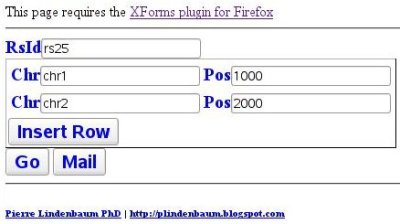
In this post I show how to send a RDF+XML document describing a SNP to a web server using XForms. The form contains a field for the name of the SNP. It also contains a table with two columns (chromosome and position) for mapping the SNP. As this SNP could be mapped more than once on the genome (don't use this for genotyping !), the user will be able to append a row at the end of the table for each position.


Note: The file must be an Xhtml file and the form must send its data to the same domain.

The <HEAD> contains the <xforms:model> This element represents a form definition and is used as
a container for elements that define the XForms Model.

<xforms:model> contains the <xforms:instancel>. An instance defines a template for the data to be collected. Here the template is a RDF file describing a SNP. This SNP is mapped twice.
<xforms:instance id="me">
<rdf:RDF>
<bio:SNP rdf:about="">
<bio:rsId>rs25</bio:rsId>
<bio:mapping>
<bio:Position>
<bio:chromosome>chr1</bio:chromosome>
<bio:position>1000</bio:position>
</bio:Position>
</bio:mapping>
<bio:mapping>
<bio:Position>
<bio:chromosome>chr2</bio:chromosome>
<bio:position>2000</bio:position>
</bio:Position>
</bio:mapping>
</bio:SNP>
</rdf:RDF>
</xforms:instance>

We then bind the node of this instance to an unique descriptor using an xpath expression. Note that the attribute @type can be used to add a restriction to this form (for example the position must be a non-negative integer), if the form is not validated, the data won't be send to the server. A finer validation could also be performed if an XSD schema was attached to the model. Note also that the @rdf:about (a link to the ncbi for the SNP) attribute will be calculated from the name of the SNP.
<xforms:bind nodeset="/rdf:RDF/bio:SNP/bio:rsId" id="rsId" required="true( )"/>
<xforms:bind nodeset="/rdf:RDF/bio:SNP/@rdf:about" calculate="concat('http://www.ncbi.nlm.nih.gov/SNP/snp_ref.cgi?rs=',substring(../bio:rsId,3))"/>
<xforms:bind nodeset="/rdf:RDF/bio:SNP/bio:mapping/bio:Position/bio:chromosome" type="xsd:NMTOKEN" id="mapChrom" required="true( )"/>
<xforms:bind nodeset="/rdf:RDF/bio:SNP/bio:mapping/bio:Position/bio:position" type="xsd:nonNegativeInteger" id="mapPos" required="true( )"/>

We then describe how the data should be submited. Here are two <xforms:submission>: one send the data as XML just like a regular html form, the other send a mail (this second form didn't worked).

<xforms:submission action="echo.php" method="post" id="submit" ref="/rdf:RDF" instance="me" encoding="ISO-8859-1" replace="all"/>
<xforms:submission action="mailto:me@yahoo.fr" method="post" id="mail" ref="/rdf:RDF" instance="me" encoding="ISO-8859-1" replace="all"/>


Then, the input fields are written in the body of the XHTML document. Each field contains a xforms:label as well as a xforms:alert displayed if the field is not valid.
<xforms:input ref="bio:chromosome">
<xforms:label>Chr</xforms:label>
<xforms:alert class="inline">Chromosme is a xsd:NMTOKEN</xforms:alert>
</xforms:input>

For each position of this SNP, the fields are inserted in a table using <xforms:repeat>
<table border="1"><xforms:repeat nodeset="/rdf:RDF/bio:SNP/bio:mapping/bio:Position" id="repeatpositions"><tr>
<td>

<xforms:input ref="bio:chromosome">
<xforms:label>Chr</xforms:label>
<xforms:alert class="inline">Chromosome is a xsd:NMTOKEN</xforms:alert>
</xforms:input>
</td>
<td>
<xforms:input ref="bio:position">
<xforms:label>Pos</xforms:label>
<xforms:alert class="inline">Position must be greater or equals to 0</xforms:alert>
</xforms:input>
</td>
</tr></xforms:repeat></table>

A button is used to append a new row in this table:
<xforms:trigger>
<xforms:label>Insert Row</xforms:label>
<xforms:insert nodeset="/rdf:RDF/bio:SNP/bio:mapping/bio:Position" at="index('repeatpositions')" position="after" ev:event="DOMActivate"/>
</xforms:trigger>

And at the end, here are the two 'submit' buttons:
<xforms:submit submission="submit">
<xforms:label>Go</xforms:label>
<xforms:hint>Click to post</xforms:hint>
</xforms:submit>
<xforms:submit submission="mail">
<xforms:label>Mail</xforms:label>
<xforms:hint>Click to Send</xforms:hint>
</xforms:submit>

... and in the header, a little piece of CSS for styling:
<style type="text/css">
@namespace xforms url("http://www.w3.org/2002/xforms");

xforms|input {
color:blue; font-weight:bold;font-size:20px;width:500px
}

xforms|label {
color:blue; font-weight:bold;font-size:20px;width:500px
}

</style>


And here is the XML sent to the server

<rdf:RDF>
<bio:SNP rdf:about="http://www.ncbi.nlm.nih.gov/SNP/snp_ref.cgi?rs=25">
<bio:rsId>rs25</bio:rsId>
<bio:mapping>
<bio:Position>
<bio:chromosome>chr1</bio:chromosome>
<bio:position>1000</bio:position>
</bio:Position>
</bio:mapping>
<bio:mapping>
<bio:Position>
<bio:chromosome>chr2</bio:chromosome>
<bio:position>2000</bio:position>
</bio:Position>
</bio:mapping>
</bio:SNP>
</rdf:RDF>


All in one...

<html xmlns="http://www.w3.org/1999/xhtml"
xmlns:xforms="http://www.w3.org/2002/xforms"
xmlns:xsd="http://www.w3.org/2001/XMLSchema"
xmlns:ev="http://www.w3.org/2001/xml-events"
xmlns:rdf="http://www.w3.org/1999/02/22-rdf-syntax-ns#"
xmlns:bio="http://ontology.lindenb.org/snp#"
xmlns:xsi="http://www.w3.org/2001/XMLSchema-instance">

<head>
<title>XFORM</title>
<!-- Let's add style to the XFORM components -->
<style type="text/css">
@namespace xforms url("http://www.w3.org/2002/xforms");

xforms|input {
color:blue; font-weight:bold;font-size:20px;width:500px
}

xforms|label {
color:blue; font-weight:bold;font-size:20px;width:500px
}

</style>

<!--

This element represents a form definition and is used as
a container for elements that define the XForms Model.

-->


<xforms:model>

<!-- instance defines a template for the data to be collected. -->
<xforms:instance id="me">
<!-- we send a RDF document to the server -->
<rdf:RDF>
<bio:SNP rdf:about="">
<bio:rsId>rs25</bio:rsId>
<bio:mapping>
<bio:Position>
<bio:chromosome>chr1</bio:chromosome>
<bio:position>1000</bio:position>
</bio:Position>
</bio:mapping>
<bio:mapping>
<bio:Position>
<bio:chromosome>chr2</bio:chromosome>
<bio:position>2000</bio:position>
</bio:Position>
</bio:mapping>
</bio:SNP>
</rdf:RDF>
</xforms:instance>

<xforms:bind nodeset="/rdf:RDF/bio:SNP/bio:rsId" id="rsId" required="true( )"/>
<xforms:bind nodeset="/rdf:RDF/bio:SNP/@rdf:about" calculate="concat('http://www.ncbi.nlm.nih.gov/SNP/snp_ref.cgi?rs=',substring(../bio:rsId,3))"/>
<xforms:bind nodeset="/rdf:RDF/bio:SNP/bio:mapping/bio:Position/bio:chromosome" type="xsd:NMTOKEN" id="mapChrom" required="true( )"/>
<xforms:bind nodeset="/rdf:RDF/bio:SNP/bio:mapping/bio:Position/bio:position" type="xsd:nonNegativeInteger" id="mapPos" required="true( )"/>
<xforms:submission action="echo.php" method="post" id="submit" ref="/rdf:RDF" instance="me" encoding="ISO-8859-1" replace="all"/>
<xforms:submission action="mailto:me@yahoo.fr" method="post" id="mail" ref="/rdf:RDF" instance="me" encoding="ISO-8859-1" replace="all"/>
</xforms:model>
</head>
<body>
This page requires the
<a href="https://addons.mozilla.org/en-US/firefox/addon/824">XForms plugin for Firefox</a><hr/>
<xforms:input bind="rsId">
<xforms:label>RsId</xforms:label>
<xforms:hint>Rs##</xforms:hint>
</xforms:input><br/>
<table border="1">

<xforms:repeat nodeset="/rdf:RDF/bio:SNP/bio:mapping/bio:Position" id="repeatpositions"><tr>
<td>

<xforms:input ref="bio:chromosome">
<xforms:label>Chr</xforms:label>
<xforms:alert class="inline">Chromosme is a xsd:NMTOKEN</xforms:alert>
</xforms:input>
</td>
<td>
<xforms:input ref="bio:position">
<xforms:label>Pos</xforms:label>
<xforms:alert class="inline">Position must be greater or equal to 0</xforms:alert>
</xforms:input>
</td>
</tr></xforms:repeat>
<tfoot><tr>
<xforms:group>
<xforms:trigger>
<xforms:label>Insert Row</xforms:label>
<xforms:insert nodeset="/rdf:RDF/bio:SNP/bio:mapping/bio:Position" at="index('repeatpositions')" position="after" ev:event="DOMActivate"/>
</xforms:trigger>
</xforms:group>
</tr></tfoot>
</table>

<xforms:submit submission="submit">
<xforms:label>Go</xforms:label>
<xforms:hint>Click to post</xforms:hint>
</xforms:submit>
<xforms:submit submission="mail">
<xforms:label>Mail</xforms:label>
<xforms:hint>Click to Send</xforms:hint>
</xforms:submit>
<tr/>
<hr/>
<h6><a href="mailto:plindenbaum@yahoo.fr">Pierre Lindenbaum PhD</a> |
<a href="http://plindenbaum.blogspot.com">http://plindenbaum.blogspot.com</a></h6>
</body>
</html>


That's it,
Pierre

10 February 2009

A standalone XUL application translating a DNA. My notebook

In this post, I will present how I wrote a standalone XUL application: it's a simple GUI translating a DNA sequence to a proteic sequence. (Wikipedia:) XUL stands for "XML User Interface Language". It's a language developed by the Mozilla project which operates in Mozilla cross-platform applications, it relies on multiple existing web standards and technologies, including CSS, JavaScript, and DOM. Such reliance makes XUL relatively easy to learn for people with a background in web-programming and design.
A XUL standalone application has not the barreers of security of the web browsers: It can open/save/write/read a file, create a database (via sqlite/mozstorage), etc...

This post was mostly written with the help of the xulrunner tutorial (https://developer.mozilla.org/en/Getting_started_with_XULRunner).

The complete source code of this application is available at: http://code.google.com/p/lindenb/source/browse/#svn/trunk/proj/tinyxul/translate.

File hierarchy


tinyxul/
+translate/
application.ini
+chrome/
chrome.manifest
+translate
translate.xul
+defaults
+preferences/
prefs.js

  • application.ini: provides metadata that allows XULRunner to launch the application properly.
  • prefs.js: the preferences file
  • translate.xul: the xul file containing the layout of the application and, in this case, the javascript methods


translate/application.ini


This file provides metadata that allows XULRunner to launch the application properly.
[App]
Vendor=lindenb
Name=translate
Version=0.1
BuildID=20090209
ID=translation@pierre.lindenbaum.fr
[Gecko]
MinVersion=1.8


translate/defaults/preferences/prefs.js


The preference file contains among other things, the URI of the main xul window to be opened when the application starts
pref("toolkit.defaultChromeURI", "chrome://translate/content/translate.xul");


translate/chrome/translate/translate.xul


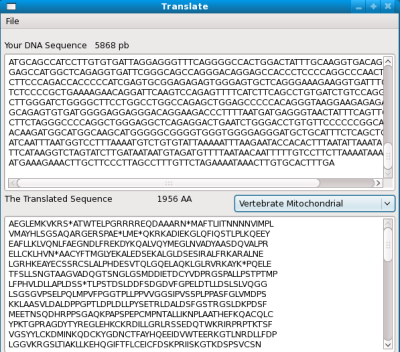
The window is defined with the XML/XUL layout. At the end, it will look like this:

The application is a <window>, it contains a <menubar>, two <textbox> (for the DNA and the proteic sequences) and a <menulist> where the user select the Genetic Code (standard, mitochondrial...)
<?xml version="1.0"?>
<?xml-stylesheet href="chrome://global/skin/" type="text/css"?>
<window id="main" title="Translate" width="800" height="600"
xmlns:html="http://www.w3.org/1999/xhtml"
xmlns="http://www.mozilla.org/keymaster/gatekeeper/there.is.only.xul"
onload="init()"
>
<script>(...)
</script>
<toolbox flex="1">
<menubar id="sample-menubar">
<menu label="File">
<menupopup id="file-popup">
<menuitem label="New" oncommand="doNewWindow();"/>
<menuitem label="Save As..." oncommand="doSaveAs();"/>
<menuseparator/>
<menuitem label="Exit" oncommand="window.close();"/>
</menupopup>
</menu>
</menubar>
</toolbox>
<vbox flex="13">
<hbox><label control="dnaseq" value="Your DNA Sequence" label="Your DNA Sequence" /><label id="dnalength" flex="1" value="0 pb"/></hbox>
<textbox flex="6" id="dnaseq" rows="5" multiline="true" onchange="doTranslate()" oninput="doTranslate()"/>

<hbox>
<label flex="1" control="protseq" value="The Translated Sequence"/>
<label id="protlength" flex="1" value="0 AA"/>
<menulist flex="1" oncommand="currentGeneticCode=GeneticCode[selectedIndex];doTranslate();">
<menupopup id="gcpopup">
</menupopup>
</menulist>
</hbox>
<textbox flex="6" id="protseq" rows="5" multiline="true" readOnly="true"/>

</vbox>
</window>


An array of genetic codes is stored as a javascript array (BTW, thanks to Brad Chapman and PJ Davis for their suggestions):
/* via ftp://ftp.ncbi.nih.gov/entrez/misc/data/gc.prt */
var GeneticCode=[
{
name: "Standard" ,
ncbieaa : "FFLLSSSSYY**CC*WLLLLPPPPHHQQRRRRIIIMTTTTNNKKSSRRVVVVAAAADDEEGGGG"
},
{
name: "Vertebrate Mitochondrial" ,
ncbieaa : "FFLLSSSSYY**CCWWLLLLPPPPHHQQRRRRIIMMTTTTNNKKSS**VVVVAAAADDEEGGGG"
},
{
name: "Yeast Mitochondrial" ,
ncbieaa : "FFLLSSSSYY**CCWWTTTTPPPPHHQQRRRRIIMMTTTTNNKKSSRRVVVVAAAADDEEGGGG",
},
{
name: "Bacterial and Plant Plastid" ,
ncbieaa : "FFLLSSSSYY**CC*WLLLLPPPPHHQQRRRRIIIMTTTTNNKKSSRRVVVVAAAADDEEGGGG",
}
];


Each time the DNA sequence is modified, the method doTranslate is called.
function doTranslate()
{
var ncbieaa= currentGeneticCode.ncbieaa ;
var dna=document.getElementById('dnaseq').value;
var prot="";
var i=0;
var aa="";
var dnalength=0;
var protlength=0;
while(i&lt; dna.length)
{
var c= dna.charAt(i++);
if("\n\t \r".indexOf(c)!=-1)
{
continue;
}
dnalength++;
aa+=c;
if(aa.length==3)
{
prot+=translation(ncbieaa,aa);
protlength++;
if(protlength % 50==0) { prot+="\n";}
aa="";
}
}
document.getElementById('protseq').value = prot;
document.getElementById('protlength').value = protlength+" AA";
document.getElementById('dnalength').value = dnalength+" pb";
}

And because, this is a standalone application, the user can SAVE the sequence of the protein.
function doSaveAs()
{
try {
const nsIFilePicker = Components.interfaces.nsIFilePicker;

var fp = Components.classes["@mozilla.org/filepicker;1"]
.createInstance(nsIFilePicker);
fp.init(window, "Save As...", nsIFilePicker.modeSave);


var rv = fp.show();
if (!(rv == nsIFilePicker.returnOK || rv == nsIFilePicker.returnReplace) ) return;
var file = fp.file;


var foStream = Components.classes["@mozilla.org/network/file-output-stream;1"].
createInstance(Components.interfaces.nsIFileOutputStream);


foStream.init(file, 0x02 | 0x08 | 0x20, 0666, 0);

var data=document.getElementById('protseq').value;
foStream.write(data, data.length);
foStream.close();


} catch(err){ alert(err.message);}
}

Testing the application


To launch the application, call xulrunner
xulrunner translate/application.ini

Or firefox with the app option
firefox -app translate/application.ini


I guess there should have a way to package this application in a jar/zip, but I still haven't found a way to to this.

That's it !
Pierre

22 January 2009

An ubiquity script for Mediawiki

I've just written a script for mozilla ubiquity. When editing a page in a wiki, this command mw calls the mediawiki API and suggests some internal links.

This extension is available here: http://yokofakun.googlepages.com/ubiquity.html. It worked fine with wikipedia and openwetware.

More info about this extension is available on mediawiki.org

And here is a screenshot:


That's it.
Pierre

02 September 2008

Ubiquity: Arf-arf ! smooch ! Achoo! Wee Woo !

Ok, after a few others (Pawel, Thomas Lemberger, Egon, )I've succumbed to Mozilla Ubiquity, an experimental Firefox extension that (they say) gives you a powerful way to interact with the Web. The following useless script comics inserts a speech balloon using the font samples from http://www.dafont.com/

CmdUtils.CreateCommand({
name: "comics",
author: { name: "Pierre Lindenbaum", email: "plindenbaum@yahoo.fr"},
description: "Comics",
takes: {"Your text": noun_arb_text},
help: "Insert a speech balloon with a comic font ",

preview: function( pblock, theShout ) {
var msg = "Inserts a speech balloon : (<i>"+ theShout.summary+"</i>)";
pblock.innerHTML = CmdUtils.renderTemplate( msg );
},

execute: function(theShout) {
CmdUtils.setSelection(
"<img src=\'http://img.dafont.com/preview.php?text=" +
escape(theShout.text)+
"&ttf=badaboom_bb0&size=49&psize=m&y=58'/>"
);
}
})


It worked fine with GMail !


Update: The script is available here.

Pierre

02 February 2008

Creating a XUL extension for Mozilla/Firefox: my notebook.

(RSS readers, this file is better displayed on my blog)
Here is my notebook on how to create an extension for firefox. The following example was tested with firefox 2.0.0.11. This extension is used to insert a few default templates (such as Template:Infobox_scientist ) when editing a biography on Wikipedia. Infoboxes are used , for example by DBPedia, to create a structured version of wikipedia.

First, create a new profile for firefox, say TEST by invoking firefox with option '-P'

firefox -P

Set up your extension development environment as described here.

I'm now working in the directory ~/XUL:

Create the file ./install.rdf. It's a RDF file describing your extension:
<?xml version="1.0" encoding="UTF-8"?>
<rdf:RDF xmlns:rdf="http://www.w3.org/1999/02/22-rdf-syntax-ns#"
xmlns:em="http://www.mozilla.org/2004/em-rdf#">

<rdf:Description about="urn:mozilla:install-manifest">
<!-- my extension ID -->
<em:id>biography-helper@plindenbaum.com</em:id>
<!-- version -->
<em:version>2.0</em:version>
<!-- this is a firefox extension -->
<em:type>2</em:type>

<em:targetApplication>
<rdf:Description>
<!-- this is for firefox -->
<em:id>{ec8030f7-c20a-464f-9b0e-13a3a9e97384}</em:id>
<!-- min/max firefox version -->
<em:minVersion>2.0</em:minVersion>
<em:maxVersion>2.0.0.*</em:maxVersion>
</rdf:Description>
</em:targetApplication>

<!-- name -->
<em:name>Wikipedia Edit Helper!</em:name>
<!-- description -->
<em:description>An Extension for Editing biographies in Wikipedia</em:description>
<!-- author -->
<em:creator>Pierre Lindenbaum</em:creator>
<!-- contact -->
<em:homepageURL>http://plindenbaum.blogspot.com</em:homepageURL>
<!-- icon -->
<em:iconURL>chrome://wiki4biography/skin/darwin32.png</em:iconURL>
</rdf:Description>
</rdf:RDF>


The file ./chrome/content/menu.xul is the XUL interface which will be added to the contextual popup-menu.

<?xml version="1.0" encoding="UTF-8"?>
<overlay id="wiki4biography" xmlns="http://www.mozilla.org/keymaster/gatekeeper/there.is.only.xul">
<script src="library.js"/>

<popup id="contentAreaContextMenu">
<menuseparator/>
<menu label="Wikipedia" id="menuWikipedia">
<menupopup>

<menuitem label="Infobox Scientist" oncommand="MY.infobox()" />

<menu label="Categories">
<menupopup>
<menuitem label="Astronomers" oncommand="MY.category('Astronomers')"/>
<menuitem label="Biologists" oncommand="MY.category('Biologists')"/>
<menuitem label="Chemists" oncommand="MY.category('Chemists')"/>
<menuitem label="Physicists" oncommand="MY.category('Physicists')"/>
</menupopup>
</menu>

<menu label="Stubs">
<menupopup>
<menuitem label="Astronomer" oncommand="MY.insertTemplate('{{astronomer-stub}}')"/>
<menuitem label="Chemist" oncommand="MY.insertTemplate('{{chemist-stub}}')"/>
<menuitem label="Biologist" oncommand="MY.insertTemplate('{{biologist-stub}}')"/>
<menuitem label="Mathematician" oncommand="MY.insertTemplate('{{mathematician-stub}}')"/>
<menuitem label="Physicist" oncommand="MY.insertTemplate('{{physicist-stub}}')"/>
</menupopup>
</menu>

</menupopup>
</menu>

</popup>
</overlay>


The script used by our menu is ./chrome/content/library.js
var MY={
/** when the xul page is loaded, register for events from the contextual popupmenu */
onload:function()
{
var element = document.getElementById("contentAreaContextMenu");
element.addEventListener("popupshowing",function(evt){MY.preparePopup(evt);},true);
},
/* prepare the contextual menu just before it is showing on screen: hide or show our menu */
preparePopup:function(evt)
{
var element = document.getElementById("menuWikipedia");
if(document.popupNode.id!="wpTextbox1")
{
element.hidden=true;
return;
}
element.hidden=false;
},
/** insert a text at the caret position in the textarea of wikipedia */
insertTemplate:function(text)
{
var area= content.document.getElementById("wpTextbox1");
if(area==null) return;
//alert(area.value.substring(0,20)+" "+area.tagName);
var selstart=area.selectionStart;
var x= area.scrollLeft;
var y= area.scrollTop;
area.value= area.value.substring(0,selstart)+
text+
area.value.substring(area.selectionEnd)
;
area.scrollLeft=x;
area.scrollTop=y;
selstart+=text.length;
area.setSelectionRange(selstart,selstart);
},
/* insert a wikipedia category */
category:function(text)
{
MY.insertTemplate("[[Category:"+text+"]]");
},
/** get current article name */
article:function()
{
var url=""+content.document.location;
var i=url.indexOf("title=",0);
if(i==-1) return "";
i+=6;
var j=url.indexOf("&action",i);
if(j==-1) return "";
return unescape(url.substr(i,j-i).replace("_"," "));
},
/* insert an infobox */
infobox:function()
{
var box="{{Infobox Scientist\n"+
"|name = "+MY.article()+"\n"+
"|box_width =\n"+
"|image = No_free_image_man_%28en%29.svg\n"+ /** sorry, most scientists in wikipedia are men */
"|image_width = 200px\n"+
"|caption = "+MY.article()+"\n"+
"|birth_date = \n"+
"|birth_place = \n"+
"|death_date = \n"+
"|death_place = \n"+
"|residence = \n"+
"|citizenship = \n"+
"|nationality = \n"+
"|ethnicity = \n"+
"|field = \n"+
"|work_institutions = \n"+
"|alma_mater = \n"+
"|doctoral_advisor = \n"+
"|doctoral_students = \n"+
"|known_for = \n"+
"|author_abbrev_bot = \n"+
"|author_abbrev_zoo = \n"+
"|influences = \n"+
"|influenced = \n"+
"|prizes = \n"+
"|footnotes = \n"+
"|signature =\n"+
"}}\n";
MY.insertTemplate(box);
}
};
/* initialize all this stuff */
window.addEventListener("load",MY.onload, false);


The icon ./chrome/skin/darwin32.png is used as an icon for the extension.

The file ./chrome.manifest says what firefox packages and overlays this extension provides.
content wiki4biography chrome/content/
overlay chrome://browser/content/browser.xul chrome://wiki4biography/content/menu.xul
skin wiki4biography classic/1.0 chrome/skin/


To test this extension a file ${HOME}/.mozilla/firefox/testmozilla/extensions/biography-helper@plindenbaum.com is created. This file contains the path to the XUL folder.
/home/pierre/tmp/XUL/

You can test the extension by invoking firefox with the profile "TEST":
firefox -no-remote -P TEST


When your extension is ready you can package it into a *.xpi archive.
zip -r wikipedia.zip chrome chrome.manifest install.rdf
mv wikipedia.zip wikipedia.xpi


That's it. You can download this extension at http://lindenb.integragen.org/xul/wikipedia.xpi and then open it with firefox which will prompt you if you want to install this extension. Then, edit an article in wikipedia and click the left button to get the new contextual menu.


Pierre

04 July 2007

Systems-Biology using GoogleGears: my notebook


Google gears is an open source browser extension that enables web applications to provide offline functionality. The data are stored locally in a fully-searchable relational database using the sqlite engine.


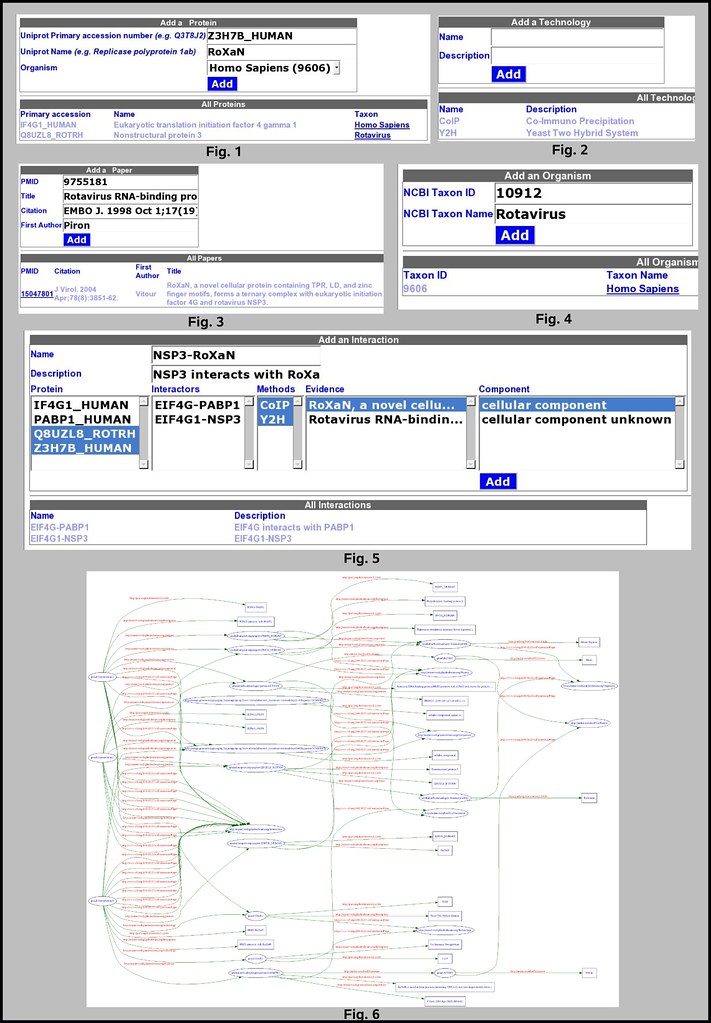
My Biological Network is a tool I created as a test to play with Google gears: it is used to build a network of protein-protein interactions. It uses Google Gears to record your entries on the local disk, so Gears needs to be installed on your computer. Programming with gears with JAVASCRIPT is really cool as you don't have to implement the storage of the data on the server side and you're using some standard SQL statements to handle the data.


Screenshots


My Biological Network


Tutorial


Open the tab Organism (fig. 4): add one or more organism. (Homo Sapiens already inserted by default)

Open the tab Protein (fig. 1): add one or more protein.

Open the tab Paper (fig. 3): add one or more article that will be used as an evidence for an interaction.

Open the tab Technology (fig. 2): add one or more technology that was used to characterize an interaction.

Open the tab Component: add one or more cellular component using Gene Ontology (GO:0005575 \"cellular component\" was inserted by default)

Open the tab Interaction (fig. 5):


  • Name and describe this interaction

  • Select one or more protein and/or one or more previously defined proteic complex. You Cannot describe self interactions with this tool.

  • (optional) choose one or more paper/technology/component...


Open the RDF table (fig. 6): I choose to display the content of the database using RDF. Such format can then be validated and visualized using the W3C RDF validator, or transformed using XSLT, etc.... I also used the life science identifier (LSID) as an URI for my resources.


On my computer, the database is stored in /env/islande/home/lindenb/.mozilla/firefox/<profile-id>/Google Gears for Firefox/islande/<host>/mynetwork#database. The database can be manualy accessed using sqlite3:

sqlite3 mynetwork#database
SQLite version 3.4.0
Enter '.help' for instructions
sqlite> .tables
component interactionhash paper technology
interaction organism prote
sqlite> .schema organism
CREATE TABLE organism(id integer primary key ,name varchar(50) not null unique);
sqlite> select * from organism;
9606|Homo Sapiens
sqlite>


Internals


We the page is loaded, we check that gears was installed


if (!window.google || !google.gears) {
debug("NOTE: You must install Google Gears first.")

We then create the database if does not exist. The file is created in firefox in ${HOME}/.mozilla/firefox/<profile-id>/Google Gears for Firefox/<server>/mynetwork#database


connection = google.gears.factory.create("beta.database","1.0");

I create the tables just by invoking some standards SQL 'CREATE TABLE' statements. I also insert some default values (e.g. human organism)


connection.execute("create table if not exists organism(id integer primary key ,name varchar(50) not null unique)");
connection.execute("insert or ignore into organism(id,name) values(9606,\"Homo Sapiens\")");
connection.execute("create table if not exists protein(id integerprimary key autoincrement,name varchar(50) not null,taxId int not null,acn varchar(50) not null unique)");
connection.execute("create table if not exists paper(pmid integerprimary key ,title varchar(255) not null,citation varchar(255) not null,firstAuthor varchar(50) not null)");
connection.execute("create table if not exists component(id integer primary key autoincrement,go varchar(50) not null unique, name varchar(50) not null unique)");

connection.execute("insert or ignore into component(go,name) values(\"GO:0005575\",\"cellular component\")");
connection.execute("insert or ignore into component(go,name) values(\"GO:0008372\",\"cellular component unknown\")");

connection.execute("create table if not exists technology(id integer primary key autoincrement,name varchar(50) not null unique, description varchar(255) not null)");

connection.execute("insert or ignore into technology(name,description) values(\"Y2H\",\"Yeast Two Hybrid System\")");
connection.execute("insert or ignore into technology(name,description) values(\"CoIP\",\"Co-Immuno Precipitation\")");


connection.execute("create table if not exists interaction(id integer primary key autoincrement, name varchar(50) not null unique,description varchar(255) not null)");
connection.execute("create table if not exists interactionhash(id integer primary key autoincrement,LINK_interaction int ,type varchar(20) not null,child int not null)");

When a data is about to be inserted we check all the fields and we insert them using SQL: INSERT INTO


var id= getById("organism-input-id");
if(!isInteger(id.value))
{
debug("TaxId not a Number");
return;
}
var name=getById("organism-input-name");
if(trim(name.value).length==0)
{
debug("Taxon Name empty");
return;
}

try
{
connection.execute("insert into organism(id,name) values("+sqlescape(trim(id.value))+","+sqlquote(trim(name.value))+")");
id.value="";
name.value="";
}
catch(err)
{
debug(err.message);
return;
}

a simple SELECT is used to retrieve the data and insert them in a HTML table


var rs= connection.execute("select id,name from organism order by name");
while (rs.isValidRow())
{
var tr= ce("tr");
table.appendChild(tr);
var td= ce("td");
tr.appendChild(td);
td.appendChild(ct(rs.field(0)));

td= ce("td");
tr.appendChild(td);
var a= ce("a");
a.setAttribute("title","Open in NCBI");
a.setAttribute("target","tax"+rs.field(0));
a.setAttribute("href","http://www.ncbi.nlm.nih.gov/Taxonomy/Browser/wwwtax.cgi?id="+rs.field(0));
td.appendChild(a);
a.appendChild(ct(rs.field(1)));
rs.next();
}
rs.close();


That's it !

Pierre

updated 2010-08-12: source code

<!DOCTYPE html PUBLIC "-//W3C//DTD XHTML 1.0 Transitional//EN" "http://www.w3.org/TR/xhtml1/DTD/xhtml1-transitional.dtd">
<html xmlns="http://www.w3.org/1999/xhtml">
<head>
<script type="text/javascript" src="gears_init.js"></script>
<script type="text/javascript" src="network.js"></script>
<link rel="stylesheet" type="text/css" href="./network.css" />
<title>My Biological Network</title>
</head>
<body onload="init()">
<h1>My Biological Network</h1>
<p>Pierre Lindenbaum PhD <a href="mailto:plindenbaum@yahoo.fr">plindenbaum@yahoo.fr</a><br/><a href="http://plindenbaum.blogspot.com">http://plindenbaum.blogspot.com</a><br/><address>Bioinformatics department<br/><a href="http://www.integragen.com">Integragen S.A.</a><br/>Evry, France</address></p>
<p/>
<div>
<button onclick="javascript:showCard('home-pane');">Home</button>
<button onclick="showOrganismPane()">Organisms</button>
<button onclick="showProteinPane()">Proteins</button>
<button onclick="showPaperPane()">Papers</button>
<button onclick="showTechnologyPane()">Technology</button>
<button onclick="showComponentPane()">Component</button>
<button onclick="showInteractionPane()">Interactions</button>
<button onclick="showRDFPane()">RDF</button>
</div>
<div style="color:red;" id="stderr"></div>
<p/>

<!-- ====================================== ORGANISM ====================================== -->
<div style="display:none;" id="organism-pane">
<table>
<caption>Add an Organism</caption>
<tr><th>NCBI Taxon ID <i>(e.g. 10912)</i></th><td><input id="organism-input-id" length="10"/></td></tr>
<tr><th>NCBI Taxon Name <i>(e.g. Rotavirus)</i></th><td><input id="organism-input-name" length="10"/></td></tr>
<tr><th/><td><button onclick="addOrganism()">Add</button></td></tr>
</table>

<hr/>

<table width="80%">
<caption>All Organisms</caption>
<thead>
<tr><th>Taxon ID</th><th>Taxon Name</th></tr></tr>
</thead>
<tbody id="organism-table">
</tbody>
</table>

</div>

<!-- ====================================== COMPONENT ====================================== -->
<div style="display:none;" id="component-pane">
<table>
<caption>Add a Component</caption>
<tr><th>Name</th><td><input id="component-input-name" length="10"/></td></tr>
<tr><th>GO</th><td><input id="component-input-go" length="10"/></td></tr>
<tr><th/><td><button onclick="addComponent()">Add</button></td></tr>
</table>

<hr/>

<table width="80%">
<caption>All Components</caption>
<thead>
<tr><th>Name</th><th>GO</th></tr>
</thead>
<tbody id="component-table">
</tbody>
</table>

</div>

<!-- ====================================== TECHNOLOGY ====================================== -->
<div style="display:none;" id="technology-pane">
<table>
<caption>Add a Technology</caption>
<tr><th>Name</th><td><input id="technology-input-name" length="50"/></td></tr>
<tr><th>Description</th><td><input id="technology-input-desc" length="50"/></td></tr>
<tr><th/><td><button onclick="addTechnology()">Add</button></td></tr>
</table>

<hr/>

<table width="80%">
<caption>All Technologies</caption>
<thead>
<tr><th>Name</th><th>Description</th></tr></tr>
</thead>
<tbody id="technology-table">
</tbody>
</table>

</div>


<!-- ====================================== PROTEIN ====================================== -->

<div style="display:none;" id="protein-pane">
<table>
<caption>Add a Protein</caption>
<tr><th>Uniprot accession number <i>(e.g. Q3T8J2)</i></th><td><input id="protein-input-acn" length="10"/></td></tr>
<tr><th>Uniprot Name <i>(e.g. Replicase polyprotein 1ab)</i></th><td><input id="protein-input-name" length="10"/></td></tr>
<tr><th>Organism</th><td><select id="protein-input-taxon" length="10"><option>A</option></select></td></tr>
<tr><th/><td><button onclick="addProtein()">Add</button></td></tr>
</table>

<hr/>

<table width="80%">
<caption>All Proteins</caption>
<thead>
<tr><th>Primary accession</th><th>Name</th><th>Taxon</th></tr></tr>
</thead>
<tbody id="protein-table">
</tbody>
</table>

</div>

<!-- ====================================== PAPER ====================================== -->
<div style="display:none;" id="paper-pane">
<table>
<caption>Add a Paper</caption>
<tr><th>PMID</th><td><input id="paper-input-pmid" length="10"/></td></tr>
<tr><th>Title</th><td><input id="paper-input-title" length="50"/></td></tr>
<tr><th>Citation</th><td><input id="paper-input-citation" length="50"/></td></tr>
<tr><th>First Author</th><td><input id="paper-input-author" length="50"/></td></tr>
<tr><th/><td><button onclick="addPaper()">Add</button></td></tr>
</table>

<hr/>

<table width="80%">
<caption>All Papers</caption>
<thead>
<tr><th>PMID</th><th>Citation</th><th>First Author</th><th>Title</th></tr></tr>
</thead>
<tbody id="paper-table">
</tbody>
</table>

</div>

<!-- ====================================== INTERACTION ====================================== -->


<div style="display:none;" id="interaction-pane">

<table>
<caption>Add an Interaction</caption>
<tr><th>Name</th><td colspan="4"><input id="interaction-input-name" length="50"/></td></tr>
<tr><th>Description</th><td colspan="4"><input id="interaction-input-desc" length="50"/></td></tr>
<tr>
<th>Protein</th>
<th>Interactors</th>
<th>Methods</th>
<th>Evidences</th>
<th>Components</th></tr>
<tr>
<td><select id="interactors-input-proteins" size="5" multiple="true"/></td>
<td><select id="interactors-input-interactors" size="5" multiple="true"></td>
<td><select id="interactors-input-technologies" size="5" multiple="true"></td>
<td><select id="interactors-input-evidences" size="5" multiple="true"></td>
<td><select id="interactors-input-components" size="5" multiple="true"></td>
</tr>
<tr><th colspan="4"/><td><button onclick="addInteraction()">Add</button></td></tr>
</table>

<hr/>

<table width="80%">
<caption>All Interactions</caption>
<thead>
<tr><th>Name</th><th>Description</th></tr></tr>
</thead>
<tbody id="interaction-table">
</tbody>
</table>

</div>

<!-- ====================================== RDF ====================================== -->
<div style="display:none;" id="rdf-pane">
<h2>RDF Pane</h2>
<textarea wrap="off" id="rdf-area" rows="20" cols="80"></textarea>

</div>

<!-- ====================================== HOME ====================================== -->
<div style="display:none;" id="home-pane">
<h3>About My Biological Network</h3>
<p><a href="http://gears.google.com/">Google gears</a> is an open source browser extension that enables web applications to provide offline functionality. The data are stored locally in a fully-searchable relational database using the <a href="http://www.sqlite.org/">sqlite engine</a>.</p>
<p><b>My Biological Network</b> is a tool I created as a test to play with Google gears: it is used to build a network of protein-protein interactions. It uses Google Gears to record your entries on the <u>local disk</u>, so Gears needs to be installed on your computer. </p>

<p>
Open the tab <b>Organism</b>: add one or more organism. (Homo Sapiens already inserted by default)<br/>
Open the tab <b>Protein</b>: add one or more protein.<br/>
Open the tab <b>Paper</b>: add one or more article that will be used as an evidence for an interaction.<br/>
Open the tab <b>Technology</b>: add one or more technology that was used to characterize an interaction.<br/>
Open the tab <b>Component</b>: add one or more cellular component using Gene Ontology (GO:0005575 \"cellular component\" was inserted by default)<br/>
Open the tab <b>Interaction</b>:<ul>
<li>Name and describe this interaction</li>
<li>Select one or more protein and/or one or more previously defined proteic complex. You <i>Cannot</i> describe self interactions with this tool.<li>
<li>(optional) choose one or more paper/technology/component...</li>
</ul><br/>
Open the <b>RDF table</b>: I choose to display the content of the database using <a href="http://www.w3.org/RDF/">RDF</a>. Such format can then be validated and visualized using the <a href="http://www.w3.org/RDF/Validator/">W3C RDF validator</a>, or transformed using <a href="http://www.w3.org/TR/xslt">XSLT</a>, etc.... I also used the <a href="http://lsid.sourceforge.net/">life science identifier (LSID)</a> as an URI for my resources.<br/>

</p>

<p>On my computer, the database is stored in <code>$HOME/.mozilla/firefox/&lt;profile-id&gt;/Google Gears for Firefox/&lt;host&gt;/mynetwork#database</code>. The database can be manualy accessed using <a href="http://www.sqlite.org/">sqlite3</a>:<pre style='color:black;border:1pt solid;background:lightgray;'>sqlite3 mynetwork#database
SQLite version 3.4.0
Enter &apos;.help&apos; for instructions
sqlite&gt; .tables
component interactionhash paper technology
interaction organism prote
sqlite&gt; .schema organism
CREATE TABLE organism(id integer primary key ,name varchar(50) not null unique);
sqlite&gt; select * from organism;
9606|Homo Sapiens
sqlite&gt;</pre>

</p>

</div>


<!-- google analytics -->

<script src="http://www.google-analytics.com/urchin.js"
type="text/javascript">
</script>
<script type="text/javascript">
_uacct = "XXXXXX";
urchinTracker();
</script>

<!-- google analytics -->


</body>
</html>


26 April 2007

Pubmed2connotea updated for Pubmed Beta.


I've updated the greasemonkey script 'pubmed2connotea'. The script alters the content of NCBI pubmed by inserting somes hyperlinks to connotea and it now works for the new pubmed beta.
I also added a hyperlink to http://del.icio.us.

see:


Updated 2010-08-12 source code

// pubmed2connotea
// version 0.4 BETA!
// 2007-04-26
// Copyright (c) 2006, 2007, Pierre Lindenbaum PhD
// Released under the GPL license
// http://www.gnu.org/copyleft/gpl.html
// http://www.integragen.com
// --------------------------------------------------------------------
//
// This is a Greasemonkey user script. To install it, you need
// Greasemonkey 0.6.4 or later: http://greasemonkey.mozdev.org/
// and Firefox 1.5 : http://www.mozilla.com/
// Then restart Firefox and revisit this script.
// Under Tools, there will be a new menu item to "Install User Script".
// Accept the default configuration and install.
//
// To uninstall, go to Tools/Manage User Scripts,
// select "pubmed2connotea", and click Uninstall.
//
// 2006-07: changed for abstract-plus
// 2007-04: pubmed beta
//
// --------------------------------------------------------------------

// ==UserScript==
// @name pubmed2connotea
// @namespace http://www.integragen.com
// @description insert a shortcut link used to add an entry in http://www.connotea.org or http://www.citeulike.org/ when browsing NCBI pubmed
// @include http://www.ncbi.nlm.nih.gov/entrez/*
// @include http://www.ncbi.nlm.nih.gov/sites/*
// @include http://www.ncbi.nlm.nih.gov/pubmed/*

// ==/UserScript==


function gm_xpath(expression,contextNode)
{
return document.evaluate(expression,contextNode,null,XPathResult.ORDERED_NODE_SNAPSHOT_TYPE,null);
}

function getParameter(url,parameter)
{
if(url==null) return null;
parameter=parameter.toLowerCase();
var a= url.indexOf("?");
if(a==-1) return null;
if(url.toLowerCase().indexOf(parameter+"=")==-1) return null;
var params= url.substring(a+1).split("&");
var i=0;
for(i=0;i<params.length;i++)
{
b= params[i].indexOf("=");
if(b==-1) continue;
var key = params[i].substring(0,b).toLowerCase();
if(key!=parameter) continue;
return params[i].substring(b+1);
}
return null;
}

function hasParameter(url,key,value)
{
var s= getParameter(url,key);
return (s!=null && s.toLowerCase() == value.toLowerCase() );
}

function escapeURL(url)
{
var s="";
var i=0;

for(i=0;i< url.length;++i)
{
var c=url.charAt(i)
switch( c )
{
case ':': s+= '%3A'; break;
case '/': s+= '%2F'; break;
case '?': s+= '%3F'; break;
case '=': s+= '%3D'; break;
case '&': s+= '%26'; break;
default : s+= c; break;
}
}
return s;
}


function insertAnchors()
{

if(document.getElementsByTagName)
{
//hack found at http://erik.eae.net/archives/2005/06/10/22.21.42/#comment-5337
var inputElements = document.getElementsByTagName("input");
var i=0;
for (i=0; inputElements[i]!=null; i++)
{
inputElements[i].setAttribute("autocomplete","off");
}
}
}

var prefix="http://www.ncbi.nlm.nih.gov/pubmed/";
var allAnchors = gm_xpath("//a[@href]",document);

var i=0;
var prev=0;

for(i=0; i<allAnchors.snapshotLength; i++)
{
a = allAnchors.snapshotItem(i);
if(a.parentNode==null) continue;
var href=a.href;

var index=href.indexOf(prefix);


var list_uids="null";
if(index==-1){
var templocation=href.indexOf("IdsFromResult");
if(templocation!=-1){
list_uids=getParameter(href,"IdsFromResult");
index=0;
}
}

if(index==-1) continue;

if(href.indexOf("id=Limits")!=-1||
href.indexOf("id=Preview/Index")!=-1||
href.indexOf("id=History")!=-1||
href.indexOf("id=Clipboard")!=-1||
href.indexOf("id=Details")!=-1||
href.indexOf("filter=review&")!=-1
) continue;

if(list_uids=="null"){

qlocation=href.indexOf("?");
if(qlocation!=-1){
list_uids=href.substring(35,qlocation);//pmid starts at 35
}
}

if(list_uids!=prev){

href= "http://www.ncbi.nlm.nih.gov/entrez/query.fcgi?cmd=Retrieve&db=pubmed&dopt=Abstract&list_uids="+list_uids;
//href= "http://www.ncbi.nlm.nih.gov/entrez/query.fcgi?cmd=Retrieve&db=pubmed&list_uids="+list_uids;
prev=list_uids;

var newanchor = document.createElement("a");
newanchor.setAttribute("title","insert into www.connotea.org");
newanchor.setAttribute("target","connotea"+i+list_uids);
//addpopup?continue=confirm
//newanchor.setAttribute("href","http://www.connotea.org/addpopup?continue=confirm&uri="+escapeURL(href)+"&button=Look%20Up");
newanchor.setAttribute("href","http://www.connotea.org/addpopup?continue=confirm&uri="+escapeURL(href));

var img = document.createElement("img");
img.setAttribute("alt","insert into www.connotea.org");
img.setAttribute("src","http://www.connotea.org/connotea_icon.png");
img.setAttribute("border","0");

newanchor.appendChild(img);
//GM_log(a.href);
a.parentNode.insertBefore(newanchor,a);
a.parentNode.insertBefore(document.createTextNode(" "),a);

//now create link for citeulike

newanchor = document.createElement("a");
newanchor.setAttribute("title","insert into www.citeulike.org");
newanchor.setAttribute("target","citeulike"+i);
newanchor.setAttribute("href","http://www.citeulike.org/posturl?url="+escapeURL(href)+"&title=Entrez%20PubMed");

img = document.createElement("img");
img.setAttribute("alt","insert into www.citeulike.org");
img.setAttribute("src","http://static.citeulike.org/img/note.gif");
img.setAttribute("border","0");

newanchor.appendChild(img);
a.parentNode.insertBefore(newanchor,a);
a.parentNode.insertBefore(document.createTextNode(" "),a);


//now create link for del.icio.us

newanchor = document.createElement("a");
newanchor.setAttribute("title","insert into del.icio.us");
newanchor.setAttribute("target","delicious"+i);
newanchor.setAttribute("href","http://del.icio.us/post?url="+escapeURL(href));

img = document.createElement("img");
img.setAttribute("alt","insert into del.icio.us");
img.setAttribute("src","http://del.icio.us/favicon.ico");
img.setAttribute("border","0");

newanchor.appendChild(img);
a.parentNode.insertBefore(newanchor,a);
a.parentNode.insertBefore(document.createTextNode(" "),a);

}
}


window.addEventListener("load", insertAnchors, false);

12 May 2006

Playing with Connotea API (3/2 (!) )

Cool stuff can be written quickly. I simply cut and pasted some piece of javascript code I already wrote to create the following GreaseMonkey Script:


A GreaseMonkey Script to Display SVG TreeMaps of Tags in Connotea.
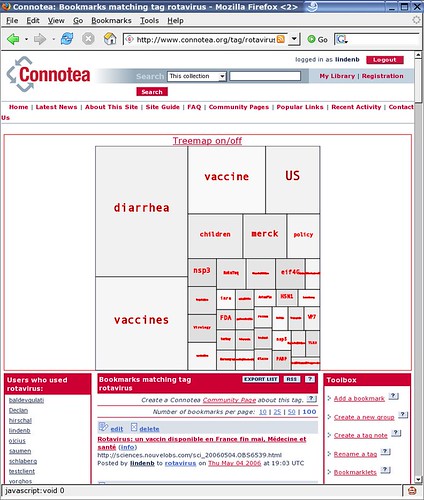
Connotea is a free online reference management service. It allows you to save links to all your favourite articles, references, websites and other online resources with one click. Connotea is also a social bookmarking tool, so you can view other people's collections to discover new, interesting content. The script I wrote is a Greasemonkey user script which alters the content of the web page, when you'browsing connotea: it inserts a treemap of the current tags using SVG. The code was inspired from [here]. As Firefox now supports the SVG format, this drawing can be displayed in your web browser. SVG is a vectorial format: Vector graphics editors allow to rotate, move, mirror, stretch, skew, generally perform affine transformations of objects, change z-order and combine the primitives into more complex objects..

A sample with the tag rotavirus

GMConnoteaSVG


Update 2010-08-12:source code

// pubmed2connotea
// version 0.2 BETA!
// 2006-05-12
// Copyright (c) 2006, Pierre Lindenbaum PhD
// Released under the GPL license
// http://www.gnu.org/copyleft/gpl.html
// http://www.integragen.com
// http://plindenbaum.blogspot.com
// --------------------------------------------------------------------
//
// This is a Greasemonkey user script. To install it, you need
// Greasemonkey 0.6.4 or later: http://greasemonkey.mozdev.org/
// and Firefox 1.5 : http://www.mozilla.com/
// Then restart Firefox and revisit this script.
// Under Tools, there will be a new menu item to "Install User Script".
// Accept the default configuration and install.
//
// To uninstall, go to Tools/Manage User Scripts,
// select "connoteatreemap", and click Uninstall.
//
// --------------------------------------------------------------------

// ==UserScript==
// @name connoteatreemap
// @namespace http://www.integragen.com
// @description showtreemap of tags in SVG when browsing connotea
// @include http://www.connotea.org/recent
// @include http://www.connotea.org/recent?*
// @include http://www.connotea.org/user/*
// @include http://www.connotea.org/tag/*
// @include http://www.connotea.org/date/*
// @include http://www.connotea.org/uri/*
// ==/UserScript==

var Namespaces= new Object();
Namespaces.RDF="http://www.w3.org/1999/02/22-rdf-syntax-ns#";
Namespaces.RDFS ="http://www.w3.org/2000/01/rdf-schema#";
Namespaces.DC="http://purl.org/dc/elements/1.1/";
Namespaces.DCTERMS="http://purl.org/dc/terms/";
Namespaces.PRISM="http://prismstandard.org/namespaces/1.2/basic/";
Namespaces.FOAF="http://xmlns.com/foaf/0.1/";
Namespaces.CONNOTEA="http://www.connotea.org/2005/01/schema#";
Namespaces.XHTML="http://www.w3.org/1999/xhtml";
Namespaces.SVG="http://www.w3.org/2000/svg";
Namespaces.XLINK="http://www.w3.org/1999/xlink";


/**
*
* Color
* eq of java.awt.Color
*
*/
function Color(r,g,b)
{
this.r=r;
this.g=g;
this.b=b;

/* return "rgb(r,b,b)" */
Color.prototype.toSVG=function()
{
return "rgb("+this.r+","+
this.g+","+
this.b+")";
}
}

/**
*
* A Dimension
*
*/
function Dimension(w,h)
{
this.width=w;
this.height=h;

Dimension.prototype.setSize=function(width, height)
{
this.width=width;
this.height=height;
}

Dimension.prototype.setWidth=function(width)
{
this.width=width;
}

Dimension.prototype.setHeight=function(height)
{
this.height=height;
}

Dimension.prototype.getWidth=function()
{
return this.width;
}

Dimension.prototype.getHeight=function()
{
return this.height;
}
}
/**
*
* A Rectangle
*
*/

Rectangle.prototype= new Dimension(0,0);

function Rectangle(x,y,w,h)
{
//
this.x=x;
this.y=y;
this.setSize(w,h);


Rectangle.prototype.setLocation=function(x, y)
{
this.x=x;
this.y=y;
}

Rectangle.prototype.setX=function(x)
{
this.x=x;
}

Rectangle.prototype.setY=function(y)
{
this.y=y;
}


Rectangle.prototype.getX=function()
{
return this.x;
}

Rectangle.prototype.getY=function()
{
return this.y;
}


Rectangle.prototype.setRectangle=function(rect)
{
this.setBounds(
rect.getX(),
rect.getY(),
rect.getWidth(),
rect.getHeight()
);
}

Rectangle.prototype.setBounds=function(x,y,width, height)
{
this.setSize(width, height);
this.setLocation(x,y);
}


Rectangle.prototype.getCenterX=function()
{
return this.getX()+this.getWidth()/2.0;
}

Rectangle.prototype.getCenterY=function()
{
return this.getY()+this.getHeight()/2.0;
}

Rectangle.prototype.toString=function()
{
return "Rectangle("+
this.getX()+","+
this.getY()+","+
this.getWidth()+","+
this.getHeight()+
")";
}
}


/**
*
* A TreeMapItem is a "square" in the TreeMap
* it is initialized with a positive number used as
* the weight of this square
*
*/

TreeMapItem.prototype= new Rectangle(0.0,0.0,0.0,0.0);

function TreeMapItem(weight)
{
//
this.weight=weight;
this.url=null;/* url for hyperlink xml escaped */
this.label=weight;/* label for this item default is weight */
this.fill=null;/* a Color for filling */
this.stroke=new Color(255,255,255);/* a color for stroking */
this.id=null;/* optional id for xml dom */
this.title=null;
//
TreeMapItem.prototype.setFill=function(color)
{
this.fill=color;
}

TreeMapItem.prototype.setID=function(id)
{
this.id=id;
}


TreeMapItem.prototype.getRGBFill=function()
{
if(this.fill==null) return "none";
return this.fill.toSVG();
}

TreeMapItem.prototype.getRGBStroke=function()
{
if(this.stroke==null) return "none";
return this.stroke.toSVG();
}

TreeMapItem.prototype.getWeight=function()
{
return this.weight;
}

TreeMapItem.prototype.setURL=function(url)
{
this.url=url;
}

TreeMapItem.prototype.setTitle=function(title)
{
this.title=title;
}


TreeMapItem.prototype.setLabel=function(label)
{
this.label=label;
}

/* print this item as SVG using stream out and using parameters from its owner treemap */
TreeMapItem.prototype.toSVG=function(treemap,doc)
{
var fontsize= treemap.getFontSize();


var g= doc.createElementNS(Namespaces.SVG,"svg:g");
if(this.id!=null) g.setAttribute("id",this.id);

var node=g;

if(this.url!=null)
{
node= doc.createElementNS(Namespaces.SVG,"svg:a");
var t= this.title;
if(t==null) t=this.url;
g.appendChild(node);
node.setAttributeNS(Namespaces.XLINK,"xlink:title",t);
node.setAttributeNS(Namespaces.XLINK,"xlink:href",this.url);
}

var rect= doc.createElementNS(Namespaces.SVG,"svg:rect");
node.appendChild(rect);
rect.setAttribute("x",this.getX());
rect.setAttribute("y",this.getY());
rect.setAttribute("width",this.getWidth());
rect.setAttribute("height",this.getHeight());
rect.setAttribute("fill",this.getRGBFill());
rect.setAttribute("stroke",this.getRGBStroke());
rect.setAttribute("stroke","black");


if(this.label!=null)
{
while(!( this.getHeight()> fontsize && this.getWidth() > this.label.length*fontsize))
{
--fontsize;
if(fontsize<=4) break;
}
var text= doc.createElementNS(Namespaces.SVG,"svg:text");
text.setAttribute("x",this.getCenterX());
text.setAttribute("y",this.getCenterY());
text.setAttribute("stroke",this.getRGBStroke());
text.setAttribute("font-size",fontsize);
text.appendChild(doc.createTextNode(this.label));
node.appendChild(text);
}
return g;
}

TreeMapItem.prototype.setStroke= function(color)
{
this.stroke=color;
}

}


/* used to sort treeMap Item */
function treemap_item_compare(a,b)
{
if(a.getWeight()== b.getWeight())
{
return 0;
}
else if(a.getWeight()< b.getWeight())
{
return 1;
}
return -1;
}


/**
* The Treemap : a container of TreeMapItem(s)
* contains the treemap algorithm
* original java code from http://www.cs.umd.edu/hcil/treemap-history/Treemaps-Java-Algorithms.zip
* by
* - Martin Wattenberg, w(at)bewitched.com
* - Ben Bederson, bederson(at)cs.umd.edu
* University of Maryland, Human-Computer Interaction Lab
* http://www.cs.umd.edu/hcil
*
*/
TreeMap.prototype= new Dimension(0.0,0.0);
function TreeMap(w,h)
{
this.treemapitems=new Array();
this.fontsize=24;
this.setSize(w,h);


/* add a new TreeMapItem */
TreeMap.prototype.addItem=function(item)
{
if(item.getWeight()<=0) return;
this.treemapitems[this.treemapitems.length]=item;
}

TreeMap.prototype.getFontSize=function()
{
return this.fontsize;
}

TreeMap.prototype.setFontSize=function(fontsize)
{
this.fontsize=fontsize;
}

/* creates the treemap as SVG using doc */
TreeMap.prototype.toSVG=function(doc)
{

var svg = doc.createElementNS(Namespaces.SVG,"svg:svg");
svg.setAttribute("xmlns:svg",Namespaces.SVG);
svg.setAttribute("xmlns:xlink",Namespaces.XLINK);
svg.setAttribute("width",this.getWidth());
svg.setAttribute("height",this.getHeight());
svg.setAttribute("text-anchor","middle");
svg.setAttribute("font-family","monospace");
svg.setAttribute("font-size",this.getFontSize());

var tt= doc.createElementNS(Namespaces.SVG,"svg:title");
svg.appendChild(tt);
tt.appendChild(doc.createTextNode("ConnoteaTreeMap.svg"));

var desc= doc.createElementNS(Namespaces.SVG,"svg:desc");
svg.appendChild(desc);
desc.appendChild(doc.createTextNode("generated by Pierre Lindenbaum PhD 2006 Integragen plindenbaum (at) yahoo (dot) fr http://www.connotea.org/wiki/User:lindenb . Original java code from Martin Wattenberg, w(at)bewitched.com and Ben Bederson, bederson(at)cs.umd.edu University of Maryland, Human-Computer Interaction Lab http://www.cs.umd.edu/hcil"));


var rect= doc.createElementNS(Namespaces.SVG,"svg:rect");
svg.appendChild(rect);
rect.setAttribute("x","0");
rect.setAttribute("y","0");
rect.setAttribute("width",this.getWidth());
rect.setAttribute("height",this.getHeight());
rect.setAttribute("stroke","blue");
rect.setAttribute("fill","none");

if(this.treemapitems.length>0)
{
this.layout(this.treemapitems,new Rectangle(0,0,this.getWidth(),this.getHeight()));
}

for(i=0;i< this.treemapitems.length;i++ )
{
svg.appendChild(this.treemapitems[i].toSVG(this,doc));
}

return svg;
}

/* private */
TreeMap.prototype.layout=function(items, rect)
{
items.sort(treemap_item_compare);
this.layout2(items,0,items.length,rect);
}

/* private */
TreeMap.prototype.getWeight=function(items, start,end)
{
var sum=0.0;
while(start<end)
{
sum +=items[start].getWeight();
start++;
}
return sum;
}

/* private */
TreeMap.prototype.sliceLayout=function(comps,start,end,bounds)
{
var end=(comps.length<end?comps.length:end);
var total = this.getWeight(comps,start,end);
var a=0.0;
var vertical=(bounds.getWidth()<bounds.getHeight() );
var pos= (vertical==true?bounds.getY():bounds.getX());
var i;
for (i=start;i<end; i++)
{
var r=new Rectangle(0,0,0,0);
var b= comps[i].getWeight()/total;
if (vertical==true)
{
r.setX(bounds.getX());
r.setWidth(bounds.getWidth());
r.setY(pos);
var len = bounds.getHeight()*b;
r.setHeight(len);
pos+=len;
}
else
{
r.setX(pos);
var len = bounds.getWidth()*b;
r.setWidth(len);
r.setY(bounds.getY());
r.setHeight(bounds.getHeight());
pos+=len;
}
comps[i].setRectangle(r);
a+=b;
}
}

/* private */
TreeMap.prototype.layout2=function(comps,start,end,bounds)
{
if (start>=end) return;

if (end-start<2)
{
this.sliceLayout(comps,start,end,bounds);
return;
}

var x=bounds.getX();
var y=bounds.getY();
var w=bounds.getWidth();
var h=bounds.getHeight();

var total=this.getWeight(comps,start, end);
var mid=start;
var a= comps[start].getWeight()/total;
var b=a;

if (w<h)
{
// height/width
while (mid<end)
{
var aspect=this.normAspect(h,w,a,b);
var q= comps[mid].getWeight()/total;
if (this.normAspect(h,w,a,b+q)>aspect) break;
mid++;
b+=q;
}
this.sliceLayout(comps,start,mid+1,new Rectangle(x,y,w,(h*b)));
this.layout2(comps,mid+1,end,new Rectangle(x,(y+h*b),w,(h*(1-b))));
}
else
{
// width/height
while (mid<end)
{
var aspect=this.normAspect(w,h,a,b);
var q= comps[mid].getWeight()/total;
if (this.normAspect(w,h,a,b+q)>aspect) break;
mid++;
b+=q;
}
this.sliceLayout(comps,start,mid+1,new Rectangle(x,y,(w*b),h));
this.layout2(comps,mid+1,end,new Rectangle((x+w*b),y,(w*(1-b)),h));
}

}
/* private */
TreeMap.prototype.aspect=function(big,small,a,b)
{
return (big*b)/(small*a/b);
}
/* private */
TreeMap.prototype.normAspect=function(big, small,a,b)
{
x=this.aspect(big,small,a,b);
if (x<1) return 1.0/x;
return x;
}


}


function gm_xpath(expression,contextNode)
{
return document.evaluate(expression,contextNode,null,XPathResult.UNORDERED_NODE_SNAPSHOT_TYPE,null);
}

function getParameter(url,parameter)
{
if(url==null) return null;
var a= url.indexOf("?");
if(a==-1) return null;
if(url.indexOf(parameter+"=")==-1) return null;
var params= url.substring(a+1).split("&");
var i=0;
for(i=0;i<params.length;i++)
{
b= params[i].indexOf("=");
if(b==-1) continue;
var key = params[i].substring(0,b);
if(key!=parameter) continue;
return params[i].substring(b+1);
}
return null;
}

function escapeURL(url)
{
var s="";
var i=0;

for(i=0;i< url.length;++i)
{
var c=url.charAt(i)
switch( c )
{
case ':': s+= '%3A'; break;
case '/': s+= '%2F'; break;
case '?': s+= '%3F'; break;
case '=': s+= '%3D'; break;
case '&': s+= '%26'; break;
default : s+= c; break;
}
}
return s;
}

function Agent(name)
{
this.name=name;
this.count=1;
}


function insertToggle()
{

if(document.getElementsByTagName)
{
//hack found at http://erik.eae.net/archives/2005/06/10/22.21.42/#comment-5337
var inputElements = document.getElementsByTagName("input");
var i=0;
for (i=0; inputElements[i]!=null; i++)
{
inputElements[i].setAttribute("autocomplete","off");
}
}

var wrapper = document.getElementById("outer-wrapper");
if(wrapper==null)
{
GM_log('cannot find connotea div id="outer-wrapper"');
return;
}

var div1 = document.createElement("div");
div1.setAttribute("id","treemap-div");
div1.setAttribute("align","center");
div1.setAttribute("style","border:5px; margin: 5px; border: 1px solid #f00; font-family: Verdana, Arial, Helvetica, sans-serif; font-size:12pt;");
wrapper.parentNode.insertBefore(div1,wrapper);


var newanchor = document.createElement("a");
newanchor.setAttribute("title","show/hide treemap");
newanchor.setAttribute("href","javascript:void%200");
newanchor.appendChild( document.createTextNode("Treemap on/off"));
div1.appendChild(newanchor);

var div2 = document.createElement("div");
div2.setAttribute("id","treemap");
div2.setAttribute("align","center");
div1.appendChild(div2);


newanchor.addEventListener('click', function(event)
{

var treemapdiv = document.getElementById("treemap");
if(treemapdiv==null)
{
GM_log('cannot find connotea div id="treemap"');
return;
}
if(treemapdiv.hasChildNodes())
{
while(treemapdiv.hasChildNodes())
{
treemapdiv.removeChild(treemapdiv.firstChild);
}
}
else
{
var slashtagslash="/tag/";
var prefix="http://www.connotea.org"+slashtagslash;
var locationhref = window.location.href;
var ignoretag=null;
var num=getParameter(locationhref,"num");


var i=0;
var j=0;

i= locationhref.indexOf(slashtagslash);
if(i!=-1)
{
ignoretag = locationhref.substring(i+slashtagslash.length);
i= ignoretag.indexOf("?");
if(i!=-1) ignoretag= ignoretag.substring(0,i);
i= ignoretag.indexOf("/");
if(i!=-1) ignoretag= ignoretag.substring(0,i);
}


var main = document.getElementById("main");
var tags= new Array();

var wheight=window.outerHeight;
if(window.outerWidth< wheight) wheight=window.outerWidth;
wheight=wheight*0.6;
if(wheight<50) wheight=50;
var tm= new TreeMap(wheight,wheight);


if(main==null)
{
GM_log('cannot find connotea div id="main"');
return;
}
var divs= gm_xpath(".//div[@id]",main);
for(j=0; j<divs.snapshotLength; j++)
{
var d = divs.snapshotItem(j);
if(d.parentNode==null) continue;
var divid=d.id;
if(divid.indexOf("user_bookmark_")!=0) continue;

var allAnchors = gm_xpath(".//a[@href]",d);
for(i=0; i<allAnchors.snapshotLength; i++)
{
a = allAnchors.snapshotItem(i);
if(a.parentNode==null) continue;
var href=a.href;
if(href.indexOf(prefix)!=0) continue;
var tag=href.substring(prefix.length);
if( tag.length==0 ||
tag=="uploaded" ||
tag.indexOf("geo:")==0 ||
tag==ignoretag
) continue;


var k=0;
for(k=0;k< tags.length;++k)
{
if(tags[k].name==tag)
{
tags[k].count++;
break;
}
}
if(k==tags.length)
{
var newtag= new Agent(tag);
newtag.count=1;
tags.push(newtag);
}
}
}
for(i=0;i< tags.length;++i)
{
/** create a new item with weight=14 */
var item= new TreeMapItem(tags[i].count);
/* set stroke color */
item.setStroke(new Color(255,0,0));
/* set background color */
var gray= 220+ Math.floor(Math.random()*30.0);
item.setFill(new Color(gray,gray,gray));
/* set Label */
item.setLabel(tags[i].name);
//GM_log(tags[i].name+" "+tags[i].count);
/* set URL anchor */
item.setURL(prefix+tags[i].name+"?tool=gmtreemap"+(num==null?"":"&num="+num));
/* set title */
item.setTitle(tags[i].name+" ("+tags[i].count+")");
/* add the new item into the treemap */
tm.addItem(item);
}
//GM_log(tags.length);
var svg= tm.toSVG(document);
//GM_log(svg);
treemapdiv.appendChild(svg);
//GM_log("done");
}
},true);
}
window.addEventListener("load", insertToggle, false);