10 March 2008

Custom Search Engine For Bioinformatics

Mostly because I need this every time, I wrote a few "Custom Search" engines for dbSNP, Hapmap and the ICSC Genome Browser. Those engines are available at http://lindenb.integragen.org/opensearch/opensearch.html.

Pierre

19 February 2008

Freebase Wikipedia Extraction (WEX)

Via the Freebase blog.

The Freebase Wikipedia Extraction (WEX) http://download.freebase.com/wex/ is a processed dump of the English language Wikipedia. The wiki markup for each article is transformed into machine-readable XML, and common relational features such as templates, infoboxes, categories, article sections, and redirects are extracted in tabular form.

Freebase WEX is provided as a set of database tables in TSV format for PostgreSQL, along with tables providing mappings between Wikipedia articles and Freebase topics, and corresponding Freebase Types


See also:


Pierre

14 February 2008

Freebase and the History of Sciences

(feed readers, this post is better displayed on the web site)
I've been looking for a way to get a structured description of the biographies of the scientists threw the History. One of my investigation led to wikistory, a webstart application based on the data extracted from Wikipedia by the project DBPedia.

History of Sciences / Freebase


However, the data collected from DBPedia are mostly based on the infoboxes and most of them are missing or are incomplete. (as an example this is ok for Darwin (happy birthday) but there is no box for Georges-Louis Leclerc, Comte de Buffon (last accessed February 14th 2008 20H46)). Moreover the informations stored in those infoboxes are missing the fields I needed: gender, a short biography, parents, children.... etc....

I eventually decided to go back to look after freebase wich I tested a few monthes ago and which was also introduced at scifoo:

image from  dchud


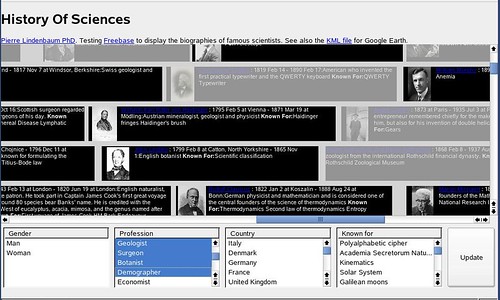
A screenshot of my final result is presented below:
and you can test this interface here:

This is an interactive XUL page (it will only work with firefox) with a timeline containing a few hundred of scientists.


Just for fun, I also generated a time-based KML file for google-earth with those data.


The source code used to create this XUL page is available at here.

Here is how I proceeded:
On freebase I created my own type "scientist" enclosing some fields such as "short bio", "known for", "students", etc... (I don't know how to define 'inverse properties' in freebase: if A was the teacher of B, how can I automatically say that B was the student of A ?). This type scientist was added to some of the freebase records and completed (I think that Freebase also parsed the infoboxes in wikipedia to build their database, that is why most their records are almost empty). For example see: Buffon.


All the persons associated with my type scientist can be retrieved using the following MQL query:


{"qname1":{"query":[{"guid":null,"type":"/user/lindenb/default_domain/scientist"}]}}


The result looks like this...

{
"status": "200 OK",
"code": "/api/status/ok",
"qname1": {
"code": "/api/status/ok",
"result": [
{
"guid": "#9202a8c04000641f800000000000cb7c",
"type": "/user/lindenb/default_domain/scientist"
},
{
"guid": "#9202a8c04000641f800000000000f65e",
"type": "/user/lindenb/default_domain/scientist"
},

(...)
{
"guid": "#9202a8c04000641f80000000003b7d80",
"type": "/user/lindenb/default_domain/scientist"
},
{
"guid": "#9202a8c04000641f80000000003bd1ef",
"type": "/user/lindenb/default_domain/scientist"
}
]
}


For each gui we can retrieve the types associated with the record.


{"qname1":{"query":{"guid":"#9202a8c04000641f800000000000cb7c","type":[]}}}


The types associated with the record #9202a8c04000641f800000000000cb7c" were returned as follow:

{
"status": "200 OK",
"code": "/api/status/ok",
"qname1": {
"code": "/api/status/ok",
"result": {
"guid": "#9202a8c04000641f800000000000cb7c",
"type": [
"/common/topic",
"/people/person",
"/people/deceased_person",
"/book/author",
"/user/mikelove/default_domain/influence_node",
"/user/lindenb/default_domain/scientist",
"/award/award_winner"
]
}
}
}


For each type, I fetched the fields this record.

{"qname1":{"query":{"guid":"#9202a8c04000641f800000000000cb7c","*":null,"type":"/people/person"}}}


here is the response from freebase:

{
"status": "200 OK",
"code": "/api/status/ok",
"qname1": {
"code": "/api/status/ok",
"result": {
"creator": "/user/metaweb",
"profession": [
"Naturalist",
"Biologist",
"Geologist"
],
"places_lived": [
null,
null,
null,
null
],
"education": [
null,
null
],
"children": [
"George Howard Darwin",
"Horace Darwin"
],
"guid": "#9202a8c04000641f800000000000cb7c",
"employment_history": [],
"id": "/topic/en/charles_darwin",
"religion": [
"Agnosticism",
"Christianity",
"Unitarianism",
"Church of England"
],
"date_of_birth": "1809-02-12",
"parents": [
"Robert Darwin",
"Susannah Darwin"
],
"metaweb_user_s": [],
"type": "/people/person",
"attribution": "/user/metaweb",
"permission": "/boot/all_permission",
"timestamp": "2006-10-22T08:53:38.0061Z",
"signature": [],
"weight_kg": null,
"key": [
"Charles_Darwin",
"Charles_Robert_Darwin",
"Darwin$0027s",
"Mary_Darwin",
"Darwin$002C_Charles",
"C$002E_R$002E_Darwin",
"Charles_R$002E_Darwin",
"8145410",
"Charles_Darwin$0027s",
"Charles_darwin",
"charles_darwin",
"CR_Darwin",
"Charles_R_Darwin",
"71b891f5-92bb-42be-9c45-98b8f56a3177"
],
"nationality": [
"United Kingdom"
],
"spouse_s": [
null
],
"name": "Charles Darwin",
"gender": "Male",
"sibling_s": [
null
],
"height_meters": null,
"place_of_birth": "Shrewsbury",
"quotations": []
}
}
}


And so on, using this kind of queries I was able to fetch the birth dates, the geographical coordinate of the places, the pictures, etc...

The result is available here:
History of Sciences / Freebase

http://lindenb.integragen.org/xulhistory/history.php


That's it.
Pierre

Update 2010-08-12 : source code

history.js

var XUL={
NS:"http://www.mozilla.org/keymaster/gatekeeper/there.is.only.xul"
};

var XHTML={
NS:"http://www.w3.org/1999/xhtml"
};

function StartDate(year,month,dayOfMonth)
{
this.year=year;
this.month=month;
this.dayOfMonth=dayOfMonth;
}

StartDate.prototype.days=function()
{
var d= this.year*365.25;
if(this.month!=null)
{
d+=(this.month*(365.25/12.0));
if(this.dayOfMonth!=null)
{
d+=this.dayOfMonth;
}
}
return d;
}


function EndDate(year,month,dayOfMonth)
{
this.year=year;
this.month=month;
this.dayOfMonth=dayOfMonth;
}

EndDate.prototype.days=function()
{
var v= 0;
if(this.month!=null)
{
if(this.dayOfMonth!=null)
{
v+=(1+this.dayOfMonth);
v+=this.month*(365.25/12.0);
}
else
{
v+=(this.month+1)*(365.25/12.0);
}
v+=this.year*365.25;
}
else
{
v+=(1+this.year)*365.25;
}
return v;
}


var MY={
now: null,
iconSize:64,
screenWidth:15000,
minDate:null,
maxDate:null,
debug:function(msg)
{
var message=document.getElementById("message");
if(message==null) return;
MY.removeAllChild(message);
message.appendChild(document.createTextNode(msg==null?"null":msg));
},
x1:function(person)
{
return MY.convertDate2Pixel(person.birthDate);
},
x2:function(person)
{
var d= person.deathDate;
if(d==null)
{
d= MY.now;
}
return MY.convertDate2Pixel(d);
},
convertDate2Pixel:function(date)
{
return MY.screenWidth*((date.days()-MY.minDate.days())/(MY.maxDate.days()-MY.minDate.days()));
},
removeAllChild:function(root)
{
if(root==null) return;
while(root.hasChildNodes())
{
root.removeChild(root.firstChild);
}
},
loaded:function()
{
var d= new Date();
MY.now = new EndDate(d.getFullYear(),1+d.getMonth(),d.getUTCDate());

var set= new Array()
for(var i=0;i< persons.length;++i)
{
for(var j=0;j< persons[i].profession.length;++j)
{
set[persons[i].profession[j] ]=1;
}
}
MY.fillListBox("profession",set);

//knownfor
set= new Array()
for(var i=0;i< persons.length;++i)
{
for(var j=0;j< persons[i].knownFor.length;++j)
{
set[persons[i].knownFor[j] ]=1;
}
}
MY.fillListBox("knownfor",set);

//country
set= new Array()
for(var i=0;i< persons.length;++i)
{
for(var j=0;j< persons[i].nationality.length;++j)
{
set[persons[i].nationality[j] ]=1;
}
}
MY.fillListBox("country",set);

//AWARDS
set= new Array()
for(var i=0;i< persons.length;++i)
{
for(var j=0;j< persons[i].awards.length;++j)
{
set[persons[i].awards[j] ]=1;
}
}
MY.fillListBox("awards",set);

MY.pileup();
},
fillListBox:function(id,set)
{
var root=document.getElementById(id);
if(root==null) return;
var array2= new Array(set.length);
for(var p in set)
{
array2.push(p);
}
array2.sort();
for(var j=0;j< array2.length;++j)
{
var item=document.createElementNS(XUL.NS,"listitem");
item.setAttribute("label",array2[j]);
item.setAttribute("value",array2[j]);
root.appendChild(item);
}
},
selectedItems:function(id)
{
var set= new Array();
var root=document.getElementById(id);
if(root==null) return set;
var selected= root.selectedItems;

for(var i=0;i<selected.length;++i)
{
set.push(selected[i].value);
}
return set;
},
date2text:function(date)
{
var s=""+date.year;
if(date.month!=null)
{
s+=" ";
switch(date.month)
{
case 1: s+=("Jan"); break;
case 2: s+=("Feb"); break;
case 3: s+=("Mar"); break;
case 4: s+=("Apr"); break;
case 5: s+=("May"); break;
case 6: s+=("Jun"); break;
case 7: s+=("Jul"); break;
case 8: s+=("Aug"); break;
case 9: s+=("Sep"); break;
case 10: s+=("Oct"); break;
case 11: s+=("Nov"); break;
case 12: s+=("Dec"); break;
default: s+=date.month; break;
}
if(date.dayOfMonth!=null)
{
s+=" "+date.dayOfMonth;
}
}
return s;
},
containsSet:function(set,subset)
{
if(subset.length==0) return true;
for(var i=0;i< subset.length;++i)
{
if(set.indexOf(subset[i])!=-1) return true;
}
return false;
},
update:function()
{
for(var i=0;i< persons.length;++i)
{
persons[i].selected=true;
}
var sel=MY.selectedItems("profession");

for(var i=0;i< persons.length && sel.length>0;++i)
{
if(!MY.containsSet(persons[i].profession,sel))
{
persons[i].selected=false;
}
}
sel=MY.selectedItems("knownfor");

for(var i=0;i< persons.length && sel.length>0;++i)
{
if(!persons[i].selected) continue;
if(!MY.containsSet(persons[i].knownFor,sel))
{
persons[i].selected=false;
}
}

sel=MY.selectedItems("country");

for(var i=0;i< persons.length && sel.length>0;++i)
{
if(!persons[i].selected) continue;
if(!MY.containsSet(persons[i].nationality,sel))
{
persons[i].selected=false;
}
}

sel=MY.selectedItems("awards");

for(var i=0;i< persons.length && sel.length>0;++i)
{
if(!persons[i].selected) continue;
if(!MY.containsSet(persons[i].awards,sel))
{
persons[i].selected=false;
}
}

sel=MY.selectedItems("gender");

for(var i=0;i< persons.length && sel.length>0;++i)
{
if(!persons[i].selected ) continue;
if(sel.indexOf(persons[i].gender)==-1)
{
persons[i].selected=false;
}
}

for(var i=0;i< persons.length ;++i)
{
persons[i].node.style.opacity=(persons[i].selected?1.0:0.3);
}
},
simpleTag:function(tag,text)
{
var e = document.createElementNS(XHTML.NS,tag);
e.appendChild(document.createTextNode(text));
return e;
},
bold:function(text) { return MY.simpleTag("h:b",text);},
italic:function(text) { return MY.simpleTag("h:i",text);},
underline:function(text) { return MY.simpleTag("h:u",text);},
pileup:function()
{
var remains=new Array(persons.length);
for(var i=0;i< persons.length;++i) remains[i]=persons[i];
MY.minDate=null;
MY.maxDate=null;
for(var i=0;i< remains.length;++i)
{
var o=remains[i];
if(MY.minDate==null || o.birthDate.days() < MY.minDate.days())
{
MY.minDate= o.birthDate;
}
if(o.deathDate!=null && (MY.maxDate==null || MY.maxDate.days()< o.deathDate.days()))
{
MY.maxDate= o.deathDate;
}
}
if(MY.minDate==null || MY.maxDate==null) return;
/*
var nLine=-1;
while(remains.length>0)
{
++nLine;
var first=remains[0];
remains=remains.slice(1);
first.y=nLine;

while(true)
{
var best=null;
var bestIndex=-1;
for(var i=0;i< remains.length;++i)
{
var next=remains[i];
if(MY.x1(next)< MY.x2(first)+5) continue;
if(best==null ||
(MY.x1(next)-MY.x2(first) < MY.x1(best)-MY.x2(first)))
{
best=next;
bestIndex=i;
}
}
if(best==null) break;
first=best;
first.y=nLine;
remains.splice(bestIndex,1);
}
}
*/
var timeline=document.getElementById("timeline");
MY.removeAllChild(timeline);
var MARGIN=2;
var HEIGHT=MY.iconSize+MARGIN*2;
for(var i=0;i< persons.length;++i)
{
var o= persons[i];
var stack= document.createElementNS(XUL.NS,"stack");
var style="top:"+Math.round(o.y*(HEIGHT+10))+"px;"+
"left:"+Math.round(o.x1)+"px;"+
"width:"+Math.round(o.x2-o.x1)+"px;"+
"height:"+Math.round(HEIGHT)+"px;"+
"background-color:black;"+
"color:white;"+
"border-width:2px;"+
"border-color:red;"+
"overflow:hidden;"+
"font-size:11px;"+
"opacity: 1;"
;
o.node=stack;
stack.setAttribute("style",style);


var hbox= document.createElementNS(XUL.NS,"hbox");
hbox.setAttribute("flex","1");
stack.appendChild(hbox);
if(o.img!=null)
{
var img= document.createElementNS(XUL.NS,"image");
hbox.appendChild(img);
img.setAttribute("src",o.img);
img.setAttribute("style","width:"+MY.iconSize+"px;height:"+MY.iconSize+"px;");
}

var div= document.createElementNS(XHTML.NS,"h:div");
div.setAttribute("style","width:"+Math.round(MY.x2(o)-MY.x1(o)-(o.img==null?0:MY.iconSize))+"px;");
//div= document.createElementNS(XUL.NS,"label");
hbox.appendChild(div);

var anchor= document.createElementNS(XHTML.NS,"h:a");
anchor.appendChild(document.createTextNode(o.name));
anchor.setAttribute("href","http://www.freebase.com/view/guid/"+o.guid);
anchor.setAttribute("target",o.guid);
anchor.setAttribute("title",o.name);
div.appendChild(anchor);

div.appendChild(document.createTextNode(" : "));
if(o.birthDate!=null)
{
div.appendChild(document.createTextNode(MY.date2text(o.birthDate)));
if(o.birthPlace!=null)
{
div.appendChild(document.createTextNode(" at "+o.birthPlace));
}
div.appendChild(document.createTextNode(" - "));
}
if(o.deathDate!=null)
{
div.appendChild(document.createTextNode(MY.date2text(o.deathDate)));
if(o.deathPlace!=null)
{
div.appendChild(document.createTextNode(" at "+o.deathPlace));
}
}
div.appendChild(document.createTextNode(":"+o.shortBio+" "));
if(o.knownFor.length>0)
{
div.appendChild(MY.bold("Known For:"));
for(var k in o.knownFor)
{
div.appendChild(document.createTextNode(o.knownFor[k]+" "));
}
}
timeline.appendChild(stack);
}


}

};


history.xul

<?xml version="1.0" encoding="UTF-8"?>
<?xml-stylesheet href="chrome://global/skin/" type="text/css"?>
<window
id="main-window"
title="History Of Science"
orient="horizontal"
xmlns="http://www.mozilla.org/keymaster/gatekeeper/there.is.only.xul"
xmlns:h="http://www.w3.org/1999/xhtml"
onload="MY.loaded();"
>
<!-- FIREFOX 2.0 IS REQUIRED TO SEE THIS FILE !!! -->
<script src="history.js"/>
<script src="person.js"/>
<script src="http://www.google-analytics.com/urchin.js" type="text/javascript"></script><script type="text/javascript">_uacct = "UA-307413-2";urchinTracker();</script>
<vbox flex="1">
<hbox>
<h:div><h:h1>History Of Sciences</h:h1> 2008 <h:a title="plindenbaum@yahoo.fr" href="mailto:plindenbaum@yahoo.fr">Pierre Lindenbaum PhD</h:a>.
Testing <h:a title="freebase" href="http://www.freebase.com">Freebase</h:a> to fetch the biographies of famous scientists. See also my <h:a href="http://plindenbaum.blogspot.com/2008/02/freebase-and-history-of-sciences.html">blog</h:a> and the <h:a href="http://maps.google.com/maps?f=q&amp;hl=en&amp;geocode=&amp;q=http%3A%2F%2Flindenb.integragen.org%2Fxulhistory%2Fhistory.kml&amp;ie=UTF8&amp;ll=53.956086,-13.007812&amp;spn=99.233765,284.0625&amp;t=h&amp;z=2" title="kml">KML file</h:a> for Google Earth. </h:div>
</hbox>
<scrollbox flex="6" style='overflow: auto;'>
<stack id="timeline" flex="6" style="background-color:lightgray;color:black;width:200px;border-style:solid;border-color: black;border-width:1px;">
<!-- content goes here -->
</stack>
</scrollbox>

<vbox flex="1">
<hbox><description id="message"/></hbox>
<hbox flex="1">

<listbox id="gender" seltype="multiple" rows="2" flex="1">
<listhead>
<listheader label="Gender"/>
</listhead>
<listitem label="Man" value="Man"/>
<listitem label="Woman" value="Female"/>
</listbox>

<listbox id="profession" seltype="multiple" rows="5" flex="1">
<listhead>
<listheader label="Profession"/>
</listhead>
</listbox>

<listbox id="country" seltype="multiple" rows="5" flex="1">
<listhead>
<listheader label="Country"/>
</listhead>
</listbox>

<listbox id="awards" seltype="multiple" rows="5" flex="1">
<listhead>
<listheader label="Awards"/>
</listhead>
</listbox>

<listbox id="knownfor" seltype="multiple" rows="5" flex="1">
<listhead>
<listheader label="Known for"/>
</listhead>
</listbox>
<button id="yes" label="Update" flex="1" oncommand="MY.update();"/>
</hbox>
<hbox><label value="Updated: 2008-03-02"/></hbox>
</vbox>

</vbox>
</window>


person.js

var persons=[
{
name:"Thales",
guid:"9202a8c04000641f800000000003b246",
gender:"Male",
x1:0.0,
x2:527.9741361723788,
y:0,
node:null,
selected:true,
nationality:["Ancient Greece"],
shortBio:"pre-Socratic Greek philosopher and one of the Seven Sages of Greece. Many regard him as the first philosopher in the Greek tradition, while some also consider him the \"father of science.\"",
profession:["Mathematician","Philosopher"],
birthDate:new StartDate(-634,null,null),
birthPlace:null,deathDate:new EndDate(-542,null,null),
deathPlace:null,
knownFor:["Thales\' theorem"],
img:null,
awards:[]
}
,
{
name:"Anaximander",
guid:"9202a8c04000641f8000000000004e68",
gender:"Male",
x1:147.60567247829948,
x2:505.2655711757174,
y:1,
node:null,
selected:true,
nationality:["Ancient Greece"],
shortBio:"pre-Socratic philosopher",
profession:["Mathematician"],
birthDate:new StartDate(-608,null,null),
birthPlace:null,deathDate:new EndDate(-546,null,null),
deathPlace:null,
knownFor:["Apeiron"],
img:null,
awards:[]
}
(...)
,
{
name:"Brian Greene",
guid:"9202a8c04000641f80000000001f50ef",
gender:"Male",
x1:14744.621902781384,
x2:15000.473095104098,
y:5,
node:null,
selected:true,
nationality:["United States"],
shortBio:"Theoretical physicist and one of the best-known string theorists.",
profession:["Physicist","Scientist","Science writer"],
birthDate:new StartDate(1963,2,9),
birthPlace:"New York, New York",deathDate:null,
deathPlace:null,
knownFor:["The Elegant Universe","The Fabric of the Cosmos","String theory"],
img:"9202a8c04000641f80000000049ae0ba.png",
awards:[]
}
];

02 February 2008

Creating a XUL extension for Mozilla/Firefox: my notebook.

(RSS readers, this file is better displayed on my blog)
Here is my notebook on how to create an extension for firefox. The following example was tested with firefox 2.0.0.11. This extension is used to insert a few default templates (such as Template:Infobox_scientist ) when editing a biography on Wikipedia. Infoboxes are used , for example by DBPedia, to create a structured version of wikipedia.

First, create a new profile for firefox, say TEST by invoking firefox with option '-P'

firefox -P

Set up your extension development environment as described here.

I'm now working in the directory ~/XUL:

Create the file ./install.rdf. It's a RDF file describing your extension:
<?xml version="1.0" encoding="UTF-8"?>
<rdf:RDF xmlns:rdf="http://www.w3.org/1999/02/22-rdf-syntax-ns#"
xmlns:em="http://www.mozilla.org/2004/em-rdf#">

<rdf:Description about="urn:mozilla:install-manifest">
<!-- my extension ID -->
<em:id>biography-helper@plindenbaum.com</em:id>
<!-- version -->
<em:version>2.0</em:version>
<!-- this is a firefox extension -->
<em:type>2</em:type>

<em:targetApplication>
<rdf:Description>
<!-- this is for firefox -->
<em:id>{ec8030f7-c20a-464f-9b0e-13a3a9e97384}</em:id>
<!-- min/max firefox version -->
<em:minVersion>2.0</em:minVersion>
<em:maxVersion>2.0.0.*</em:maxVersion>
</rdf:Description>
</em:targetApplication>

<!-- name -->
<em:name>Wikipedia Edit Helper!</em:name>
<!-- description -->
<em:description>An Extension for Editing biographies in Wikipedia</em:description>
<!-- author -->
<em:creator>Pierre Lindenbaum</em:creator>
<!-- contact -->
<em:homepageURL>http://plindenbaum.blogspot.com</em:homepageURL>
<!-- icon -->
<em:iconURL>chrome://wiki4biography/skin/darwin32.png</em:iconURL>
</rdf:Description>
</rdf:RDF>


The file ./chrome/content/menu.xul is the XUL interface which will be added to the contextual popup-menu.

<?xml version="1.0" encoding="UTF-8"?>
<overlay id="wiki4biography" xmlns="http://www.mozilla.org/keymaster/gatekeeper/there.is.only.xul">
<script src="library.js"/>

<popup id="contentAreaContextMenu">
<menuseparator/>
<menu label="Wikipedia" id="menuWikipedia">
<menupopup>

<menuitem label="Infobox Scientist" oncommand="MY.infobox()" />

<menu label="Categories">
<menupopup>
<menuitem label="Astronomers" oncommand="MY.category('Astronomers')"/>
<menuitem label="Biologists" oncommand="MY.category('Biologists')"/>
<menuitem label="Chemists" oncommand="MY.category('Chemists')"/>
<menuitem label="Physicists" oncommand="MY.category('Physicists')"/>
</menupopup>
</menu>

<menu label="Stubs">
<menupopup>
<menuitem label="Astronomer" oncommand="MY.insertTemplate('{{astronomer-stub}}')"/>
<menuitem label="Chemist" oncommand="MY.insertTemplate('{{chemist-stub}}')"/>
<menuitem label="Biologist" oncommand="MY.insertTemplate('{{biologist-stub}}')"/>
<menuitem label="Mathematician" oncommand="MY.insertTemplate('{{mathematician-stub}}')"/>
<menuitem label="Physicist" oncommand="MY.insertTemplate('{{physicist-stub}}')"/>
</menupopup>
</menu>

</menupopup>
</menu>

</popup>
</overlay>


The script used by our menu is ./chrome/content/library.js
var MY={
/** when the xul page is loaded, register for events from the contextual popupmenu */
onload:function()
{
var element = document.getElementById("contentAreaContextMenu");
element.addEventListener("popupshowing",function(evt){MY.preparePopup(evt);},true);
},
/* prepare the contextual menu just before it is showing on screen: hide or show our menu */
preparePopup:function(evt)
{
var element = document.getElementById("menuWikipedia");
if(document.popupNode.id!="wpTextbox1")
{
element.hidden=true;
return;
}
element.hidden=false;
},
/** insert a text at the caret position in the textarea of wikipedia */
insertTemplate:function(text)
{
var area= content.document.getElementById("wpTextbox1");
if(area==null) return;
//alert(area.value.substring(0,20)+" "+area.tagName);
var selstart=area.selectionStart;
var x= area.scrollLeft;
var y= area.scrollTop;
area.value= area.value.substring(0,selstart)+
text+
area.value.substring(area.selectionEnd)
;
area.scrollLeft=x;
area.scrollTop=y;
selstart+=text.length;
area.setSelectionRange(selstart,selstart);
},
/* insert a wikipedia category */
category:function(text)
{
MY.insertTemplate("[[Category:"+text+"]]");
},
/** get current article name */
article:function()
{
var url=""+content.document.location;
var i=url.indexOf("title=",0);
if(i==-1) return "";
i+=6;
var j=url.indexOf("&action",i);
if(j==-1) return "";
return unescape(url.substr(i,j-i).replace("_"," "));
},
/* insert an infobox */
infobox:function()
{
var box="{{Infobox Scientist\n"+
"|name = "+MY.article()+"\n"+
"|box_width =\n"+
"|image = No_free_image_man_%28en%29.svg\n"+ /** sorry, most scientists in wikipedia are men */
"|image_width = 200px\n"+
"|caption = "+MY.article()+"\n"+
"|birth_date = \n"+
"|birth_place = \n"+
"|death_date = \n"+
"|death_place = \n"+
"|residence = \n"+
"|citizenship = \n"+
"|nationality = \n"+
"|ethnicity = \n"+
"|field = \n"+
"|work_institutions = \n"+
"|alma_mater = \n"+
"|doctoral_advisor = \n"+
"|doctoral_students = \n"+
"|known_for = \n"+
"|author_abbrev_bot = \n"+
"|author_abbrev_zoo = \n"+
"|influences = \n"+
"|influenced = \n"+
"|prizes = \n"+
"|footnotes = \n"+
"|signature =\n"+
"}}\n";
MY.insertTemplate(box);
}
};
/* initialize all this stuff */
window.addEventListener("load",MY.onload, false);


The icon ./chrome/skin/darwin32.png is used as an icon for the extension.

The file ./chrome.manifest says what firefox packages and overlays this extension provides.
content wiki4biography chrome/content/
overlay chrome://browser/content/browser.xul chrome://wiki4biography/content/menu.xul
skin wiki4biography classic/1.0 chrome/skin/


To test this extension a file ${HOME}/.mozilla/firefox/testmozilla/extensions/biography-helper@plindenbaum.com is created. This file contains the path to the XUL folder.
/home/pierre/tmp/XUL/

You can test the extension by invoking firefox with the profile "TEST":
firefox -no-remote -P TEST


When your extension is ready you can package it into a *.xpi archive.
zip -r wikipedia.zip chrome chrome.manifest install.rdf
mv wikipedia.zip wikipedia.xpi


That's it. You can download this extension at http://lindenb.integragen.org/xul/wikipedia.xpi and then open it with firefox which will prompt you if you want to install this extension. Then, edit an article in wikipedia and click the left button to get the new contextual menu.


Pierre

24 January 2008

Scrollable HTML table

A CSS tip I learned today: you can get a scrollable HTML table by using overflow in the associated CSS stylesheet.


<table style=' width:500px;border-collapse:collapse; font-family: sans-serif;border: 1px solid blue;' >
<thead><tr><th>ACC</th><th>Position</th></tr></thead>
<tbody style="height:105; overflow-y:auto;overflow-x:hidden;">
<tr><td>NP_001004053</td><td><a href="http://genome.ucsc.edu/cgi-bin/hgTracks?db=hg18&p
osition=chr22:14636331-14667937">chr22:14636331-14667937</a></td></tr>
<tr><td>NP_001005239</td><td><a href="http://genome.ucsc.edu/cgi-bin/hgTracks?db=hg18&p
osition=chr22:14828823-14829804">chr22:14828823-14829804</a></td></tr>
<tr><td>Q9UJS3</td><td><a href="http://genome.ucsc.edu/cgi-bin/hgTracks?db=hg18&positio
n=chr22:15451647-15453700">chr22:15451647-15453700</a></td></tr>
<tr><td>Q5GH77</td><td><a href="http://genome.ucsc.edu/cgi-bin/hgTracks?db=hg18&positio
n=chr22:15644305-15682584">chr22:15644305-15682584</a></td></tr>
<tr><td>Q2WGN9</td><td><a href="http://genome.ucsc.edu/cgi-bin/hgTracks?db=hg18&positio
n=chr22:15822826-15869112">chr22:15822826-15869112</a></td></tr>
...many rows...
</tbody>
</table>


the result:

shhh... doesn't display correctly within blogger

23 January 2008

Introduction of new relationship types in GO

FYI: via the GO-friends mailing list.
We are pleased to announce that The Gene Ontology Consortium will
introduce three new relationship types


  • regulates

  • negatively_regulates

  • positively_regulates

into the BiologicalProcess ontology.

17 January 2008

Thomson scientific launches www.researcherid.com

http://www.researcherid.com

Thomson scientific launches researcher id.com to associate a researcher with their published works:

Unique Identifier Ensures An Accurate Record Of A Researcher’s Output And Attribution and Builds a World-class Author Community

Researcher ID is a global, multi-disciplinary scholarly research community. Each researcher listed is assigned a unique identifier, to aid in solving the common problem of author misidentification. Search the registry to find citations, collaborators, and more.

see also: http://scientific.thomson.com/press/2008/8429910/

Pierre

14 January 2008

Nucl. Acids Res.: Database issue, January 2008

The annual database issue of NAR is freely available at:http://nar.oxfordjournals.org/content/vol36/suppl_1/index.dtl?etoc

The 2008 update includes 1078 databases, 110 more than the previous one. The links to more than 80 databases have been updated and 25 obsolete databases have been removed from the list.

Who can say: "I'm a specialist in the databases in biology" ?

11 January 2008

Scientists for Better PCR

Via:Coffee and Science.

10 January 2008

JAVA Native Interface (JNI): notebook

The JAVA Native Interface (JNI)allows Java code running in the Java virtual machine to call and (be called) some methods from libraries written in C/C++. I've learned this technology by trying to use the CURSES library (an API allowing the programmer to write text user interfaces in a terminal).

We starts by creating a java class: NCurses.java


1 /* A JNI test */
2 public class NCurses
3 {
4 public NCurses() {}
5 /** initializes the ncurses library */
6 public native static int install();
7 /** disposes the ncurses library */
8 public native static int uninstall();
9 /** set character on screen */
10 public native static void setCharAt(int x,int y,int ch);
11 /** update the screen */
12 public native static void refresh();
13 /** get the number of rows */
14 public native int getRowCount();
15 /** get the number of columns */
16 public native int getColumnCount();
17 /** inverse video */
18 public native int standout();
19 /** normal video */
20 public native int standend();
21
22 /** draw a string at the given position */
23 public void drawString(String s,int x, int y)
24 {
25 int maxx= getColumnCount();
26 for(int i=0;i< s.length() && i+x < maxx;++i)
27 {
28 if(i+3< s.length() && s.substring(i,i+3).equals("<b>"))
29 {
30 standout(); i+=2; continue;
31 }
32 else if(i+4< s.length() && s.substring(i,i+4).equals("</b>"))
33 {
34 standend(); i+=3; continue;
35 }
36 setCharAt(i+x,y,s.charAt(i));
37 }
38 }
39
40 public static void main(String[] args)
41 {
42 //load the C library
43 System.loadLibrary("NCurses");
44 //init curses
45 NCurses.install();
46
47 NCurses sample = new NCurses();
48
49 //draw a box
50 for(int i=1;i+1< sample.getRowCount();++i)
51 {
52 sample.setCharAt(1,i,'*');
53 sample.setCharAt(sample.getColumnCount()-2,i,'*');
54 }
55 for(int i=1;i+1< sample.getColumnCount();++i)
56 {
57 sample.setCharAt(i,1,'*');
58 sample.setCharAt(i,sample.getRowCount()-2,'*');
59 }
60 /* draw some strings */
61 int n=0;
62 for(int i=2;i+3< sample.getRowCount();i+=3)
63 {
64 sample.drawString("<b>Menu \t"+(++n)+"</b>: Hello Menu",5,i);
65 }
66 /* update the screen */
67 sample.refresh();
68 /* wait 10 sec */
69 try{ Thread.sleep(10000); } catch(Exception err) {}
70 //dispose ncurses
71 NCurses.uninstall();
72 }
73 }


This class contains some native methods that are not implemented in this class but they will be loading (line 43 by calling System.loadLibrary)

We can compile this class:
javac NCurses.java


We can run JAVAH on this class. javah will generate the C header file that are needed to implement our native methods.

javah NCurses


This generates the following file: NCurses.h


1 /* DO NOT EDIT THIS FILE - it is machine generated */
2 #include <jni.h>
3 /* Header for class NCurses */
4
5 #ifndef _Included_NCurses
6 #define _Included_NCurses
7 #ifdef __cplusplus
8 extern "C" {
9 #endif
10 /*
11 * Class: NCurses
12 * Method: install
13 * Signature: ()I
14 */
15 JNIEXPORT jint JNICALL Java_NCurses_install
16 (JNIEnv *, jclass);
17
18 /*
19 * Class: NCurses
20 * Method: uninstall
21 * Signature: ()I
22 */
23 JNIEXPORT jint JNICALL Java_NCurses_uninstall
24 (JNIEnv *, jclass);
25
26 /*
27 * Class: NCurses
28 * Method: setCharAt
29 * Signature: (III)V
30 */
31 JNIEXPORT void JNICALL Java_NCurses_setCharAt
32 (JNIEnv *, jclass, jint, jint, jint);
33
34 /*
35 * Class: NCurses
36 * Method: refresh
37 * Signature: ()V
38 */
39 JNIEXPORT void JNICALL Java_NCurses_refresh
40 (JNIEnv *, jclass);
41
42 /*
43 * Class: NCurses
44 * Method: getRowCount
45 * Signature: ()I
46 */
47 JNIEXPORT jint JNICALL Java_NCurses_getRowCount
48 (JNIEnv *, jobject);
49
50 /*
51 * Class: NCurses
52 * Method: getColumnCount
53 * Signature: ()I
54 */
55 JNIEXPORT jint JNICALL Java_NCurses_getColumnCount
56 (JNIEnv *, jobject);
57
58 /*
59 * Class: NCurses
60 * Method: standout
61 * Signature: ()I
62 */
63 JNIEXPORT jint JNICALL Java_NCurses_standout
64 (JNIEnv *, jobject);
65
66 /*
67 * Class: NCurses
68 * Method: standend
69 * Signature: ()I
70 */
71 JNIEXPORT jint JNICALL Java_NCurses_standend
72 (JNIEnv *, jobject);
73
74 #ifdef __cplusplus
75 }
76 #endif
77 #endif


I've implemented the C methods in the following file: NCurses.c

1 #include "NCurses.h"
2 #include <string.h>
3 #include <curses.h>
4 #include <signal.h>
5
6 JNIEXPORT jint JNICALL Java_NCurses_install(JNIEnv *env, jclass clazz)
7 {
8 //(void) signal(SIGINT, finish); /* arrange interrupts to terminate */
9
10 (void) initscr(); /* initialize the curses library */
11 keypad(stdscr, TRUE); /* enable keyboard mapping */
12 (void) nonl(); /* tell curses not to do NL->CR/NL on output */
13 (void) cbreak(); /* take input chars one at a time, no wait for \n */
14 (void) noecho(); /* don't echo input */
15 clear();
16 move(0,0);
17 refresh();
18 return 0;
19 }
20
21 JNIEXPORT jint JNICALL Java_NCurses_uninstall(JNIEnv *env, jclass clazz)
22 {
23 endwin();
24 return 0;
25 }
26
27 JNIEXPORT jint JNICALL Java_NCurses_getRowCount(JNIEnv *env, jobject obj)
28 {
29 int h, w;
30 getmaxyx(stdscr, h, w);
31 return h;
32 }
33
34
35 JNIEXPORT jint JNICALL Java_NCurses_getColumnCount(JNIEnv *env, jobject obj)
36 {
37 int h, w;
38 getmaxyx(stdscr, h, w);
39 return w;
40 }
41
42 /*
43 * Class: NCurses
44 * Method: setCharAt
45 * Signature: (III)V
46 */
47 JNIEXPORT void JNICALL Java_NCurses_setCharAt
48 (JNIEnv *env, jclass object, jint x, jint y, jint chr)
49 {
50 mvaddch(y,x,chr);
51 }
52
53 /*
54 * Class: NCurses
55 * Method: refresh
56 * Signature: ()V
57 */
58 JNIEXPORT void JNICALL Java_NCurses_refresh
59 (JNIEnv *env, jclass object)
60 {
61 refresh();
62 }
63
64
65 /*
66 * Class: NCurses
67 * Method: standout
68 * Signature: ()I
69 */
70 JNIEXPORT jint JNICALL Java_NCurses_standout
71 (JNIEnv *env, jobject object)
72 {
73 standout();
74 }
75
76 /*
77 * Class: NCurses
78 * Method: standend
79 * Signature: ()I
80 */
81 JNIEXPORT jint JNICALL Java_NCurses_standend
82 (JNIEnv * env, jobject object)
83 {
84 standend();
85 }


before compiling the C source, I set the variable LD_LIBRARY_PATH. For my machine it was:
export LD_LIBRARY_PATH=${PWD}:/usr/local/lib:/usr/lib


We can now compile NCurses.c and create the C library. You may need to add the path the java C headers which are contained in ${JAVA_HOME}/include/ and ${JAVA_HOME}/include/{your-machine}

gcc -fpic -c NCurses.c -o NCurses.o
gcc -shared -o libNCurses.so NCurses.o -lcurses


Let's run our java program:

java NCurses


The result looks like this:

*********************************************
* Menu 1 : Hello Menu *
* *
* *
* Menu 2 : Hello Menu *
* *
* *
* Menu 3 : Hello Menu *
* *
* *
* Menu 4 : Hello Menu *
* *
* *
* Menu 5 : Hello Menu *
* *
* *
* Menu 6 : Hello Menu *
* *
* *
* *
*********************************************


That's it.
Pierre