17 December 2008

Putting semantics in the spreadsheets.

Just a few ideas

I've been recently asked to find a way to store a set of heterogeneous files ( pedigrees, linkage, results of unix pipelines.... ). My first idea was to upload the file in a wiki and to append some well choosen categories to then easily retrieve the file later. I also imagined to use a Template to create a form where the user would add some semi-structured annotations (see my test on openwetware.org here ).

But, of course, the users want always more. There must be a Murphy's law for this....

Now I should create a robot that could find any file of a given type (say a linkage file) containing a given information (say a snp defined by its rs-id). So I've started to create a set of two RDFS-based ontologies that could be used to describe what is this file about (e.g. File -> Plain Text -> Tab-Delimited -> Pedigree) , and what are the columns about (e.g. xsd:string -> biological entity -> genetic marker -> snp -> rs-id ). A robot would then be able to identify and parse the files and , for example, would find the columns containing "SNP" or "Microsattelite" if I ask for the columns containing a 'Genetic Marker' "
The two drafts are available here:

  • http://code.google.com/p/fileontology/source/browse/trunk/files/ont/columns.rdf
  • http://code.google.com/p/fileontology/source/browse/trunk/files/ont/files.rdf
  • .

    I don't know if this idea has already been implemented elsewhere. Nevertheless Frank Gibson suggested me to have a look at Information-artifact-ontology: The Information Artifact Ontology (IAO) is a new ontology of information entities, originally driven by work by the OBI digital entity and realizable information entity branch.. Lots of information here...

    I'm still exploring this subject.


    Pierre

    Validating JSON with lex & yac

    In a recent post on Twitter, Chris Lasher/agbiotec said:
    I did a quick Google for "JSON schema" and "JSON validation"; looks like there's nothing in plac e yet like XML schema..
    I suggested that lex/yacc could be used to create a trivial tool for this kind of validation. Here is an example.
    Say you have a linkage file expressed as JSON. This file contains some information about a set of genetic markers, a set of samples and some genotypes.

    {
    "markers":[
    {
    "id":1,
    "name":"rs1",
    "chrom":"chr1",
    "position":1
    },
    {
    "id":2,
    "name":"rs2",
    "chrom":"chr1",
    "position":2
    },
    {
    "id":3,
    "name":"rs3",
    "chrom":"chr1",
    "position":3
    }
    ],
    "samples":[
    {
    "id":1,
    "name":"Individual1",
    "father-id":2,
    "mother-id":3,
    "illness":true
    },
    {
    "id":2,
    "name":"Individual2",
    "father-id":0,
    "mother-id":0,
    "illness":false
    },
    {
    "id":3,
    "name":"Individual3",
    "father-id":0,
    "mother-id":0,
    "illness":true
    }
    ],
    "genotypes" : [

    {
    "sample":1,
    "marker":2,
    "allele-1":"A",
    "allele-2":"T"
    },
    {
    "sample":2,
    "marker":2,
    "allele-1":"A",
    "allele-2":"T"
    }

    ]
    }


    If we want to validate this file with lex/yacc or flex/bison. We need:

    • A Scanner generated by bison. This scanner contains the grammatical rules.

    • A Lexer generated by flex. This lexer transforms the input into a set of semantic tokens


    sample.y: the Scanner


    %{
    #include <stdio.h>
    int yywrap() { return 1;}
    void yyerror(const char* s) {fprintf(stderr,"Error:%s.\n",s);}
    %}


    %token ALLELE_1 ALLELE_2 CHROM FATHER_ID GENOTYPES ID ILLNESS MARKER MARKERS MOTHER_ID NAME POSITION SAMPLE SAMPLES
    %token BOOLEAN INTEGER STRING
    %start linkage
    %%

    linkage: '{' markers ',' samples ',' genotypes '}' ;

    markers: MARKERS ':' '[' marker_list ']';
    marker_list: marker | marker_list ',' marker ;
    marker: '{'
    ID ':' INTEGER ','
    NAME ':' STRING ','
    CHROM ':' STRING ','
    POSITION ':' INTEGER
    '}';


    samples: SAMPLES ':' '[' sample_list ']';
    sample_list: sample | sample_list ',' sample ;
    sample: '{'
    ID ':' INTEGER ','
    NAME ':' STRING ','
    FATHER_ID ':' INTEGER ','
    MOTHER_ID ':' INTEGER ','
    ILLNESS ':' BOOLEAN
    '}';


    genotypes: GENOTYPES ':' '[' genotype_list ']';
    genotype_list: genotype | genotype_list ',' genotype;
    genotype: '{'
    SAMPLE ':' INTEGER ','
    MARKER ':' INTEGER ','
    ALLELE_1 ':' STRING ','
    ALLELE_2 ':' STRING
    '}';
    %%

    int main(int argc,char** argv)
    {
    yyparse();
    }
    In this file the %token declares the keywords that will be accepted by the scanner. This grammer %starts with the linkage rule. This rule starst with a parenthesis followed by a 'markers' rule, followed by a comma, followed by a 'samples' rule, followed by a comma, followed by a 'genotypes' rule, followed by a parenthesis.
    The 'markers' rule says that this rule is a 'marker_list' into a pair of brackets.
    A marker_list is a marker or a marker_list (recursive rule) followed by a comma and another marker.
    A marker is a set of JSON key/value. (Here, for simplicity, I expect that all the fields will appear in a given order)
    etc...

    To convert this file into a C source and a C header:
    bison -d sample.y

    sample.l: the Lexer


    Here the lexer is basically a set of ordered regular expressions that will return a semantic identifier (e.g.BOOLEAN, INTEGER, MARKERS,...) about the tokens found in the input. Those identifiers were declared in a C header by the scanner.
    %{
    #include <stdio.h>
    #include "sample.tab.h"/* generated by the scanner */
    %}
    %%
    "\"allele-1\"" return ALLELE_1;
    "\"allele-2\"" return ALLELE_2;
    "\"chrom\"" return CHROM;
    "\"father-id\"" return FATHER_ID;
    "\"mother-id\"" return MOTHER_ID;
    "\"id\"" return ID;
    "\"markers\"" return MARKERS;
    "\"marker\"" return MARKER;
    "\"illness\"" return ILLNESS;
    "\"genotypes\"" return GENOTYPES;
    "\"name\"" return NAME;
    "\"position\"" return POSITION;
    "\"samples\"" return SAMPLES;
    "\"sample\"" return SAMPLE;
    true return BOOLEAN;
    false return BOOLEAN;
    [0-9]+ return INTEGER;
    \"[^\"]*\" return STRING;/* a very simple string without escapes... */
    [ \n\t\r] ;/* ignore */
    . return yytext[0];
    %%

    To convert this file into a C source :
    flex sample.l

    Compilation


    gcc -o validate sample.tab.c lex.yy.c

    Testing


    cat sample.json | ./validate
    echo "Hello"| ./validate
    Error: Syntax error


    That's it

    Pierre

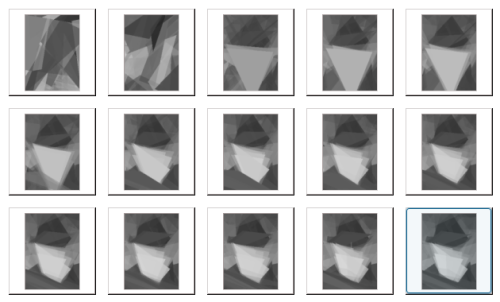
    Darwin's evolution : four days later.


    See my previous post about the underlying genetic algorithm: http://plindenbaum.blogspot.com/2008/12/random-notes-2008-12.html

    15 December 2008

    An idea: Twitter as a tool to build a protein-protein interactions database

    In this post I describe the idea about how http://twitter.com could be used as a tool to build a collaborative database of protein-protein interactions. This idea was inspired by the recent creation of http://twitter.com/omnee: Omnee is said to be the "first organic directory for Twitter which you can control directly via your tweets": Using a tag-based structure in your tweets this gives you the freedom to add yourself to multiple "groups" quickly and easily.

    e.g.:


    Chris Upton's tags
    +informatics, +ipod touch, +genomics, +proteomics, +dnasequencing, + mac, +semanticweb, -ipodtoch, +bioinformatics, +virology, #omnee
    .

    How about building a collaborative biological database with this kind of tool ?. One could create a database of protein-protein interactions using twitter. For example, say the @biotecher account will be used as the core account to harvest the tweets, anybody could send a new component of the interactome by sending a tweet to @biotecher with the gi of the two proteins, a pubmed-id as reference and a special hashtag say #interactome.

    E.g: Rotavirus protein NSP3 interacts with human EIF4G1 (view tweet )

    Tweet
    @biotecher gi:41019505 gi:255458 pmid:9755181 #interactome


    With such system the metadata ( who gave this information ? when ?) is also recorded by tweeter.com so we can imagine to filter the information according to our network ("I don't trust the information supplied by this user, discard it")

    I've also created a short piece of code as a proof of concept: the program fetches search for the tweets about #interactome and bound to @biotecher. It then download a few information from the NCBI (get the organism and name of the protein, get the title of the paper, etc...) and output the network as a RDF graph. The code (java) of this program is available at: http://code.google.com/p/lindenb/source/browse/trunk/proj/tinytools/src/org/lindenb/tinytools/TwitterOmics.java.

    Here is the output with 3 interactions. As you will see, each interaction is stored in the rdf:Class <Interaction>. The interaction is identified by the URL of the tweet. Each interaction contains a reference of the author, the proteins , the date and the article in pubmed.

    <?xml version="1.0" encoding="UTF-8"?>
    <rdf:RDF
    xmlns:foaf="http://xmlns.com/foaf/0.1/"
    xmlns:bibo="http://purl.org/ontology/bibo/"
    xmlns:rdf="http://www.w3.org/1999/02/22-rdf-syntax-ns#"
    xmlns:dc="http://purl.org/dc/elements/1.1/"
    xmlns="http://twitteromics.lindenb.org"
    >

    <foaf:Person rdf:about="http://twitter.com/yokofakun">
    <foaf:name>yokofakun (Pierre Lindenbaum)</foaf:name>
    </foaf:Person>

    <Organism rdf:about="lsid:ncbi.nlm.nih.gov:taxonomy:4932">
    <taxId>4932</taxId>
    <dc:title>Saccharomyces cerevisiae</dc:title>
    </Organism>

    <Protein rdf:about="lsid:ncbi.nlm.nih.gov:protein:417441">
    <gi>417441</gi>
    <dc:title>RecName: Full=Polyadenylate-binding protein, cytoplasmic and nuclear; Short=Poly(A)-binding protein; Short=PABP; AltName: Full=ARS consensus-binding protein ACBP-67; AltName: Full=Polyadenylate tail-binding protein</dc:title>
    <organism rdf:resource="lsid:ncbi.nlm.nih.gov:taxonomy:4932"/>
    </Protein>

    <Organism rdf:about="lsid:ncbi.nlm.nih.gov:taxonomy:9606">
    <taxId>9606</taxId>
    <dc:title>Homo sapiens</dc:title>
    </Organism>

    <Protein rdf:about="lsid:ncbi.nlm.nih.gov:protein:41019505">
    <gi>41019505</gi>
    <dc:title>RecName: Full=Eukaryotic translation initiation factor 4 gamma 1; Short=eIF-4-gamma 1; Short=eIF-4G 1; Short=eIF-4G1; AltName: Full=p220</dc:title>
    <organism rdf:resource="lsid:ncbi.nlm.nih.gov:taxonomy:9606"/>
    </Protein>

    <bibo:Article rdf:about="http://www.ncbi.nlm.nih.gov/pubmed/9418852">
    <bibo:pmid>9418852</bibo:pmid>
    <dc:title>RNA recognition motif 2 of yeast Pab1p is required for its functional interaction with eukaryotic translation initiation factor 4G.</dc:title>
    </bibo:Article>

    <Interaction rdf:about="http://twitter.com/yokofakun/statuses/1058586293">
    <interactor rdf:resource="lsid:ncbi.nlm.nih.gov:protein:417441"/>
    <interactor rdf:resource="lsid:ncbi.nlm.nih.gov:protein:41019505"/>
    <reference rdf:resource="http://www.ncbi.nlm.nih.gov/pubmed/9418852"/>
    <dc:creator rdf:resource="http://twitter.com/yokofakun"/>
    <dc:date>2008-12-15T14:51:42Z</dc:date>
    </Interaction>

    <Organism rdf:about="lsid:ncbi.nlm.nih.gov:taxonomy:10922">
    <taxId>10922</taxId>
    <dc:title>Simian rotavirus</dc:title>
    </Organism>

    <Protein rdf:about="lsid:ncbi.nlm.nih.gov:protein:255458">
    <gi>255458</gi>
    <dc:title>NS34=gene 7 nonstructural protein [simian rotavirus, SA114F, serotype G3, Peptide, 315 aa]</dc:title>
    <organism rdf:resource="lsid:ncbi.nlm.nih.gov:taxonomy:10922"/>
    </Protein>

    <Protein rdf:about="lsid:ncbi.nlm.nih.gov:protein:6176338">
    <gi>6176338</gi>
    <dc:title>ubiquitous tetratricopeptide containing protein RoXaN [Homo sapiens]</dc:title>
    <organism rdf:resource="lsid:ncbi.nlm.nih.gov:taxonomy:9606"/>
    </Protein>

    <bibo:Article rdf:about="http://www.ncbi.nlm.nih.gov/pubmed/15047801">
    <bibo:pmid>15047801</bibo:pmid>
    <dc:title>RoXaN, a novel cellular protein containing TPR, LD, and zinc finger motifs, forms a ternary complex with eukaryotic initiation factor 4G and rotavirus NSP3.</dc:title>
    </bibo:Article>

    <Interaction rdf:about="http://twitter.com/yokofakun/statuses/1058292539">
    <interactor rdf:resource="lsid:ncbi.nlm.nih.gov:protein:255458"/>
    <interactor rdf:resource="lsid:ncbi.nlm.nih.gov:protein:6176338"/>
    <reference rdf:resource="http://www.ncbi.nlm.nih.gov/pubmed/15047801"/>
    <dc:creator rdf:resource="http://twitter.com/yokofakun"/>
    <dc:date>2008-12-15T11:01:10Z</dc:date>
    </Interaction>

    <bibo:Article rdf:about="http://www.ncbi.nlm.nih.gov/pubmed/9755181">
    <bibo:pmid>9755181</bibo:pmid>
    <dc:title>Rotavirus RNA-binding protein NSP3 interacts with eIF4GI and evicts the poly(A) binding protein from eIF4F.</dc:title>
    </bibo:Article>

    <Interaction rdf:about="http://twitter.com/yokofakun/statuses/1058290564">
    <interactor rdf:resource="lsid:ncbi.nlm.nih.gov:protein:41019505"/>
    <interactor rdf:resource="lsid:ncbi.nlm.nih.gov:protein:255458"/>
    <reference rdf:resource="http://www.ncbi.nlm.nih.gov/pubmed/9755181"/>
    <dc:creator rdf:resource="http://twitter.com/yokofakun"/>
    <dc:date>2008-12-15T10:59:19Z</dc:date>
    </Interaction>

    </rdf:RDF>


    What do you think ?

    Pierre

    12 December 2008

    Genetic Algorithm with Darwin's Face: Dynamic SVG

    In a previous post I described how I've implemented a genetic algorithm finding the best set of colored triangles to re-create an image. I've just changed the output of the program: it now saves the output as a dynamic SVG picture. Watch the creation of the picture here:


    (yes I know, this is a colored image whereas the original image was in B&W. This is because my program automatically converted the colors of the triangles to a 8bit-gray-levels image)


    The current iteration on Friday:


    Pierre

    11 December 2008

    Random notes 2008-12:

    Genetic Algorithm


    Evolution of Charles Darwin. I've implemented my own version of the Genetic Algorithm described by Roger Alsing in his blog ( http://rogeralsing.com/2008/12/07/genetic-programming-evolution-of-mona-lisa ). This algorithm finds the best set of colored triangles that could be used to re-create an original image.


    On the left : the original image (via wikipdia), on the right the current image generated by the genetic algorithm at generation 240 (population:20 individuals of 50 triangles). My algorithm is currently running .
    The source is available here: http://tinyurl.com/57xaeb
    A short doc is available here: http://code.google.com/p/lindenb/wiki/GAMonaLisa
    I've also uploaded an executable jar here: http://code.google.com/p/lindenb/downloads/list

    Workbench


    I've uploaded a beta version of a spreadsheet-like program that I wrote for the people of my lab.
    It was designed to help people with handling large tables in a rich graphical environment. It currently performs a few tasks that are common under unix. For example, it can finds the information about a column of SNP and I've implemented a grep/awk function filtering the rows with a simple javascript expression.The data are stored with the help of the Java berkeleyDB API to create an index of each row in a table.


    This screenshot is a java JTable displaying the hapmap genotypes for chr1/build36/CEU. The size of the original file is 146Mo

    The tool is available as a java webstart application. See http://code.google.com/p/cephlib/wiki/Workbench.

    Wiki


    I've done a presentation on how to use a wiki in a lab. Used both OWW and wikipedia. I showed them how to edit/follow/track a page ( http://tinyurl.com/6ejw35), how to create/discuss a page with templates and categories ( http://tinyurl.com/5l5bw5 ), how files can be uploaded in a wiki and commented ( http://tinyurl.com/5ouc7y ). A demo of the wikipedia API ( http://tinyurl.com/2dp5r4 ).
    People were then interested in storing+annotating (linkage) files in a wiki.

    FiendFeed


    Thank you to all the crowd in FriendFeed. Really motivating.


    Pierre

    25 November 2008

    Taxonomy and Semantic Web: writing an extension for ARQ/SPARQL

    In this post I'll show how I've implemented a custom function in ARQ, the SPARQL/Jena engine for querying a RDF graph. The new function implemented tests if a node in the NCBI-taxonomy hierarchy as a given ancestor.

    Requirements


    Here are a sample of the very first lines of nodes.dmp: the first column is the node-id of the taxon, the second column is its parent-id.
    cat nodes.dmp | cut -c 1-20 | head
    1 | 1 | no rank | |
    2 | 131567 | superki
    6 | 335928 | genus |
    7 | 6 | species | AC
    9 | 32199 | species
    10 | 135621 | genus
    11 | 10 | species |
    13 | 203488 | genus
    14 | 13 | species |
    16 | 32011 | genus |


    The input


    our input is a RDF file:

    <?xml version="1.0" encoding="UTF-8"?>
    <rdf:RDF
    xmlns:rdf="http://www.w3.org/1999/02/22-rdf-syntax-ns#"
    xmlns:dc="http://purl.org/dc/elements/1.1/"
    xmlns:tax="http://species.lindenb.org"
    >

    <tax:Individual rdf:about="http://fr.wikipedia.org/wiki/Tintin">
    <dc:title xml:lang="fr">Tintin</dc:title>
    <dc:title xml:lang="en">Tintin</dc:title>
    <tax:taxon rdf:resource="lsid:ncbi.nlm.nih.gov:taxonomy:9606"/>
    </tax:Individual>

    <tax:Individual rdf:about="http://fr.wikipedia.org/wiki/Babar">
    <dc:title xml:lang="fr">Babar</dc:title>
    <dc:title xml:lang="en">Babar</dc:title>
    <tax:taxon rdf:resource="lsid:ncbi.nlm.nih.gov:taxonomy:9785"/>
    </tax:Individual>

    <tax:Individual rdf:about="http://fr.wikipedia.org/wiki/Milou">
    <dc:title xml:lang="fr">Milou</dc:title>
    <dc:title xml:lang="en">Snowy</dc:title>
    <tax:taxon rdf:resource="lsid:ncbi.nlm.nih.gov:taxonomy:9615"/>
    </tax:Individual>

    <tax:Individual rdf:about="http://fr.wikipedia.org/wiki/Donald_Duck">
    <dc:title xml:lang="fr">Donald</dc:title>
    <dc:title xml:lang="en">Donald Duck</dc:title>
    <tax:taxon rdf:resource="lsid:ncbi.nlm.nih.gov:taxonomy:8839"/>
    </tax:Individual>

    <tax:Individual rdf:about="http://fr.wikipedia.org/wiki/Le_L%C3%A9zard">
    <dc:title xml:lang="fr">Lezard</dc:title>
    <dc:title xml:lang="en">Lizard</dc:title>
    <dc:title xml:lang="fr">Curt Connors</dc:title>
    <dc:title xml:lang="en">Curt Connors</dc:title>
    <tax:taxon rdf:resource="lsid:ncbi.nlm.nih.gov:taxonomy:9606"/>
    <tax:taxon rdf:resource="lsid:ncbi.nlm.nih.gov:taxonomy:8504"/>
    </tax:Individual>

    </rdf:RDF>

    Images via wikipedia

    Tintin & Snowy

    Babar

    Donald

    The Lizard

    Basically this file describes
    • 4 individuals: Tintin (human), Snowy (dog), Donal (duck) , Babar (Elephant) and Dr Connors/The Lizard (spiderman's foe)
    • Each individual unambigously identified by his URI in wikipedia
    • Each individual is named in english and in french
    • For each individual, is ID in the NCBI hierarchy is specified using a simple URI (here I've tried to use a LSID, but it could have been something else (a URL... ))


    A basic query


    The following SPARQL query retrieve the URI, the taxonomy and the english name for each individuals.

    The query

    PREFIX rdf: <http://www.w3.org/1999/02/22-rdf-syntax-ns#>
    PREFIX dc: <http://purl.org/dc/elements/1.1/>
    PREFIX tax: <http://species.lindenb.org>

    SELECT ?individual ?taxon ?title
    {
    ?individual a tax:Individual .
    ?individual dc:title ?title .
    ?individual tax:taxon ?taxon .
    FILTER langMatches( lang(?title), "en" )
    }

    Invoking ARQ


    arq --query query01.rq --data taxonomy.rdf

    Result


    -------------------------------------------------------------------------------------------------------------
    | individual | taxon | title |
    =============================================================================================================
    | <http://fr.wikipedia.org/wiki/Le_L%C3%A9zard> | <lsid:ncbi.nlm.nih.gov:taxonomy:8504> | "Curt Connors"@en |
    | <http://fr.wikipedia.org/wiki/Le_L%C3%A9zard> | <lsid:ncbi.nlm.nih.gov:taxonomy:9606> | "Curt Connors"@en |
    | <http://fr.wikipedia.org/wiki/Le_L%C3%A9zard> | <lsid:ncbi.nlm.nih.gov:taxonomy:8504> | "Lizard"@en |
    | <http://fr.wikipedia.org/wiki/Le_L%C3%A9zard> | <lsid:ncbi.nlm.nih.gov:taxonomy:9606> | "Lizard"@en |
    | <http://fr.wikipedia.org/wiki/Donald_Duck> | <lsid:ncbi.nlm.nih.gov:taxonomy:8839> | "Donald Duck"@en |
    | <http://fr.wikipedia.org/wiki/Milou> | <lsid:ncbi.nlm.nih.gov:taxonomy:9615> | "Snowy"@en |
    | <http://fr.wikipedia.org/wiki/Babar> | <lsid:ncbi.nlm.nih.gov:taxonomy:9785> | "Babar"@en |
    | <http://fr.wikipedia.org/wiki/Tintin> | <lsid:ncbi.nlm.nih.gov:taxonomy:9606> | "Tintin"@en |
    -------------------------------------------------------------------------------------------------------------


    Adding a custom function


    Now, I want to add a new function in sparql. This function 'isA' will take as input to parameters: the taxon/LSID of the child and the taxon/LSID of the parent and it will return a boolean 'true' if the 'child' has the 'parent' in his phylogeny. This new function is implemented by extending the class com.hp.hpl.jena.sparql.function.FunctionBase2. This new class contains an associative array child2parent mapping each taxon-id to its parent. This map is loaded as described bellow:

    Pattern pat= Pattern.compile("[ \t]*\\|[ \t]*");
    String line;
    BufferedReader r= new BufferedReader(new FileReader(TAXONOMY_NODES_PATH));
    while((line=r.readLine())!=null)
    {
    String tokens[]=pat.split(line, 3);
    this.child2parent.put(
    Integer.parseInt(tokens[0]),
    Integer.parseInt(tokens[1])
    );
    }
    r.close();
    (...)

    The function 'exec' will check if the two arguments are an URI and will invoke the method isChildOf

    public NodeValue exec(NodeValue childNode, NodeValue parentNode)
    {
    (...check the nodes are URI)
    return NodeValue.makeBoolean(isChildOf(childId,parentId));
    }


    The function 'isChildOf' loops in the map child2parent to check if the parent is an ancestor of the child:

    while(true)
    {
    Integer id= child2parent.get(childid);
    if(id==null || id==childid) return false;
    if(id==parentid) return true;
    childid=id;
    }

    Here is the complete source code of this class:

    package org.lindenb.arq4taxonomy;

    import java.io.BufferedReader;
    import java.io.FileReader;
    import java.io.IOException;
    import java.util.HashMap;
    import java.util.Map;
    import java.util.regex.Pattern;

    import com.hp.hpl.jena.sparql.expr.ExprEvalException;
    import com.hp.hpl.jena.sparql.expr.NodeValue;
    import com.hp.hpl.jena.sparql.function.FunctionBase2;

    public class isA
    extends FunctionBase2
    {
    public static final String LSID="lsid:ncbi.nlm.nih.gov:taxonomy:";
    public static final String TAXONOMY_NODES_PATH="/home/lindenb/tmp/TAXONOMY_NCBI/nodes.dmp";
    private Map<Integer, Integer> child2parent=null;

    public isA()
    {

    }
    /**
    * return a associative map child.id -> parent.id
    * @return
    */
    private Map<Integer, Integer> getTaxonomy()
    {
    if(this.child2parent==null)
    {
    this.child2parent= new HashMap<Integer, Integer>();
    try
    {
    Pattern pat= Pattern.compile("[ \t]*\\|[ \t]*");
    String line;
    BufferedReader r= new BufferedReader(new FileReader(TAXONOMY_NODES_PATH));
    while((line=r.readLine())!=null)
    {
    String tokens[]=pat.split(line, 3);
    this.child2parent.put(
    Integer.parseInt(tokens[0]),
    Integer.parseInt(tokens[1])
    );
    }
    r.close();
    System.err.println(this.child2parent.size());
    }
    catch(IOException err)
    {
    err.printStackTrace();
    throw new ExprEvalException(err);
    }
    }
    return this.child2parent;
    }

    private boolean isChildOf(int childid,int parentid)
    {
    if(childid==parentid) return true;
    Map<Integer,Integer> map= getTaxonomy();
    while(true)
    {
    Integer id= map.get(childid);
    if(id==null || id==childid) return false;
    if(id==parentid) return true;
    childid=id;
    }
    }

    @Override
    public NodeValue exec(NodeValue childNode, NodeValue parentNode)
    {

    if( childNode.isLiteral() ||
    parentNode.isLiteral() ||
    childNode.asNode().isBlank() ||
    parentNode.asNode().isBlank())
    {
    return NodeValue.makeBoolean(false);
    }

    String childURI = childNode.asNode().getURI();
    if(!childURI.startsWith(LSID))
    {
    return NodeValue.makeBoolean(false);
    }


    String parentURI = parentNode.asNode().getURI();
    if(!parentURI.startsWith(LSID))
    {
    return NodeValue.makeBoolean(false);
    }

    int childId=0;
    try {
    childId= Integer.parseInt(childURI.substring(LSID.length()));
    }
    catch (NumberFormatException e)
    {
    return NodeValue.makeBoolean(false);
    }

    int parentId=0;
    try {
    parentId= Integer.parseInt(parentURI.substring(LSID.length()));
    }
    catch (NumberFormatException e)
    {
    return NodeValue.makeBoolean(false);
    }

    return NodeValue.makeBoolean(isChildOf(childId,parentId));
    }

    }

    This class is then compiled and packaged into the file tax.jar:

    javac -cp $(ARQ_CLASSPATH):. -sourcepath src src/org/lindenb/arq4taxonomy/isA.java
    jar cvf tax.jar -C src org


    and we add this jar in the classpath:
    export CP=$PWD/tax.jar

    To tell ARQ about this new functio,n we just add its classpath as a new PREFIX in the SPARQL query:
    PREFIX fn: <java:org.lindenb.arq4taxonomy.>


    First test


    the following SPARQL query retrieves all the Mammals (http://www.ncbi.nlm.nih.gov/Taxonomy/Browser/wwwtax.cgi?mode=Undef&id=40674) in the data set.

    The query


    PREFIX rdf: <http://www.w3.org/1999/02/22-rdf-syntax-ns#>
    PREFIX dc: <http://purl.org/dc/elements/1.1/>
    PREFIX tax: <http://species.lindenb.org>
    PREFIX fn: <java:org.lindenb.arq4taxonomy.>

    SELECT ?individual ?taxon ?title
    {
    ?individual a tax:Individual .
    ?individual dc:title ?title .
    ?individual tax:taxon ?taxon .
    FILTER fn:isA(?taxon,<lsid:ncbi.nlm.nih.gov:taxonomy:40674> )
    FILTER langMatches( lang(?title), "en" )
    }

    The command line


    arq --query query02.rq --data taxonomy.rdf


    The result


    -------------------------------------------------------------------------------------------------------------
    | individual | taxon | title |
    =============================================================================================================
    | <http://fr.wikipedia.org/wiki/Le_L%C3%A9zard> | <lsid:ncbi.nlm.nih.gov:taxonomy:9606> | "Curt Connors"@en |
    | <http://fr.wikipedia.org/wiki/Le_L%C3%A9zard> | <lsid:ncbi.nlm.nih.gov:taxonomy:9606> | "Lizard"@en |
    | <http://fr.wikipedia.org/wiki/Milou> | <lsid:ncbi.nlm.nih.gov:taxonomy:9615> | "Snowy"@en |
    | <http://fr.wikipedia.org/wiki/Babar> | <lsid:ncbi.nlm.nih.gov:taxonomy:9785> | "Babar"@en |
    | <http://fr.wikipedia.org/wiki/Tintin> | <lsid:ncbi.nlm.nih.gov:taxonomy:9606> | "Tintin"@en |
    -------------------------------------------------------------------------------------------------------------


    Second query


    the following SPARQL query retrieves all the 'Sauropdias' (http://www.ncbi.nlm.nih.gov/Taxonomy/Browser/wwwtax.cgi?mode=Undef&id=8457) in the RDF file.

    The SPARQL file


    PREFIX rdf: <http://www.w3.org/1999/02/22-rdf-syntax-ns#>
    PREFIX dc: <http://purl.org/dc/elements/1.1/>
    PREFIX tax: <http://species.lindenb.org>
    PREFIX fn: <java:org.lindenb.arq4taxonomy.>

    SELECT ?individual ?taxon ?title
    {
    ?individual a tax:Individual .
    ?individual dc:title ?title .
    ?individual tax:taxon ?taxon .
    FILTER fn:isA(?taxon,<lsid:ncbi.nlm.nih.gov:taxonomy:8457> )
    FILTER langMatches( lang(?title), "en" )
    }

    Command line


    arq --query query03.rq --datataxonomy.rdf


    The result


    -------------------------------------------------------------------------------------------------------------
    | individual | taxon | title |
    =============================================================================================================
    | <http://fr.wikipedia.org/wiki/Le_L%C3%A9zard> | <lsid:ncbi.nlm.nih.gov:taxonomy:8504> | "Curt Connors"@en |
    | <http://fr.wikipedia.org/wiki/Le_L%C3%A9zard> | <lsid:ncbi.nlm.nih.gov:taxonomy:8504> | "Lizard"@en |
    | <http://fr.wikipedia.org/wiki/Donald_Duck> | <lsid:ncbi.nlm.nih.gov:taxonomy:8839> | "Donald Duck"@en |
    -------------------------------------------------------------------------------------------------------------


    Et hop ! voila ! That's it !

    22 November 2008

    A Web Service for ONSolubility.

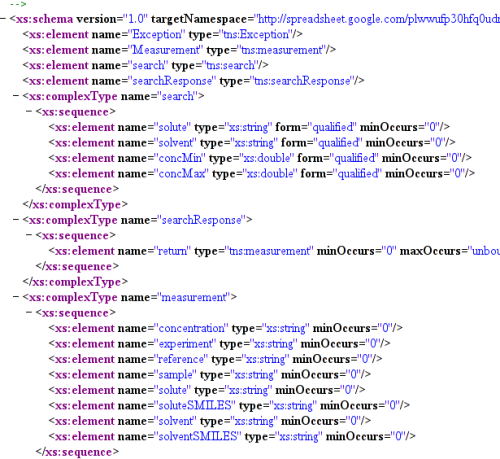
    This post is about the ONSolubility project (For references search FriendFeed for Solubility). This post is about how I've used Egon's code to create a web service to query the data of solubility. Egon has already done a great job by using the google java spreasheet API to download Jean-Claude's Solubility data. On his side, Rajarshi Guha wrote an HTML page querying those data using the Google Query-API. Here I show how I have created a webservice searching for the measurements based on their solvent/solute/concentration.

    Server Side


    Classes


    I've added some JAXB(Java Architecture for XML Binding) annotations to Egon's Measurement.java. Those annotations help the web-service compiler (wsgen) to understand how the data will be transmitted to the client.
    @javax.xml.bind.annotation .XmlRootElement(name="Measurement")
    public class Measurement
    implements Serializable
    {
    (...)

    Then we create the WebService ONService.java. This service is just a java class containing also a few annotations. First we flag the class as a webservice:
    @javax.jws.WebService(
    name="onsolubility",
    serviceName="ons"
    )
    public class ONService
    {
    Then comes the function seach provided by this service. This function will download the data from google using Egon's API and will return a collection of Measurement based on their solute/solvent/concentration. Again the java annotations will help the compiler to implement the service
    @WebMethod(action="urn:search",operationName="search")
    public List search(
    @WebParam(name="solute")String solute,
    @WebParam(name="solvent")String solvent,
    @WebParam(name="concMin")Double concMin,
    @WebParam(name="concMax")Double concMax
    ) throws Exception
    {....
    . The web service is launched with only 3 lines of code (!).
    ONService service=new ONService();
    Endpoint endpoint = Endpoint.create(service);
    endpoint.publish("http://localhost:8080/onsolubility");

    Compilation


    I've create a ant file invoking wsgen generating the stubs and installing the webservice. Here is the ouput
    compile-webservice:
    [javac] Compiling 1 source file to /home/pierre/tmp/onssolubility/ons.solubility.data/bin
    [wsgen] command line: wsgen -classpath (...) -verbose ons.solubility.ws.ONService
    [wsgen] Note: ap round: 1
    [wsgen] [ProcessedMethods Class: ons.solubility.ws.ONService]
    [wsgen] [should process method: search hasWebMethods: true ]
    [wsgen] [endpointReferencesInterface: false]
    [wsgen] [declaring class has WebSevice: true]
    [wsgen] [returning: true]
    [wsgen] [WrapperGen - method: search(java.lang.String,java.lang.String,java.lang.Double,java.lang.Double)]
    [wsgen] [method.getDeclaringType(): ons.solubility.ws.ONService]
    [wsgen] [requestWrapper: ons.solubility.ws.jaxws.Search]
    [wsgen] [should process method: main hasWebMethods: true ]
    [wsgen] [webMethod == null]
    [wsgen] [ProcessedMethods Class: java.lang.Object]
    [wsgen] ons/solubility/ws/jaxws/ExceptionBean.java
    [wsgen] ons/solubility/ws/jaxws/Search.java
    [wsgen] ons/solubility/ws/jaxws/SearchResponse.java
    [wsgen] Note: ap round: 2

    publish-webservice:
    [java] Publishing Service on http://localhost:8080/onsolubility?WSDL
    .
    And... that's it. When I open my browser on http://localhost:8080/onsolubility?WSDL , I can now see the WSDL description/schema of this service.

    Client Side


    Writing a client using this api looks the same way I did for a previous post about the IntAct/EBI API where the wsimport command generated the stubs from the WSDL file. I then wrote a simple test ONServiceTest.java, invoking our service several times.
    private void test(
    String solute,
    String solvent,
    Double concMin,
    Double concMax)
    {
    try
    {
    Ons service=new Ons();
    Onsolubility port=service.getOnsolubilityPort();
    List data=port.search(solute, solvent, concMin, concMax);

    for(Measurement measure:data)
    {
    System.out.println(
    " sample :\t"+measure.getSample()+"\n"+
    " solute :\t"+measure.getSolute()+"\n"+
    " solvent :\t"+measure.getSolvent()+"\n"+
    " experiment:\t"+measure.getExperiment()+"\n"+
    " reference :\t"+measure.getReference()+"\n"+
    " conc :\t"+measure.getConcentration()+"\n"
    );
    }
    } catch(Throwable err)

    {
    System.err.println("#error:"+err.getMessage());
    }
    }
    private void test()
    {
    test(null,null,null,null);
    test("4-nitrobenzaldehyde",null,null,null);
    test("4-nitrobenzaldehyde",null,0.3,0.4);
    }
    Here is the output
    ant test-webservice
    Buildfile: build.xml
    test-webservice
    [wsimport] parsing WSDL...
    [wsimport] generating code...
    [javac] Compiling 1 source file to onssolubility/ons.solubility.data/bin
    [java] ##Searching solute: null solvent: null conc: null-null
    [java] sample : 9
    [java] solute : D-Glucose
    [java] solvent : THF
    [java] experiment: 1
    [java] reference : http://onschallenge.wikispaces.com/JennyHale-1
    [java] conc : 0.00222
    [java]
    [java] sample : 6
    [java] solute : D-Mannitol
    [java] solvent : Methanol
    [java] experiment: 1
    [java] reference : http://onschallenge.wikispaces.com/JennyHale-1
    [java] conc : 0.00548
    [java]
    (...)
    [java]
    [java] sample : 10
    [java] solute : D-Mannitol
    [java] solvent : THF
    [java] experiment: 1
    [java] reference : http://onschallenge.wikispaces.com/JennyHale-1
    [java] conc : 0.01098
    [java] ##Searching solute: 4-nitrobenzaldehyde solvent: null conc: 0.3-0.4
    [java] sample : 2b
    [java] solute : 4-nitrobenzaldehyde
    [java] solvent : Methanol
    [java] experiment: 212
    [java] reference : http://usefulchem.wikispaces.com/exp212
    [java] conc : 0.38

    That's it and that's enough code for the week-end.

    Pierre

    11 November 2008

    SPARQL for solubility/RDF: my notebook

    In a recent thread on FriendFeed , I've transformed Jean-Claude's Bradley's data about the solubility of some compounds into RDF.


    The original data set looks like this:

    The RDF version looks like this:
    <!DOCTYPE rdf:RDF [
    <!ENTITY rdf "http://www.w3.org/1999/02/22-rdf-syntax-ns#">
    <!ENTITY rdfs "http://www.w3.org/2000/01/rdf-schema#">
    <!ENTITY doap "http://usefulinc.com/ns/doap#">
    <!ENTITY foaf "http://xmlns.com/foaf/0.1/">
    <!ENTITY dc "http://purl.org/dc/elements/1.1/">
    <!ENTITY chem "http://blueobelisk.sourceforge.net/chemistryblogs/">
    ]>
    <rdf:RDF
    xmlns:rdf="&rdf;"
    xmlns:dc="&dc;"
    xmlns:rdfs="&rdfs;"
    xmlns:doap="&doap;"
    xmlns:foaf="&foaf;"
    xmlns:chem="&chem;"
    >
    <!--=== PERSONS ============================================================== -->
    <foaf:Person rdf:about="http://www.chemistry.drexel.edu/people/bradley/bradley.asp">
    <foaf:name>Jean-Claude Bradley</foaf:name>
    <foaf:nick>jcbradley</foaf:nick>
    <foaf:sha1_sum>b68f7dca9555a1cfe1ad18c6d2be0db6e552d678</foaf:sha1_sum>
    <foaf:holdsAccount>
    <foaf:OnlineAccount>
    <foaf:accountServiceHomepage rdf:resource="http://www.linkedin.com/"/>
    <foaf:accountProfilePage rdf:resource="http://www.linkedin.com/in/jcbradley"/>
    </foaf:OnlineAccount>
    </foaf:holdsAccount>
    </foaf:Person>

    <!--=== PROJECT ============================================================== -->
    <doap:Project rdf:ID="SolubilityProject">
    <doap:name>Solubility</doap:name>
    <doap:homepage rdf:resource="http://spreadsheets.google.com/ccc?key=plwwufp30hfq0udnEmRD1aQ" />
    <doap:shortdesc xml:lang="en">Solubility</doap:shortdesc>
    <doap:shortdesc xml:lang="fr">Solubilité</doap:shortdesc>
    <doap:description xml:lang="en">Solubility</doap:description>
    <doap:description xml:lang="fr">Solubilité</doap:description>
    </doap:Project>
    <!--=== Compound ============================================================== -->

    <chem:Compound rdf:about="http://commons.wikimedia.org/wiki/Image:D-Mannitol_structure.png">
    <chem:name>D-Manitol</chem:name>
    <chem:image rdf:resource="http://upload.wikimedia.org/wikipedia/commons/b/bb/D-Mannitol_structure.png"/>
    <chem:smiles>O[C@H]([C@H](O)CO)[C@H](O)[C@H](O)CO</chem:smiles>
    </chem:Compound>

    <chem:Compound rdf:about="http://en.wikipedia.org/wiki/Ethanol">
    <chem:name>Ethanol</chem:name>
    <chem:image rdf:resource="http://upload.wikimedia.org/wikipedia/commons/6/6f/Ethanol_flat_structure.png"/>
    <chem:smiles>OCC</chem:smiles>
    </chem:Compound>

    <chem:Compound rdf:about="http://en.wikipedia.org/wiki/Sodium_chloride">
    <chem:name>Sodium chloride</chem:name>
    <chem:image rdf:resource="http://upload.wikimedia.org/wikipedia/commons/e/e9/Sodium-chloride-3D-ionic.png"/>
    <chem:smiles>[Na+].[Cl-]</chem:smiles>
    </chem:Compound>

    <!--=== Experiment ============================================================== -->
    <chem:Experiment rdf:about="http://usefulchem.wikispaces.com/exp207">
    <dc:name>Hello, I'm Experiment 207</dc:name>
    <chem:project rdf:resource="#SolubilityProject"/>
    </chem:Experiment>

    <chem:Experiment rdf:about="http://usefulchem.wikispaces.com/exp1">
    <dc:name>Hello, I'm Experiment 1</dc:name>
    <chem:project rdf:resource="#SolubilityProject"/>
    </chem:Experiment>

    <!--=== Sample ============================================================== -->
    <chem:Sample rdf:about="sample:11">
    <dc:name>Hello, I'm Sample 11</dc:name>
    </chem:Sample>
    <chem:Sample rdf:about="sample:3">
    <dc:name>Hello, I'm Sample 3</dc:name>
    </chem:Sample>
    <chem:Sample rdf:about="sample:12">
    <dc:name>Hello, I'm Sample 12</dc:name>
    </chem:Sample>
    <!--=== Experimental Data ============================================================== -->
    <chem:ExperimentalData >
    <dc:date>2008-01-01</dc:date>
    <chem:author rdf:resource="http://www.chemistry.drexel.edu/people/bradley/bradley.asp"/>
    <chem:solute rdf:resource="http://commons.wikimedia.org/wiki/Image:D-Mannitol_structure.png"/>
    <chem:solvent rdf:resource="http://en.wikipedia.org/wiki/Ethanol"/>
    <chem:experiment-id rdf:resource="http://usefulchem.wikispaces.com/exp207"/>
    <chem:sample rdf:resource="sample:11"/>
    <chem:concentration rdf:datatype="chem:Molar">0.00</chem:concentration>
    </chem:ExperimentalData>

    <chem:ExperimentalData>
    <dc:date>2008-02-01</dc:date>
    <chem:author rdf:resource="http://www.chemistry.drexel.edu/people/bradley/bradley.asp"/>
    <chem:solute rdf:resource="http://en.wikipedia.org/wiki/Sodium_chloride"/>
    <chem:solvent rdf:resource="http://en.wikipedia.org/wiki/Ethanol"/>
    <chem:experiment-id rdf:resource="http://onschallenge.wikispaces.com/JennyHale-1"/>
    <chem:sample rdf:resource="sample:3"/>
    <chem:concentration rdf:datatype="chem:Molar">0.00</chem:concentration>
    </chem:ExperimentalData>

    <chem:ExperimentalData>
    <dc:date>2008-03-01</dc:date>
    <chem:author rdf:resource="http://www.chemistry.drexel.edu/people/bradley/bradley.asp"/>
    <chem:solute rdf:resource="http://en.wikipedia.org/wiki/Sodium_chloride"/>
    <chem:solvent rdf:resource="http://en.wikipedia.org/wiki/Ethanol"/>
    <chem:experiment-id rdf:resource="http://usefulchem.wikispaces.com/exp207"/>
    <chem:sample rdf:resource="sample:12"/>
    <chem:concentration rdf:datatype="chem:Molar">0.00</chem:concentration>
    </chem:ExperimentalData>

    </rdf:RDF>

    Here I describe how I used SPARQL to retrieve Jean-Claude's original data set from this RDF file.
    I've downloaded ARQ , the SPARQL engine, from http://jena.sourceforge.net/ARQ/.
    Here are a few queries:

    listing all the chem:Compound


    query


    PREFIX rdf: <http://www.w3.org/1999/02/22-rdf-syntax-ns#>
    PREFIX rdfs: <http://www.w3.org/2000/01/rdf-schema#>
    PREFIX doap: <http://usefulinc.com/ns/doap#>
    PREFIX foaf: <http://xmlns.com/foaf/0.1/>
    PREFIX dc: <http://purl.org/dc/elements/1.1/>
    PREFIX chem: <http://blueobelisk.sourceforge.net/chemistryblogs/>

    SELECT ?x
    {
    ?x
    }

    Running the query


    sparql -query jeter.rq --data=solubility.rdf

    Result


    ----------------------------------------------------------------------
    | x |
    ======================================================================
    | <http://en.wikipedia.org/wiki/Sodium_chloride> |
    | <http://en.wikipedia.org/wiki/Ethanol> |
    | <http://commons.wikimedia.org/wiki/Image:D-Mannitol_structure.png> |
    ----------------------------------------------------------------------

    The same query but using prefixes


    query


    PREFIX rdf: <http://www.w3.org/1999/02/22-rdf-syntax-ns#>
    PREFIX rdfs: <http://www.w3.org/2000/01/rdf-schema#>
    PREFIX doap: <http://usefulinc.com/ns/doap#>
    PREFIX foaf: <http://xmlns.com/foaf/0.1/>
    PREFIX dc: <http://purl.org/dc/elements/1.1/>
    PREFIX chem: <http://blueobelisk.sourceforge.net/chemistryblogs/>

    SELECT ?x
    {
    ?x rdf:type chem:Compound
    }

    result


    ----------------------------------------------------------------------
    | x |
    ======================================================================
    | <http://en.wikipedia.org/wiki/Sodium_chloride> |
    | <http://en.wikipedia.org/wiki/Ethanol> |
    | <http://commons.wikimedia.org/wiki/Image:D-Mannitol_structure.png> |
    ----------------------------------------------------------------------

    Listing the compounds , their names, their 'smiles'


    query


    PREFIX rdf: <http://www.w3.org/1999/02/22-rdf-syntax-ns#>
    PREFIX rdfs: <http://www.w3.org/2000/01/rdf-schema#>
    PREFIX doap: <http://usefulinc.com/ns/doap#>
    PREFIX foaf: <http://xmlns.com/foaf/0.1/>
    PREFIX dc: <http://purl.org/dc/elements/1.1/>
    PREFIX chem: <http://blueobelisk.sourceforge.net/chemistryblogs/>

    SELECT ?compound ?compoundName ?compoundSmiles
    {
    ?compound rdf:type chem:Compound .
    ?compound chem:name ?compoundName .
    ?compound chem:smiles ?compoundSmiles .
    }

    result


    -----------------------------------------------------------------------------------------------------------------------------------
    | compound | compoundName | compoundSmiles |
    ===================================================================================================================================
    | <http://en.wikipedia.org/wiki/Sodium_chloride> | "Sodium chloride" | "[Na+].[Cl-]" |
    | <http://en.wikipedia.org/wiki/Ethanol> | "Ethanol" | "OCC" |
    | | "D-Manitol" | "O[C@H]([C@H](O)CO)[C@H](O)[C@H](O)CO" |
    -----------------------------------------------------------------------------------------------------------------------------------

    The same, but only the compounds with a name containing "OL"


    query


    PREFIX rdf: <http://www.w3.org/1999/02/22-rdf-syntax-ns#>
    PREFIX rdfs: <http://www.w3.org/2000/01/rdf-schema#>
    PREFIX doap: <http://usefulinc.com/ns/doap#>
    PREFIX foaf: <http://xmlns.com/foaf/0.1/>
    PREFIX dc: <http://purl.org/dc/elements/1.1/>
    PREFIX chem: <http://blueobelisk.sourceforge.net/chemistryblogs/>

    SELECT ?compound ?compoundName ?compoundSmiles
    {
    ?compound rdf:type chem:Compound .
    ?compound chem:name ?compoundName .
    ?compound chem:smiles ?compoundSmiles .
    FILTER regex(?compoundName, "ol", "i")
    }

    result


    ------------------------------------------------------------------------------------------------------------------------------
    | compound | compoundName | compoundSmiles |
    ==============================================================================================================================
    | <http://en.wikipedia.org/wiki/Ethanol> | "Ethanol" | "OCC" |
    | <http://commons.wikimedia.org/wiki/Image:D-Mannitol_structure.png> | "D-Manitol" | "O[C@H]([C@H](O)CO)[C@H](O)[C@H](O)CO" |
    ------------------------------------------------------------------------------------------------------------------------------

    the same, but add the 'chem:description', if any


    query


    PREFIX rdf: <http://www.w3.org/1999/02/22-rdf-syntax-ns#>
    PREFIX rdfs: <http://www.w3.org/2000/01/rdf-schema#>
    PREFIX doap: <http://usefulinc.com/ns/doap#>
    PREFIX foaf: <http://xmlns.com/foaf/0.1/>
    PREFIX dc: <http://purl.org/dc/elements/1.1/>
    PREFIX chem: <http://blueobelisk.sourceforge.net/chemistryblogs/>

    SELECT ?compound ?compoundName ?compoundSmiles ?description
    {
    ?compound rdf:type chem:Compound .
    ?compound chem:name ?compoundName .
    ?compound chem:smiles ?compoundSmiles .
    FILTER regex(?compoundName, "ol", "i")
    OPTIONAL { ?compound chem:description ?description }

    }

    result


    --------------------------------------------------------------------------------------------------------------------------------------------
    | compound | compoundName | compoundSmiles | description |
    ============================================================================================================================================
    | <http://en.wikipedia.org/wiki/Ethanol> | "Ethanol" | "OCC" | |
    | <http://commons.wikimedia.org/wiki/Image:D-Mannitol_structure.png> | "D-Manitol" | "O[C@H]([C@H](O)CO)[C@H](O)[C@H](O)CO" | |
    --------------------------------------------------------------------------------------------------------------------------------------------

    retrieving Jean-Claude's data


    The query


    PREFIX dc: <http://purl.org/dc/elements/1.1/>
    PREFIX chem: <http://blueobelisk.sourceforge.net/chemistryblogs/>

    SELECT
    ?exp
    ?sample
    ?solvent ?solventName ?solventSmiles
    ?solute ?soluteName ?soluteSmiles
    ?conc

    {
    ?solvent rdf:type chem:Compound .
    ?solvent chem:name ?solventName .
    ?solvent chem:smiles ?solventSmiles .

    ?solute rdf:type chem:Compound .
    ?solute chem:name ?soluteName .
    ?solute chem:smiles ?soluteSmiles .

    ?expData rdf:type chem:ExperimentalData .
    ?expData chem:solute ?solute .
    ?expData chem:solvent ?solvent .
    ?expData chem:concentration ?conc .
    ?expData chem:experiment-id ?exp .
    ?expData chem:sample ?sample .
    }

    result


    --------------------------------------------------------------------------------------------------------------------------------------------------------------------------------------------------------------------------------------------------------------------------------------------------
    | exp | sample | solvent | solventName | solventSmiles | solute | soluteName | soluteSmiles | conc |
    ==================================================================================================================================================================================================================================================================================================
    | <http://usefulchem.wikispaces.com/exp207> | <sample:12> | <http://en.wikipedia.org/wiki/Ethanol> | "Ethanol" | "OCC" | <http://en.wikipedia.org/wiki/Sodium_chloride> | "Sodium chloride" | "[Na+].[Cl-]" | "0.00"^^<chem:Molar> |
    | <http://onschallenge.wikispaces.com/JennyHale-1> | <sample:3> | <http://en.wikipedia.org/wiki/Ethanol> | "Ethanol" | "OCC" | <http://en.wikipedia.org/wiki/Sodium_chloride> | "Sodium chloride" | "[Na+].[Cl-]" | "0.00"^^<chem:Molar> |
    | <http://usefulchem.wikispaces.com/exp207> | <sample:11> | <http://en.wikipedia.org/wiki/Ethanol> | "Ethanol" | "OCC" | <http://commons.wikimedia.org/wiki/Image:D-Mannitol_structure.png> | "D-Manitol" | "O[C@H]([C@H](O)CO)[C@H](O)[C@H](O)CO" | "0.00"^^<chem:Molar> |
    --------------------------------------------------------------------------------------------------------------------------------------------------------------------------------------------------------------------------------------------------------------------------------------------------


    That's it

    Pierre

    05 November 2008

    IBM many eyes wikified.

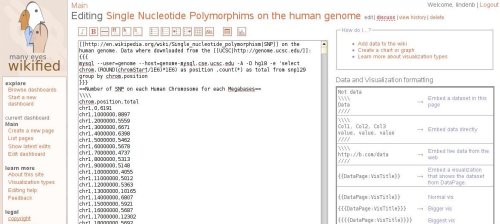
    I've just received my invitation to test the wikified version of ManyEyes.


    (see my old post about ManyEyes [here]). This wikified version is really cool. Your data are edited in a wiki. For example I've downloaded a count of the snps on the human genome from the UCSC:
    mysql --user=genome --host=genome-mysql.cse.ucsc.edu -A -D hg18 -e 'select chrom,(ROUND(chromStart/1E6)*1E6) as position ,count(*) as total from snp129 group by chrom,position'
    and copied the data in the wiki. (I could not preview the page)


    To create a visualization about a given page, you just add a colon ':' after the name of the data page followed by the name of your visualization. Your browser is then redirected to a new wiki page where you'll build a new visualization.

    (hum... back to the data page, I could not see any link to the visualization )

    Really nice !